
- Exploring the Microsoft Graph data model
- The user-shaped part of the problem
- Okay, let’s talk permissions
- App-only and delegated permissions
- Inheritable permissions
- Group membership (agent user only)
- Microsoft Entra roles
- Access package
- Putting the permissions story together
- Next: Practice setting agent identity permissions
- Explore the guide
- Endnotes
Editor’s Note: Welcome to Chapter 4 of Understanding and Preventing Entra ID Agent Identity Attacks: A Comprehensive Guide. To review previous chapters and practice lessons, start here.
In the previous chapter of this guide, we defined the core objects that make up the Agent ID model. With that overarching model in mind—and hopefully after taking a short detour to practice building Agent ID with MS Graph—we’re ready to develop a deeper understanding of how identities in the Agent ID platform are structured.
Let’s dive back in.
Exploring the Microsoft Graph data model
To understand how the four identity building blocks are represented in the underlying Microsoft Graph data hierarchy, we can inspect the Graph metadata endpoint.
Microsoft Graph exposes its data model through the OData metadata endpoint at https://graph.microsoft.com/beta/$metadata. When you access it, you get an XML document that defines entity types, complex types, enums, and relationships the API supports. In simpler terms, this is the structural map of Microsoft Graph. It does not tell us everything the platform will allow at runtime, but it does show us how Microsoft chose to model the objects.
Microsoft explains that this metadata helps developers understand the data model and the relationships between entities. For security researchers, this endpoint is extremely valuable because it exposes the inheritance hierarchy and property definitions that shape how Entra ID objects behave, including the new Agent ID types.
That said, Agent ID is still an evolving surface, and some schema details may change as the platform matures.
Before diving into the objects themselves, let’s clarify that there are two metadata constructs worth separating: EntityType and ComplexType.
- An
EntityTypeusually represents an object that can be queried directly via its own endpoint, has navigation properties (relationships to other entities), and can be stored, retrieved, and updated independently. Examples of such entity types areuser,application,servicePrincipal, andgroup. - A
ComplexTypeis a structured value type that groups multiple properties together. It has no identity of its own, it exists embedded inside an entity (or even inside anotherComplexType) and cannot be queried directly as a standalone object. Examples of such types areapiApplication,appRole,federatedIdentityCredential, andkeyCredential.
Think of it this way: an EntityType is like a database table row, and a ComplexType is a JSON object nested inside that row.
In the XML metadata response, we can see the abstract base entity type that almost all Graph entity types inherit from (and this is why almost every Microsoft Graph resource eventually has an id string):
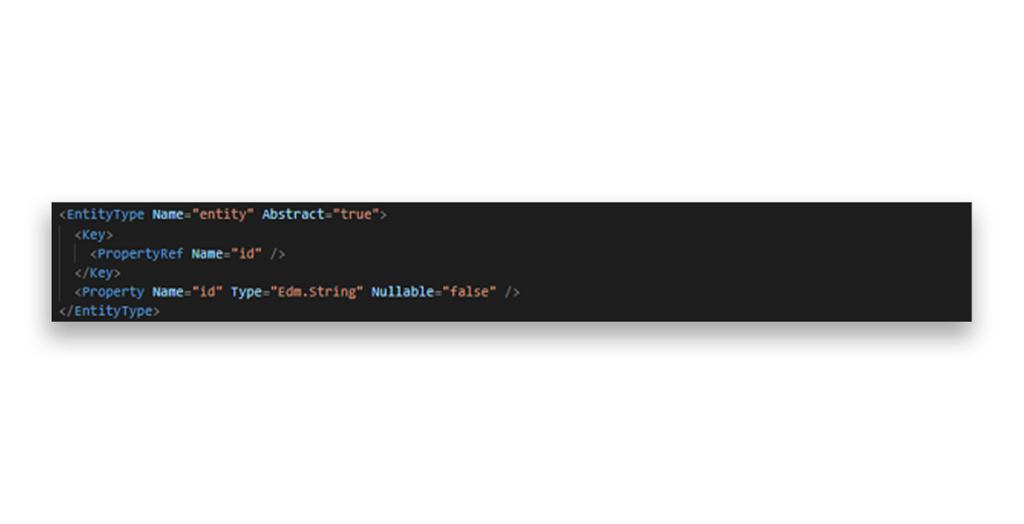
EntityTypeThe next piece is the directoryObject entity, which inherits from entity.
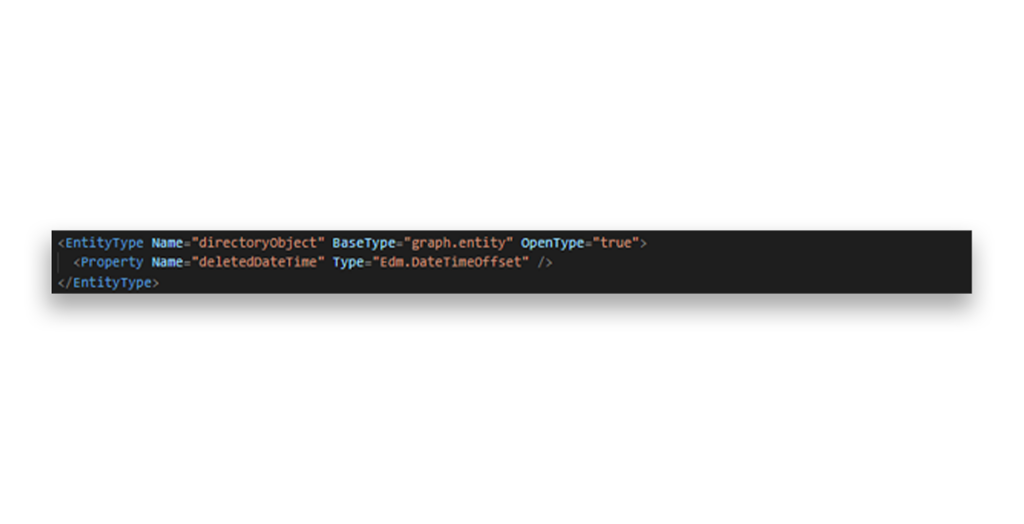
directoryObject entityFrom there, we can look at servicePrincipal type and its structure.
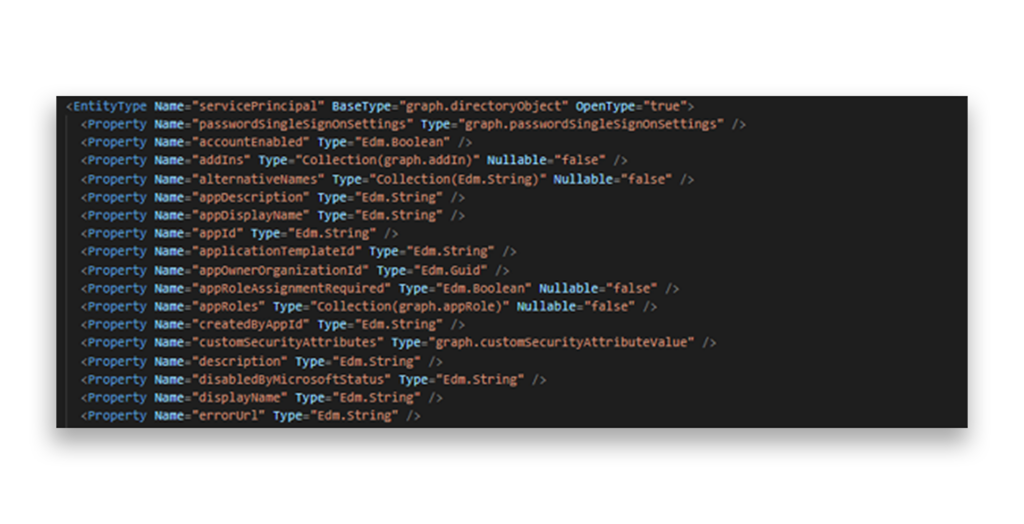
servicePrincipal type built on the directoryObject entityText-based UI is, to say the least, not the most readable format for navigating a 428KB metadata document, so we vibe-coded a local web app to make traversing these entity relationships a bit more manageable.
Now, instead of trying to understand the agentIdentity entity type by staring at its raw metadata:
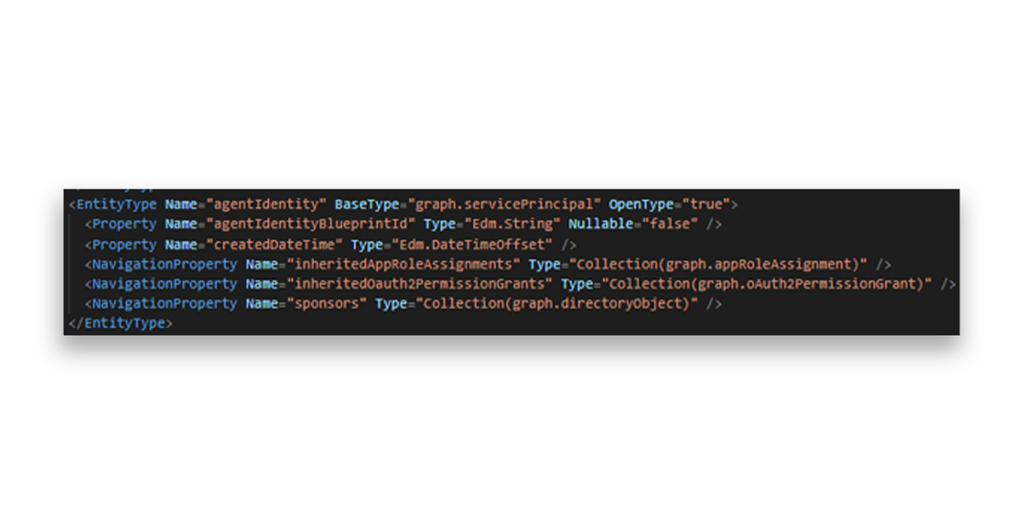
agentIdentity entity type… we can explore the object hierarchy visually and interact with the relationships around each type in a more research-ful way:
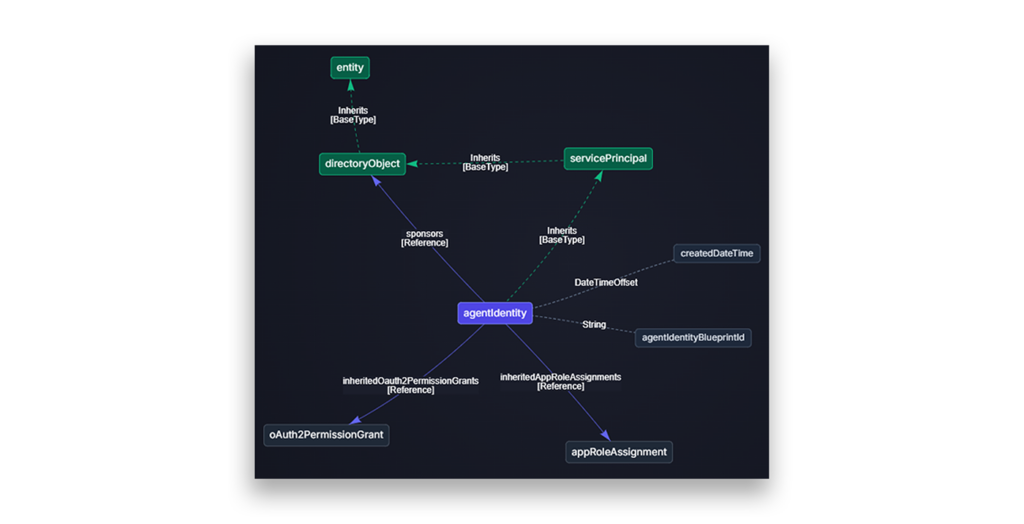
agentIdentity entity typeThe metadata tells us that agentIdentity inherits from servicePrincipal (with OpenType="true", which means additional dynamic or undocumented properties may also exist) and adds the following small set of agent-specific elements at the subtype level:
- Two properties:
agentIdentityBlueprintId(a required string that links the agent identity to its parent blueprint)createdDateTime
- Three navigation properties:
- sponsors (a collection of
directoryObject) inheritedAppRoleAssignments(a collection ofappRoleAssignment)inheritedOauth2PermissionGrants(a collection ofoAuth2PermissionGrant)
- sponsors (a collection of
The last two are recent additions to the beta schema and are especially important because they represent the permission inheritance mechanism from the parent Agent Identity Blueprint principal to the agent identity. Microsoft documents these inherited app role assignments and delegated grants as effective permissions applied at token issuance time.
This is also where the difference between “classic agents” and “modern agents” in Entra ID starts to become clearer.
- Classic agents, like those created by Copilot Studio and Azure AI Foundry before the new Agent ID model was introduced, are represented behind the scenes through regular service principal objects.
- Modern agents, on the other hand, are represented through the new
agentIdentitysubtype.
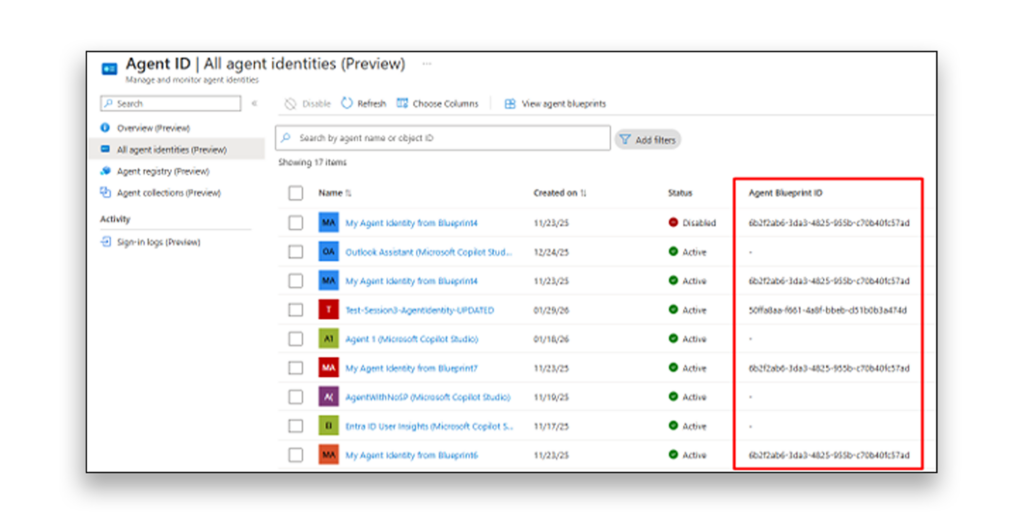
Knowing that, we can easily understand why filtering by the “Agent Blueprint ID” column in the Agent ID portal (preview) can help separate these two worlds. Objects with an agentIdentityBlueprintId belong to the new Agent ID model, while older service-principal-backed agents do not.
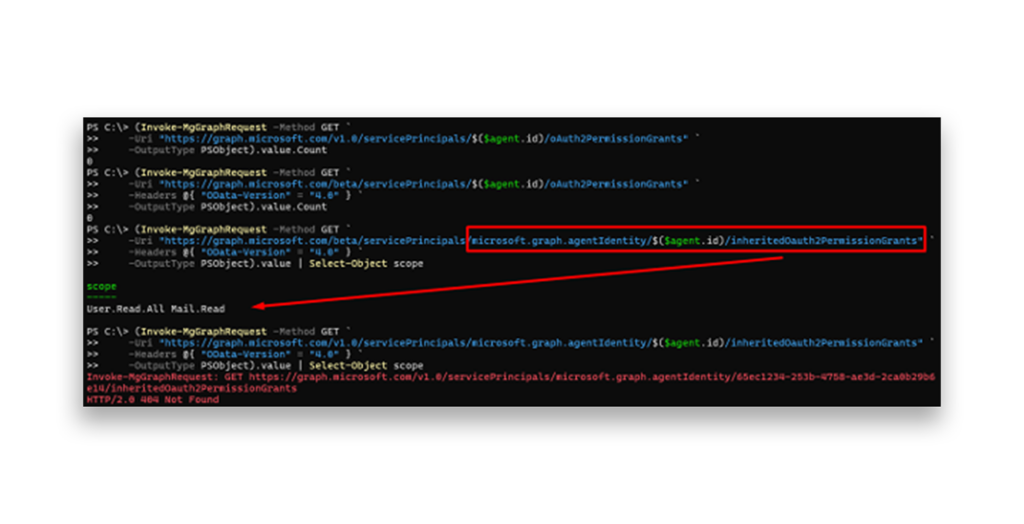
agentIdentityBlueprintId to reveal objects that belong to the Agent ID modelIt's worth noting that the v1.0 metadata currently shows a leaner definition of the schema, without the two inherited* navigation properties on agentIdentity. This kind of gap between beta and v1.0 is typical for preview features, but it has a real security impact for defenders who wish to evaluate already-integrated Entra agents in their org. Any audit tool, CSPM product, or permission enumeration script that is not aware of these inherited permission relationships may miss part of the effective permission picture for Agent ID objects.
And if we configure inheritable permissions on a blueprint, grant admin consent on the blueprint principal, and query an agent associated with it through different API versions, that gap becomes visible.
Everything else—all 40+ properties and 20+ navigation properties from the servicePrincipal object—is structurally inherited. This includes properties like keyCredentials, passwordCredentials, owners, federatedIdentityCredentials, and memberOf.
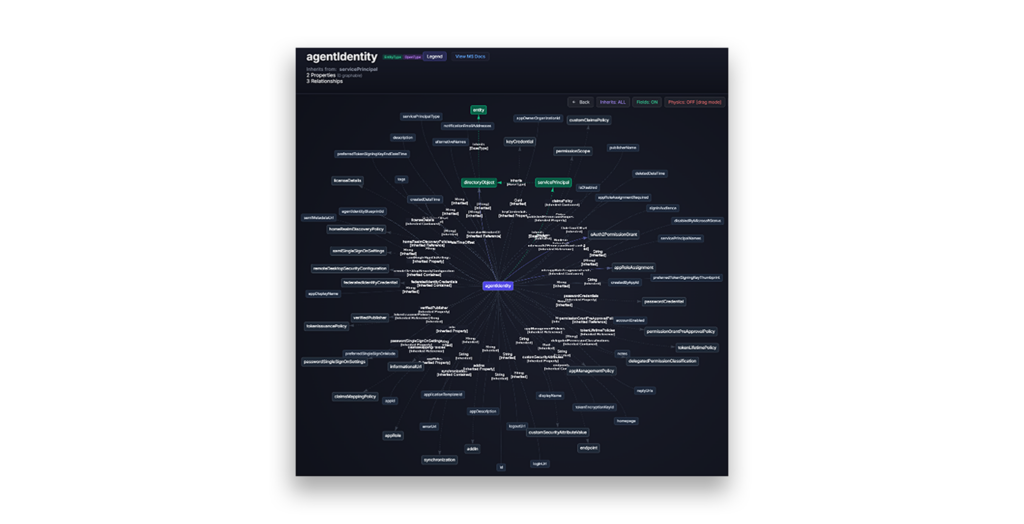
However, this is exactly where the schema can mislead us.
OData inheritance describes the shape of the object model. It does not guarantee that every inherited capability is functionally available at runtime. Microsoft's documentation explicitly notes that pattern for Agent ID related resources:
…while this resource inherits from servicePrincipal, some properties are not applicable.
Credential properties are the clearest example of that as agent identities do not have their own credentials: no passwords, no certificates, no client secrets. They rely on the parent blueprint to acquire tokens on their behalf; attempts to add credentials directly to an agent identity object are rejected by the API.
So while keyCredentials and passwordCredentials appear in the inherited schema, they are null or empty for agent identities and effectively unavailable. That enforcement does not come from the metadata file itself. It comes from code paths of runtime logic in the API layer that have to recognize the subtype and reject operations that should not apply.
A similar story applies to the agentIdentityBlueprintPrincipal object, which also inherits from servicePrincipal and adds only the owners relationship in its subtype definition. Like the agent identity, it inherits the full credential surface from servicePrincipal on paper, but in practice, its credentials are managed through the blueprint application object, and on-object operations are bound to per-endpoint hardening guards, dynamic runtime checks, and so on.
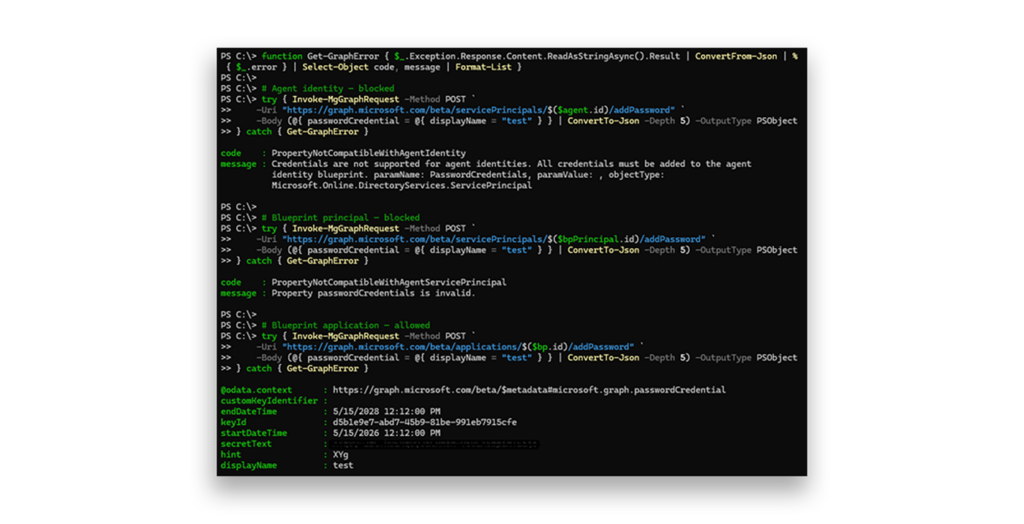
This is one of the most important security lessons in the Agent ID model: the schema tells us what the object inherits, but the platform must still enforce what the object is allowed to do.
The user-shaped part of the problem
The agentUser entity follows the same inheritance pattern we've been examining, but this time, it sits on top of the user object rather than servicePrincipal.
And if layering agent subtypes on top of the service principal surface is sensitive, layering them on top of the user surface is arguably even more delicate. The user object touches authentication policies, licensing, collaboration features, group membership, organizational structure, and administrative assignment flows that were originally designed around human identities.
Looking at the metadata, agentUser inherits from graph.user and adds zero new properties and zero new navigation properties at the subtype level. In other words, every property and every documented relationship an agent user has comes from the user base type.
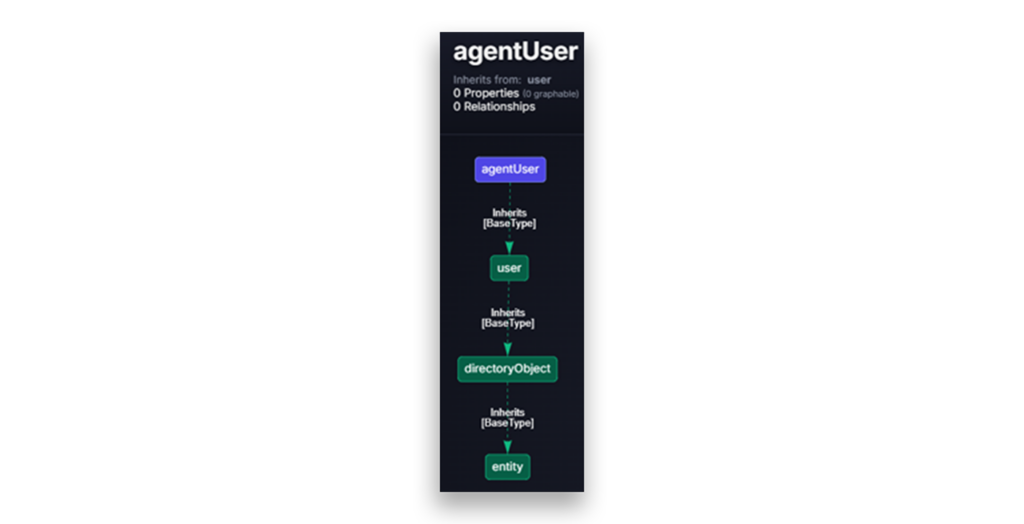
But “zero new attributes” does not mean that there is no distinguishing signal.
The identityParentId property, which links the agent user to its parent agent identity, is defined on the user base type itself. For regular human users, this property is always null but for agent users, it contains the object ID of the associated agent identity and is required at creation time. Microsoft's documentation also notes that this relationship is immutable once established and cannot be cleared or changed.
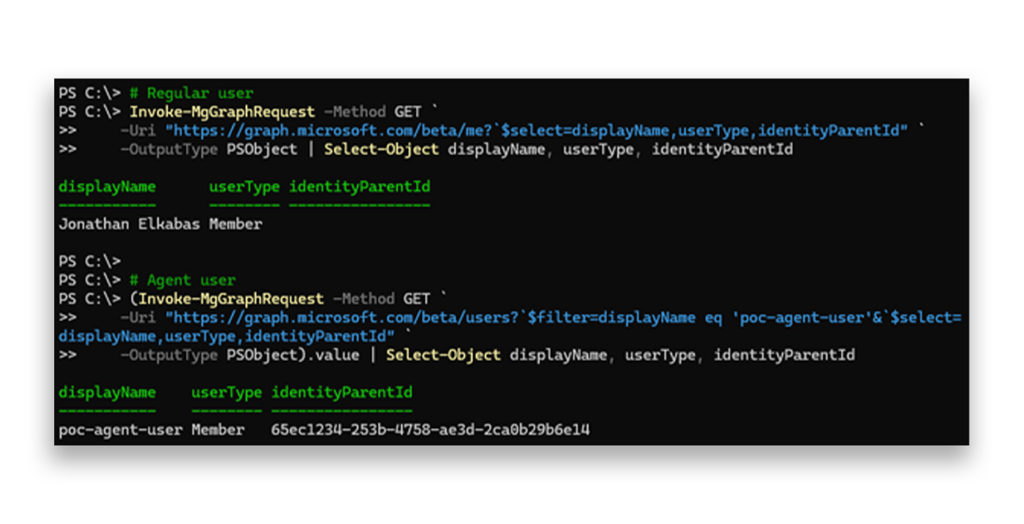
identityParentId property for humans and agentsUnlike in the agentIdentity and agentIdentityBlueprintPrincipal objects, Microsoft made an architectural choice here to push the distinguishing property up to the parent type rather than set it on the subtype, which means the OData metadata alone won't tell us that agentUser is anything other than a user and the only schema-level signal is the @odata.type discriminator on the object itself.
This distinction matters because of what agent users are designed to do. Unlike agent identities, which are service-principal-derived objects and authenticate using app-only token flows, agent users exist specifically for contexts where a user-shaped identity is required.
In token terms, they receive tokens with the idtyp=user claim, which means they can access APIs and services that specifically check for a user token rather than an app token (Outlook, Teams, SharePoint, and any other service that gates on identity type) so they can have mailboxes, join Teams channels, and appear in org charts. An AI personal assistant vision in its full glory.
Microsoft has documented several security constraints on agent user identities:
- They can’t have passwords or passkeys.
- They can’t be assigned privileged administrator roles.
- Custom role assignments and role-assignable groups aren't available to them.
- Their default permission model is similar to guest users with somewhat broader capabilities for enumerating users and groups.
These are meaningful guardrails. But every single one of them has to be enforced at the API and policy layer, individually, for every code path that touches a user object.
That is the uncomfortable part. If an endpoint treats agentUser as just another user and forgets to apply the subtype-specific restrictions, the result is not just a bug. It may become a privilege boundary issue.
For example, despite the official security constraints around privileged role assignment, in testing we were able to assign agent users 3 out of 32 roles marked with isPrivileged=true:
- Global Reader: Read-all across the directory and Microsoft 365 data
- Security Reader: Read access across security tooling, Microsoft Defender, and Identity Protection
- AI Administrator: Administrative control over AI and agent-related features
We were also able to assign many roles that are not marked as privileged (or are treated as standardAssigned) but are effectively Tier 0 in practice such as Billing Administrator, Exchange Administrator, SharePoint Administrator, and Directory Synchronization Accounts.
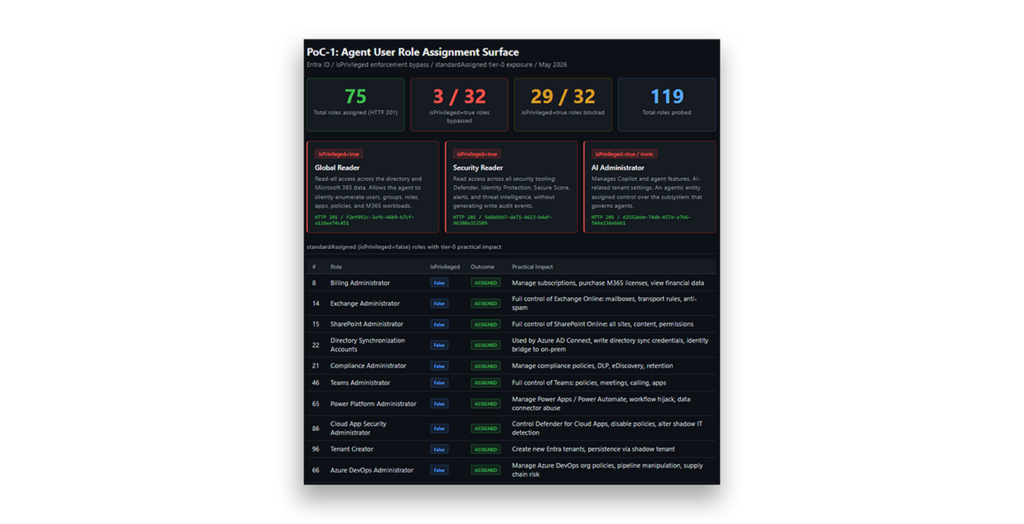
The pattern is not new, and it is not unique to agent identities.
The over-permissioning of the AI Administrator role and the Silverfort finding1 we discussed in this previous chapter are the freshest examples, but they sit in a well-documented lineage of Entra ID "scoping gap." In these cases, a permission or role that appears to operate on a narrower class of objects ends up reaching the broader base type or a more sensitive control surface than expected. The classic Application Administrator and Cloud Application Administrator privilege escalation paths are prime examples of that.
Documented extensively by Dirk-jan Mollema2and SpecterOps,3 these escalation paths abuse the fact that the roles can add credentials to any service principal in the tenant. If a service principal has high-impact application permissions, such as RoleManagement.ReadWrite.Directory or AppRoleAssignment.ReadWrite.All—or has been assigned privileged directory roles—adding credentials to it can allow the attacker to authenticate as that service principal and inherit its effective privileges.
The scoping issue here is subtle; the role is honestly described as managing applications. The dangerous assumption is that “managing applications” should not also mean “being able to take over arbitrary high-privilege service principals.” Microsoft later introduced app instance property lock controls to reduce some of this risk, but the underlying class of issue remains important: control over an object may become control over the permissions already attached to that object.
Semperis’ 2024 research on UnOAuthorized demonstrated another version of this pattern. Several Microsoft first-party service principals (remember this type from the taxonomy?) could be used by Application Administrators and Cloud Application Administrators to add and remove users from privileged roles. The issue was not simply “too much permission” in the abstract. It was a mismatch between the intended role boundary and how OAuth 2.0 scopes and first-party service principals were evaluated in practice.
Similarly, the Datadog I SPy4disclosure from 2025 showed yet another variation. In certain scenarios, service principals with Cloud Application Administrator, Application Administrator, or Application.ReadWrite.All could hijack the Office 365 Exchange Online service principal by adding credentials to it. In hybrid environments, this could be chained through federated domain trust into Global Administrator access. Different surface, same lesson: permissions scoped to “applications” can become far more dangerous when the targeted application is itself a privileged trust primitive.
And Dirk-jan Mollema’s Actor Token vulnerability,5 CVE-2025-55241, while structurally different, falls into the same broad family. In that case, undocumented internal service-to-service impersonation tokens, combined with a tenant validation gap in the legacy Azure AD Graph API, allowed cross-tenant impersonation of any user including Global Administrators, with no logs and no Conditional Access enforcement. The scoping gap here was at the tenant boundary rather than the object subtype boundary, but the core lesson is familiar: when a privileged primitive is introduced without strict validation at every consuming surface, eventually one of those surfaces becomes a path.
So what does all of this mean?
Well, first, that Agent ID is not an isolated new object type. It is a new identity model layered on top of primitives Entra ID already knows very well: applications, service principals, users, OAuth grants, app role assignments, credentials, and directory roles.
And second, that design is practical, but it also means the security model depends on something more delicate. The metadata schema hierarchy can tell us what an object inherits, but only runtime behavior tells us which inherited capabilities are actually reachable.
This is the core tension of Agent ID: Microsoft is giving AI agents first-class representation inside Entra ID, but it is doing so by extending object types that already carry years of security meaning. Every inherited property, every role action, every token flow, and every endpoint now becomes part of the question.
So before we talk about how to abuse, defend, or monitor Agent Identities, we first need to understand the shape of the thing itself.
And now, hopefully, that shape is a little less foggy.
Okay, let’s talk permissions
The Agent ID platform introduces new identity types that can perform autonomous actions, act on behalf of users, and hold persistent permissions. Understanding their permission model is essential for preventing privilege escalation and avoiding unintended high-impact access paths. This model also introduces a new concept of inheritable permission, which we need to understand.
App-only and delegated permissions
Like regular applications and service principals, agent identity blueprints and agent identities can be assigned app-only permissions or delegated permissions.
As we saw before, the agent identity blueprint always holds an app-only permission— AgentIdentity.CreateAsManager—by default, which allows it to create and manage agent identities.
For agent identities, app-only permissions should be used when the agent operates fully autonomously. Delegated permissions apply when a user is involved in the workflow and the agent needs to act on that user’s behalf.
Inheritable permissions
Inheritable permissions are a permission inheritance configuration defined at the agent identity blueprint level. They allow agent identities created from the blueprint to automatically inherit approved permissions from the blueprint, instead of requiring the same consent to be granted separately on every agent identity.
Originally, this mainly showed up around delegated permissions, but the current Microsoft documentation now describes inheritable permissions as supporting both delegated scopes and application roles. Delegated scopes appear in the agent identity’s delegated access token in the scp claim, while application roles appear in the app-only access token in the roles claim.
For inheritable permissions to take effect, configuring the blueprint is not enough by itself. Two things need to be true:
- The relevant resource app must be configured in the blueprint’s
inheritablePermissions. - The permission must also be granted to the blueprint principal.
Microsoft describes this as the difference between declaration, grant, and inheritance: inheritablePermissions is a configuration, while consent on the blueprint principal is what grants authorization.
This means that the allAllowed setting should not be read as “the agent automatically gets every permission exposed by the resource application.” It means that all eligible permissions of that type, for that resource app, that are granted to the blueprint principal can flow down to the agent identities. The effective token is then the merged result of inherited permissions and any permissions granted directly to the specific agent identity.
The configuration is done per resource application, and delegated scopes and application roles can be configured independently for the same resource. For example, a blueprint can inherit delegated scopes but not application roles; it can inherit application roles but not delegated scopes. Microsoft’s examples show this using inheritableScopes and inheritableRoles separately.
For the delegated inheritable permissions to take effect, the blueprint service principal must already hold the relevant OAuth2PermissionGrants entries for those scopes, following a consent at the blueprint level.
For delegated permissions, the documented scope inheritance patterns are:
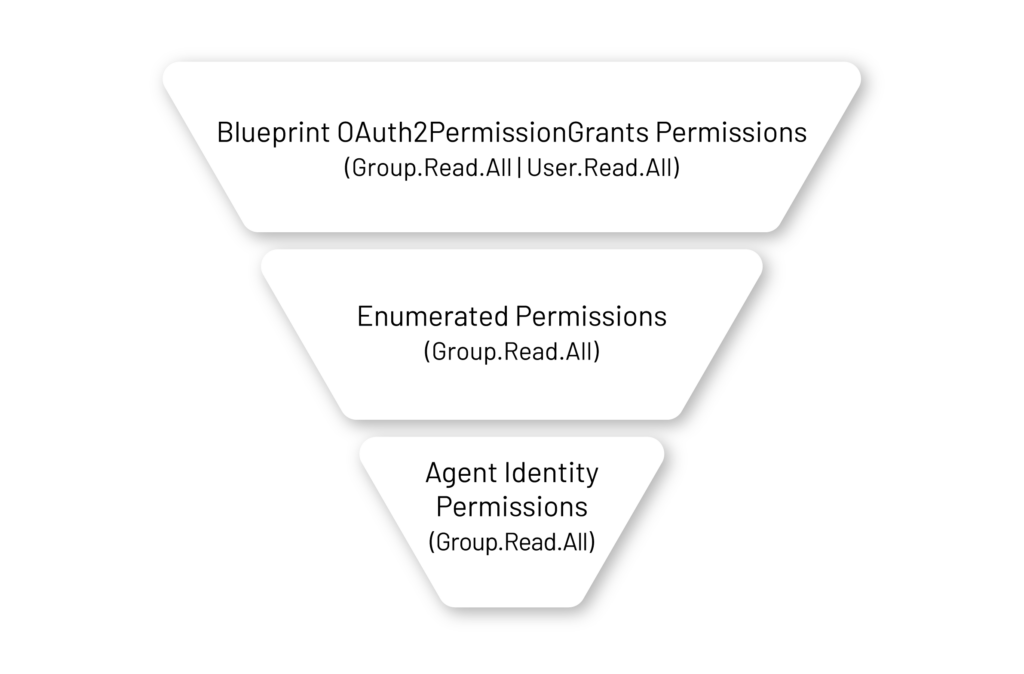
allAllowed: These patterns inherit all available delegated scopes for the resource they granted.noScopes: These patterns inherit no delegated scopes for that resource app.enumerated: Shown only under the beta API docs, these patterns include only the specified listed scopes. When using the enumerated pattern, you can include up to 40 scopes per resource application.
For application permissions, the currently documented app-only inheritance patterns are:
allAllowed: These patterns inherit all available application scopes for the resource app they granted.noRoles: These patterns inherit no application roles for that resource app.
Now the official documentation does not include any enumerated option for app-only inheritance. However, after some testing, we found that this option can be included in the app-only inheritance flow.
The following schema shows the idea behind delegated enumerated inheritable permissions. A similar schema would be relevant for the app-only permissions, which work in much the same way. (The differences will be shown in Practice Checkpoint 2.)
A blueprint can define inheritable permissions for up to 60 resource applications. This limit is not unique to blueprints.
It is also important to note that some high-risk Microsoft Graph permissions are blocked for agent identities. Microsoft documents that blocked delegated permission scopes or app roles cannot be granted to agent identities, and including a blocked delegated scope or app role causes the request to be rejected.
Inheritable permissions are optional. Even without using them, permissions can still be granted directly on each agent identity individually. The difference is that direct grants apply only to that specific agent identity, while inheritable permissions let an administrator approve permissions once at the blueprint level and have eligible permissions flow to present and future agent identities created from that blueprint.
Group membership (agent user only)
Group membership is limited to agent users. Agent users can be added to security groups, but not to role-assignable groups. They inherit permissions from their group memberships in the same way regular users do.
Microsoft Entra roles
Agent identities can be assigned Microsoft Entra directory roles, similar to service principals but with important limitations. Highly privileged roles, such as Global Administrator, Privileged Role Administrator, and User Administrator, can’t be assigned to agent identities. Only a defined subset of Microsoft Entra roles is supported, and some of those roles are still administrative in nature, so they should be assigned carefully based on the agent’s intended purpose and least-privilege requirements.
The full list of supported roles is available here.
Access package
Besides assigning access directly to an agent identity, organizations can use access packages. An access package allows the agent or a set of agents with the same needs to access resources. Access packages can include Entra roles, security group memberships, OAuth2 delegated permissions, and application permissions—all of which we’ve described earlier.
Access packages are configured by an administrator, who defines:
- Which resources are included
- Who is allowed to request access
- Who must approve access
- How long the access lasts
- And other policy settings
An agent identity can request an access package on its own, or a sponsor or manager can request it on the agent’s behalf. It can also be assigned directly by the administrator. Once approved, the agent receives time-limited access to the included resources, and a sponsor may request an extension if needed.
Putting the permissions story together
To summarize the permissions model, each component in the Agent ID platform can carry its own permissions. Agent identities can hold app only permissions or delegated permissions, agent users can receive group memberships, and agent identity blueprints can define inheritable permissions that flow to every agent identity created from them. Depending on the authentication flow, the relevant elements combine during runtime.
In case of an On Behalf Of flow, combined with new inheritable permissions, the final agent permissions will look like this:
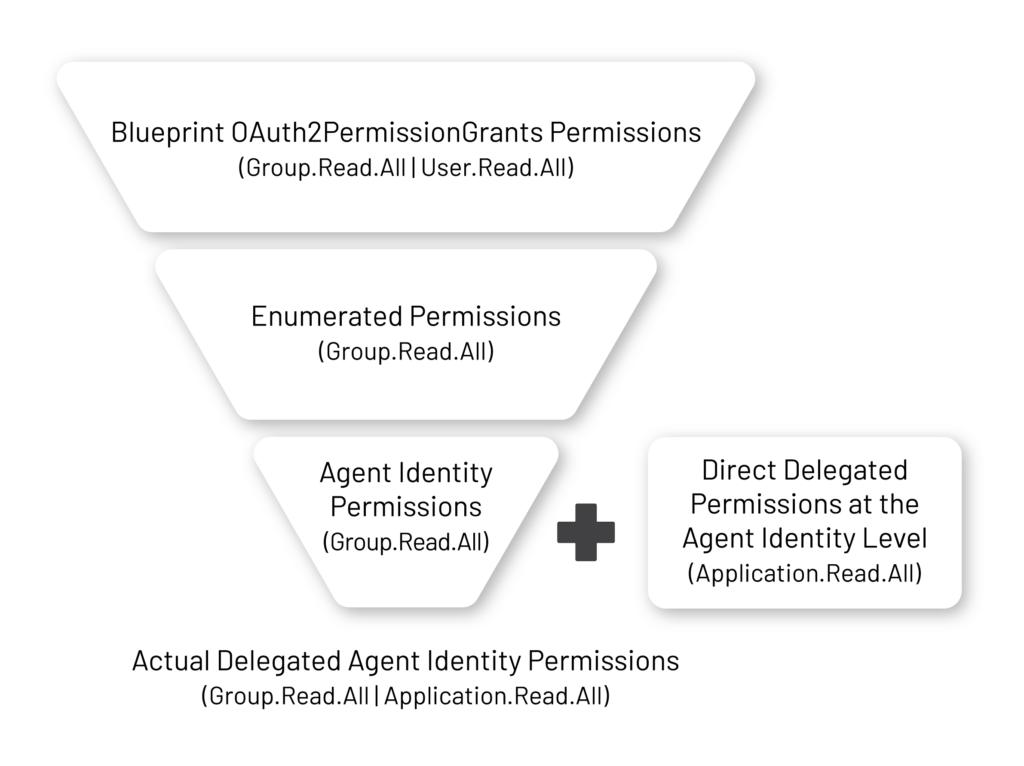
A similar stream is expected when using the app-only permissions with inheritable permissions as well. Just replace all delegated terms with app-only terms.
Next: Practice setting agent identity permissions
Now, take a side trip to our second Practice Checkpoint and walk through the steps to assign permissions to the agent identity you set up in the first practice.
Practice setting agent identity permissions.
Explore the guide
- Introduction: Understanding and Preventing Entra ID Agent Identity Attacks: A Comprehensive Guide
- Chapter 1: Meet Entra ID Agent Identities (BTW They’re Not People)
- Chapter 2: The Taxonomy of Workload Identities in Entra ID: Enterprise Applications, Service Principals, and Other Forms of Organized Confusion
- Chapter 3: Understanding Microsoft Agent ID and the Agent Identity Platform
- Practice Checkpoint 1: Building Agent ID with MS Graph
- Practice Checkpoint 2: Setting Agent Identity Permissions
- Chapter 5: The Agent Registry and How Agent Identities Operate in Entra ID
- Practice Checkpoint 3: Registering an Agent—With and Without Agent ID
- Practice Checkpoint 4: Verifying Tokens and Claims Across Three Entra ID Authentication Flows
- Chapter 6: Where Things Might Go Wrong with Agent Identities in Entra ID—and How to Prevent Disaster
Endnotes
- https://www.silverfort.com/blog/agent-id-administrator-scope-overreach-service-principal-takeover-in-entra-id/
- Azure AD privilege escalation - Taking over default application permissions as Application Admin - dirkjanm.io
- Azure Privilege Escalation via Service Principal Abuse - SpecterOps
- I SPy: Escalating to Entra ID's Global Admin with a first-party app | Datadog Security Labs
- Actor Token vulnerability