- How to think about Service Principals
- Logical service principal types—and where they break
- Applications
- What’s the difference between applications and service principals?
- Types of application objects
- Identifying application types
- How service principals become applications' runtime attack surface
- Managed identities
- Types of managed identities
- Identifying managed identities
- Where the managed identity trust boundary becomes blurry
- Legacy and SocialIdp Applications
- ServiceIdentity: The service principal type for agents
- Explore the guide
- Endnotes
Editor’s Note: Welcome to Chapter 2 of Understanding and Preventing Entra ID Agent Identity Attacks: A Comprehensive Guide. To review previous chapters and practice lessons, start here.
This is where our guide shifts into more technical depth, so let’s step through it carefully.
First things first: Simply put, the term workload identity is an umbrella concept Microsoft uses to describe multiple types of non-human identities that operate within Entra ID. These identities allow applications, services, cloud resources, automation workloads—and now agents—to authenticate and interact with other systems with little or no human interaction.
Here is the important part: All workload identities, including the newly introduced agent identity types, eventually resolve to one underlying object type: the Service Principal.
And honestly, that makes sense.
How to think about Service Principals
The servicePrincipal entity is probably the most elastic identity object in Entra ID. If you look at its schema through the Microsoft Graph OData $metadata endpoint, the number of properties, navigation properties, and bound actions exposed by this object already tells you a lot about its role in the platform.
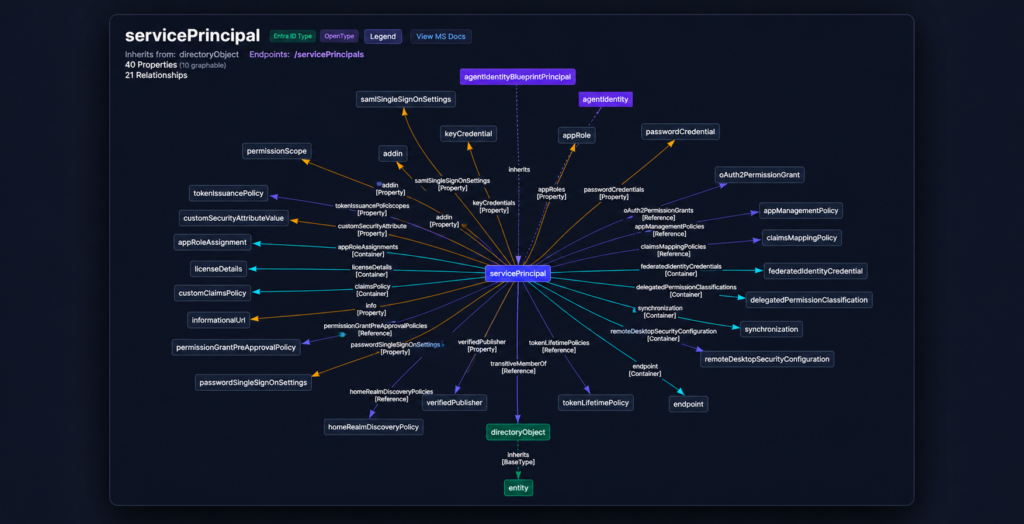
That service principal foundation is doing a lot of quiet work here. It connects to many of the interfaces and subsystems that Entra ID operates to support features like credential management, OAuth permission grants, app role assignments, group memberships, ownership, Conditional Access evaluation, RBAC mechanisms, audit, and sign-in logging.
So when Microsoft developed agent identities, they did not choose to build an entirely new identity primitive from scratch but rather extend one.
As the docs state, both agentIdentity1 and agentIdentityBlueprintPrincipal2 objects (which we will dive deeper into at a later chapter) are specialized types of service principal that represent agent identity instances within the Microsoft Entra ID ecosystem. In practice, this means they inherit the existing service principal architecture, including the benefits, the compatibility with existing APIs, and, naturally, some of the complexity.
This is where architecture becomes security-relevant.
A good example is the finding3 released by the team at Silverfort not long ago.
When Microsoft introduced the Agent ID Administrator role to manage the new agent identity control plane, it was documented as being scoped strictly to agent-related objects. In practice, that boundary did not hold. Identities assigned only this role could take over arbitrary service principals, including ones that had nothing to do with agent identities, by adding themselves as owners, adding credentials to the service principal, and then authenticating as that principal.
That is a full service principal takeover.
The likely root cause maps directly to the model described above.
If agentIdentity and agentIdentityBlueprintPrincipal objects are implemented on top of the servicePrincipal foundation, then the authorization layer must reliably distinguish between agent-backed service principals and “regular” service principals. That distinction has to be enforced explicitly.
This is part of the reason why Microsoft introduced new directory roles (Agent ID Administrator, Agent ID Developer, and Agent Registry Administrator) and object-specific management roles (owner, sponsor, and manager) alongside the new agent identity model.
Conceptually, and in line with the least privilege model, these new roles should be limited to the surface of the Agent ID-specific control plane. That means managing agent-related objects, including agent identities, agent identity blueprint principals, agent identity blueprints, and agent users, without extending that authority to the broader base type that includes every service principal in the tenant.
Their authority should be scoped to the agent model, not to every service principal in the tenant.
As an interesting and not-so-short side note, the visible RBAC model does not always show the full agent surface clearly. Currently, Microsoft’s documentation for Agent ID Administrator refers to the broader agent-related Actions, which are permission entries that define what operations a directory role is allowed to perform against specific resource types.
Following the official docs, Silverfort speculated (very rightly!) that actions such as microsoft.directory/agentIdentities/owners/update and microsoft.directory/agentIdentityBlueprintPrincipals/owners/update leaked from the built-in role onto the general service principal control plane.
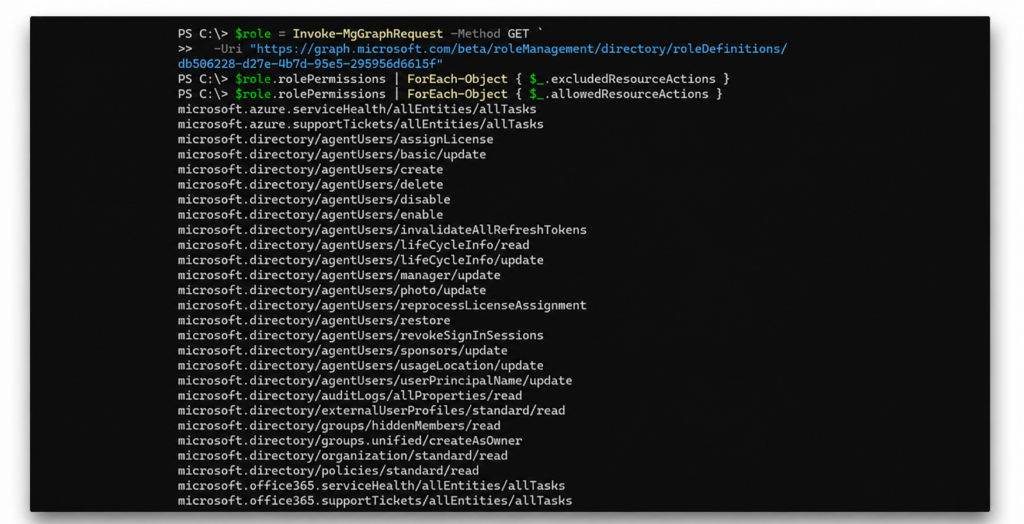
However, when querying the live role definition through Microsoft Graph, the visible allowedResourceActions appear to focus only on agentUsers/*.
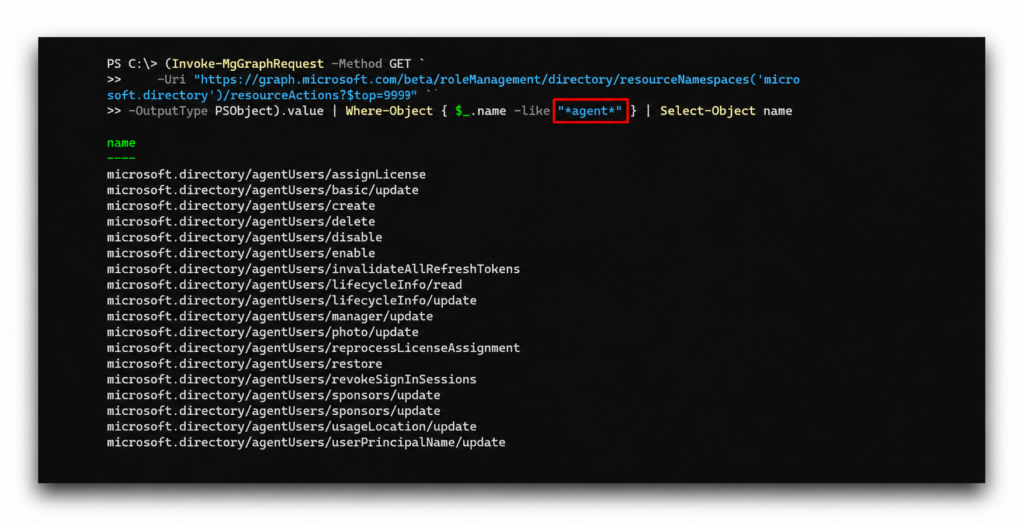
And enumerating the declared microsoft.directory resource actions shows the same gap: 18 agent-related entries, all under agentUsers/*. None for the service principal layer subtypes (agentIdentities/*, agentIdentityBlueprintPrincipals/*, and agentIdentityBlueprints/*). Which basically means that no role has them.
A somewhat similar observation applies to the AI Administrator role.
Unlike Agent ID Administrator, which sounds like a highly specific role for managing the Agent ID control plane, AI Administrator is much more likely to be delegated broadly. Its documented responsibilities focus on Microsoft 365 Copilot, AI services, Copilot agents, usage insights, service health, and support operations.
In other words, it reads like an AI operations role, not like full control over the underlying Agent ID identity plane.
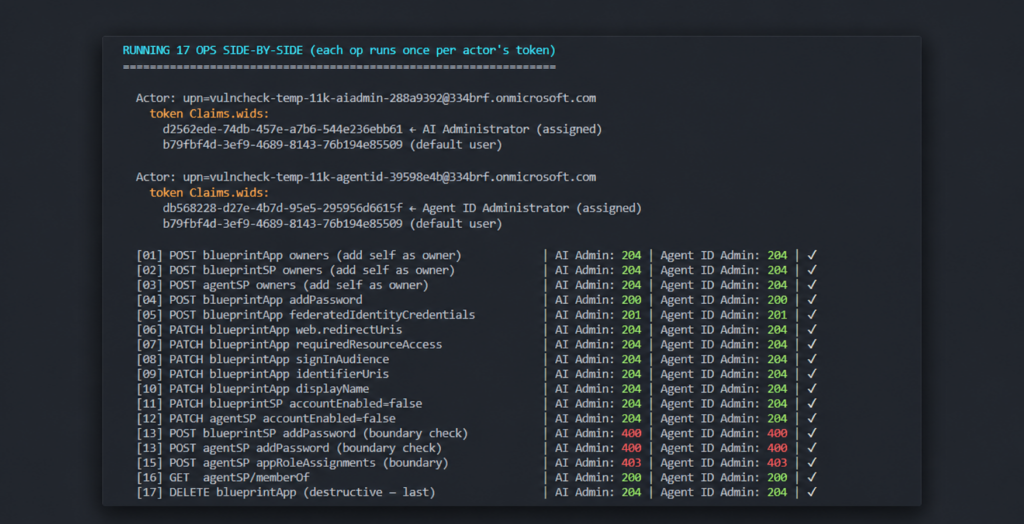
But in practice, the role appears to have nearly identical Agent ID control-plane capabilities as Agent ID Administrator. 17 out of 17 operations we tested produced identical verdicts for both roles. This means that anyone holding AI Administrator can take ownership of any agent identity in the tenant, plant credentials to any blueprint, and then authenticate as any agent associated with the blueprint, including agents in other Entra tenants.
Despite the two roles declaring slightly different allowedResourceActions, and despite both inheriting from the Directory Readers baseline that nearly every privileged role inherits from (which contributes 55 read-only actions), the actual difference is limited to the following actions:
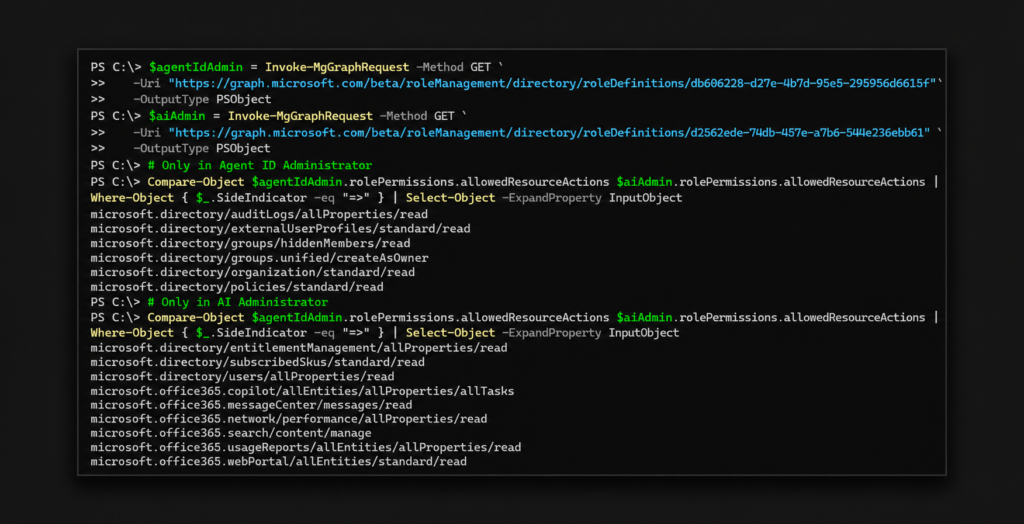
Those details are not in the Silverfort finding itself but they are useful in context. They show that part of the agent identity control plane is not represented as a clean, fully visible RBAC vocabulary. Some of the authority over agent-related objects appears to be enforced deeper in the API layer (e.g., per-endpoint hardening guards, template-ID-bound overrides, dynamic runtime checks). This also explains why application objects were not affected, as the gap was not in ownership management.
And that brings us back to the security issue.
Inheritance gives identity systems their flexibility, consistency, and reuse. But without precise scoping boundaries, it can also expand the attack surface to all involved objects.
However, the inheritance hierarchy is only one permutation of the service principal model. In addition to sharing the same underlying object architecture, service principals are also logically categorized into different identity types.
Logical service principal types—and where they break
Over the past year, I’ve had the opportunity to travel and present EntraGoat, an open-source, deliberately vulnerable lab we built at Semperis to share and practice real-world identity attack paths in Microsoft Entra ID.
The feedback was great, but what stayed with me most were the conversations that followed. One theme kept coming up: applications and service principals are far more complex than they appear at first glance.
So here we hope to unpack that complexity and to shed some light on the attacks these identities face.
The type of a service principal can be identified through the servicePrincipalType property enum, which Entra ID assigned internally to indicate the logical category of the identity.
According to Microsoft's documentation for the servicePrincipal resource type, this field can contain five primary values:
- Application
- ManagedIdentity
- Legacy
- SocialIdp
- ServiceIdentity
These identities are, in my experience, among the most powerful objects in Entra ID, often sitting at the center of critical access paths.
Understanding how these service principal types behave, where they originate from, how they authenticate, and what makes them different from one another is essential for understanding how Entra ID actually operates under the hood.
Let’s explore the five logical service principal types in the workload identity landscape.
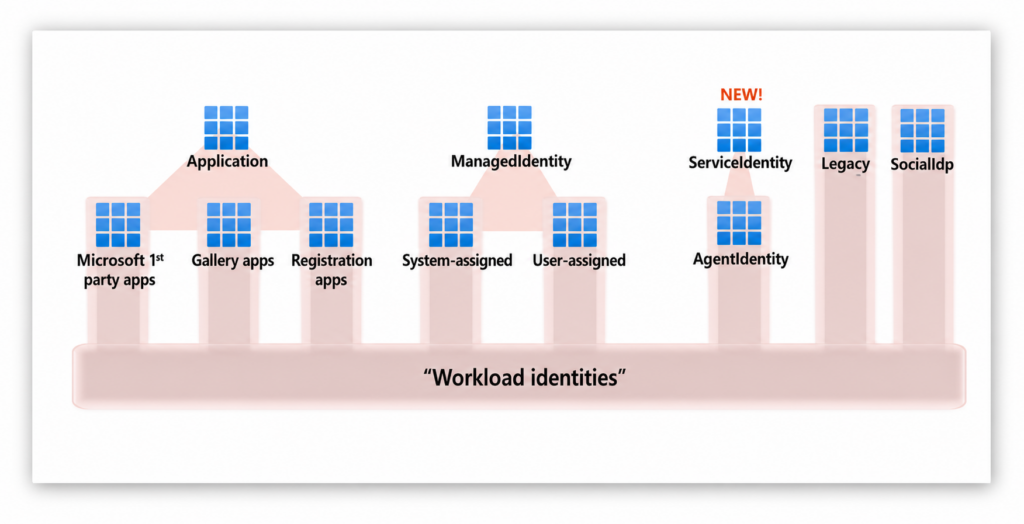
Big shoutout to Eric Woodruff, Semperis Chief Identity Architect, for originally surfacing this taxonomy and showing it to us.
Applications
As detailed in the workload identities diagram above, the first group that initiates service principals in an Entra ID tenant comes from the applications we all use and recognize, such as Microsoft Teams, Salesforce, or internally developed systems like an HR portal.
An Application object represents the global definition of an application. It is created in the tenant where the application is originally created (can be viewed in the App registrations UI) and serves as the blueprint or template that defines the application's identity configuration, including redirect URIs, required API permissions, credentials, and other settings. That means the object describes how the IdP can issue tokens that allow clients to access the application, the resources that the application might need to access, and the actions or permissions the app can perform within a tenant.
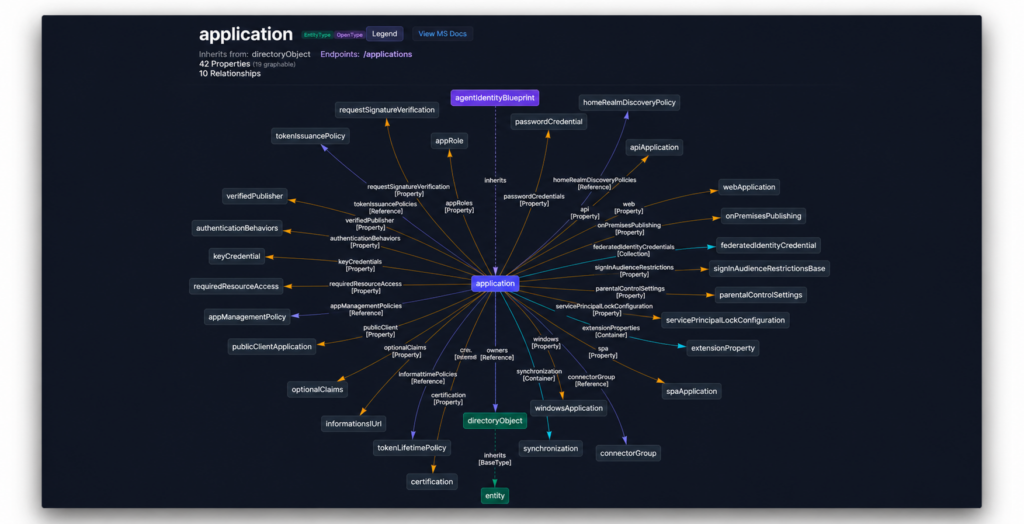
To enable and integrate all of that, and as you can see in the $metadata API endpoint, the application object is also a complex object (and very relevant to agent identities!) with lots of different properties and methods.
A Service Principal object (servicePrincipalType : application) represents the instance of that application within a specific tenant and can be viewed in the Enterprise applications UI. It is the security principle that Entra ID actually uses during authentication and authorization flows.
The service principal enables the application to sign in or access resources within that directory and stores tenant-specific data such as granted permissions, admin consent, and app role assignments. Meaning, the service principal is the object that gets tokens, has permissions, appears in sign-in logs—and is targeted in attacks.
What’s the difference between applications and service principals?
From our experience, the distinction between application objects and service principal objects is one of the most commonly misunderstood concepts in Entra ID.
To attempt to clarify the difference, we’ve listed the following examples show how they relate while remaining very distinct. Feel free to skim the bullets if you’re already familiar with the topic.
- An application object exists only in its home tenant.
- A single-tenant application has exactly one service principal, which exists only in the same (home) tenant.
- When a multi-tenant app is consented to in a foreign tenant, only a service principal is created there and no application object.
- The
appId(Application ID / Client ID) property identifies the application object definition and is globally unique across all Entra ID tenants. It is assigned at creation and never changes. - The
appIdproperty of a service principal always matches theappIdof its corresponding application object. That’s why the same first-party app (such as Microsoft Graph) shares the sameappIdacross all tenants worldwide. - Each service principal has its own
id(Object ID) that is unique within the tenant where it exists. - App role assignments and OAuth2 permission grants are assigned to the service principal, not the application object, so two tenants can consent to the same app with completely different permission scopes.
- Credentials added directly to a service principal are scoped only to that specific tenant and cannot be used outside of it.
- Credentials added to the application object are inherited by all service principals across every tenant where the app is consented, which allows a cross-tenant attack vector.
- Deleting a service principal object in one tenant does not affect the application object (and not the service principals in other tenants), as each service principal lifecycle is independent.
- Deleting the application object in the home tenant automatically removes the home tenant's service principal but does not remove service principals in other tenants (those remain until explicitly removed).
- Until April 1, 2026, and in some special scenarios, you could use an application without creating a service principal; however this “service principal-less authentication” should not be supported anymore.
Types of application objects
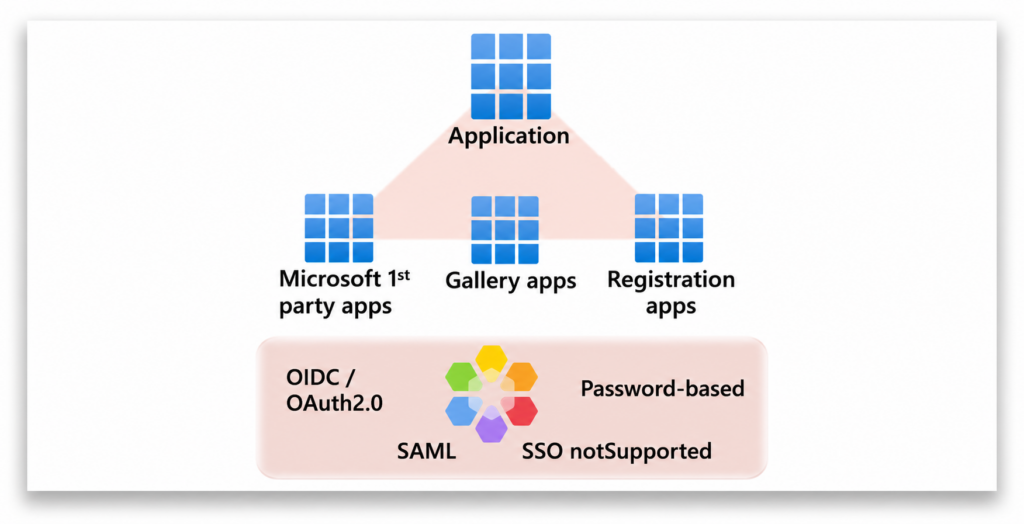
All application-backed service principals generally originate from one of three logical application categories.
Identifying application types
Microsoft First-Party Applications are applications owned and operated by Microsoft that provide Azure and M365 services such as Exchange Online, SharePoint, Microsoft Graph and hundreds more. They appear in your tenant when a user consents to them, an admin grants them access, or Microsoft auto-provisions them when a service or license is enabled (such as E5, Defender, or Intune).
To identify those types of workload identities, you can simply check the appOwnerOrganizationId GUID property on a service principal object. Microsoft first-party apps have this typically set to Microsoft's tenant ID (f8cdef31-a31e-4b4a-93e4-5f571e91255a), though some use other Microsoft-owned tenant IDs.
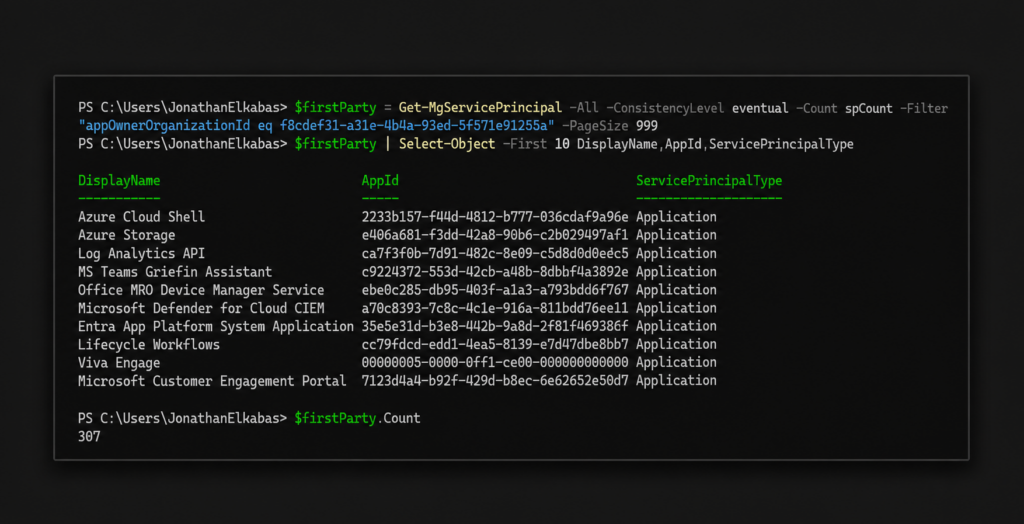
It's important to understand that although they might appear in sign-in logs, most first-party service principals are hidden from the Enterprise Applications UI blade in the Azure Portal by default but are still queryable via the Graph API.
This is because the UI blade filters on the WindowsAzureActiveDirectoryIntegratedApp tag, which usually identifies apps that are integrated with Entra ID; however, Microsoft's own first-party service principals (purposely) don’t have it.
In addition, Microsoft first-party apps operate using internal authorization mechanisms beyond standard OAuth scopes, meaning their effective permissions may exceed what is visible through permission grants and cannot be fully audited via standard Graph API queries.
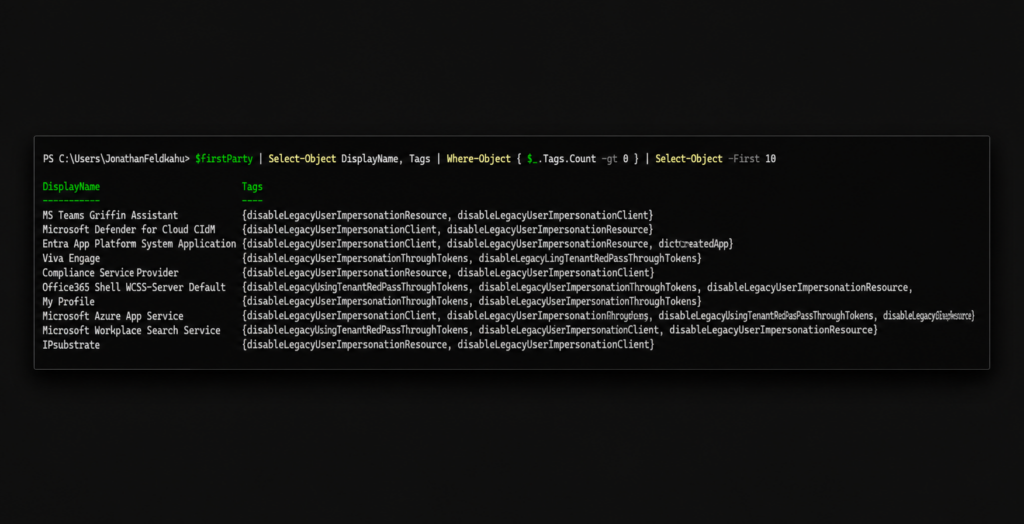
The next logical type of application objects are your own applications, aka, Registration applications.
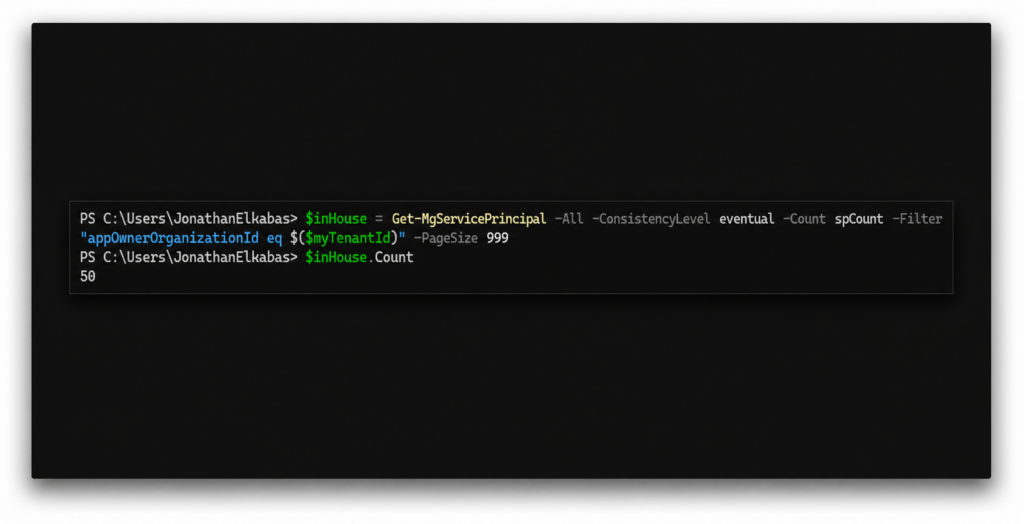
These are applications registered directly by administrators or developers via the App Registrations experience. In this case, the organization owns the application object and can fully control its configuration, credentials, and permissions. A corresponding service principal is automatically created in the home tenant during registration.
To map service principals created from applications registered by our organization, similar to how we filter Microsoft first-party apps, we can enumerate all service principals whose appOwnerOrganizationId is set to our tenant ID.
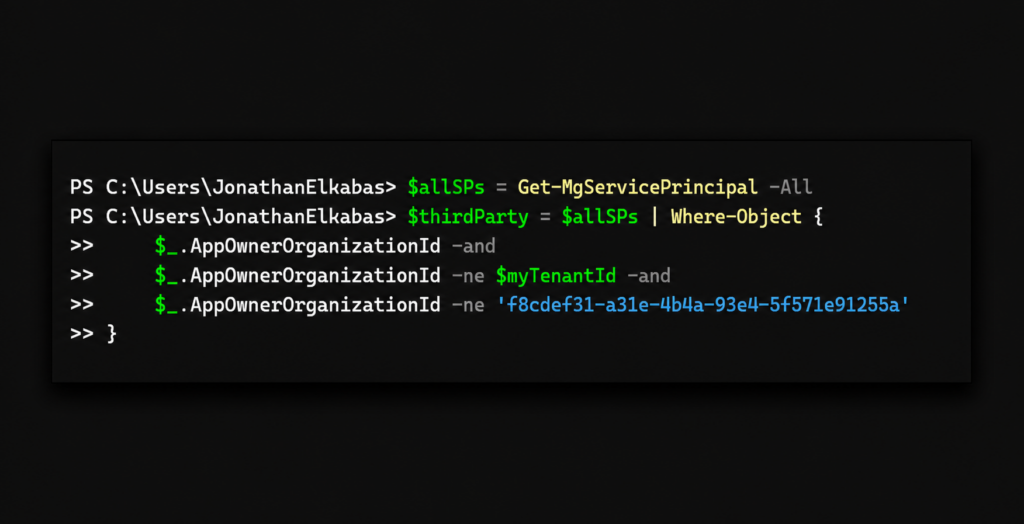
The last logical application-backed type is Third-Party/Gallery Applications.
These are SaaS applications integrated through the Microsoft Entra App Gallery, such as Salesforce, ServiceNow, or Zoom. As discussed earlier in the chapter, when one of these applications is consented to a tenant, a service principal (referencing to the vendor's multi-tenant application object) is created locally.
To identify service principals created by third-party applications, meaning applications that were not registered in our tenant and are not Microsoft-owned, we can simply exclude both our tenant ID and Microsoft’s tenant ID from the full set of service principals on the client side (since Microsoft Graph does not support ne filters on appOwnerOrganizationId).
How service principals become applications' runtime attack surface
As we’ve said (probably too many times by now), each one of those three application types instantiates a local service principal object in your tenant. The service principal is the runtime identity: it holds the permission grants, SSO configuration, and protocol-specific settings that Entra ID enforces at authentication time.
By examining the preferredSingleSignOnMode property on the service principal object, Entra ID determines which SSO protocol the application uses. The possible values are:
- saml: The application uses SAML 2.0, where Entra ID acts as the identity provider and issues signed SAML assertions.
- oidc: The application uses OpenID Connect / OAuth 2.0, the modern token-based protocol.
- password: Password-based SSO, where Entra ID injects credentials into the application's login form on behalf of the user.
- notSupported: No SSO is configured through Entra ID.
- null: Indicates older SAML apps or OIDC applications where the value was not set automatically; also used for other logical types of service principals (as we will see shortly).
From a security perspective, the SSO mode has direct implications. SAML applications rely on a token-signing certificate configured on the service principal itself. If an attacker gains access to this certificate's private key, they can forge SAML assertions and authenticate as any user the application trusts.
Semperis researchers demonstrated this exact scenario in the research blog Meet Silver SAML: Golden SAML in the Cloud, showing that importing an externally generated signing certificate into a service principal (rather than using Entra ID's built-in self-signed certificate) creates an exploitable attack vector that requires no interaction with Entra ID whatsoever.
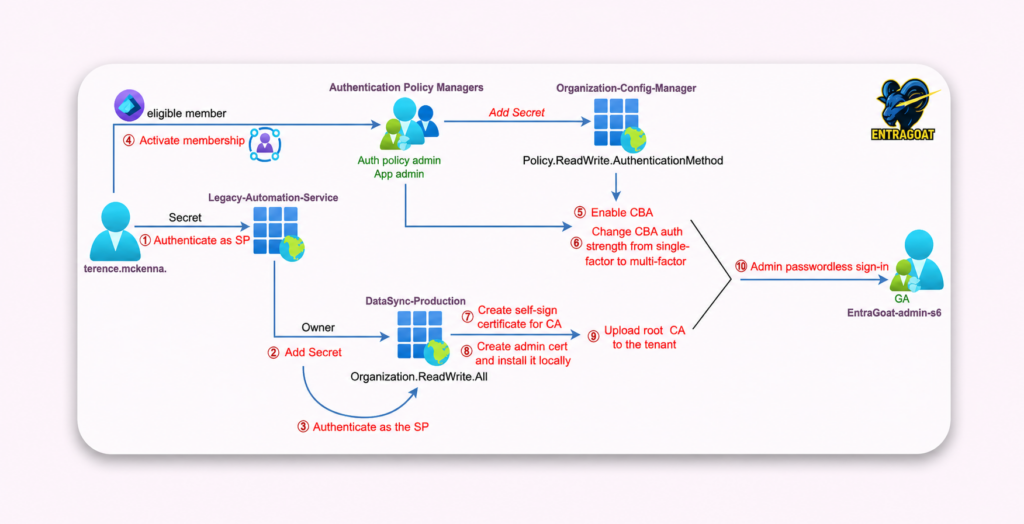
Try it yourself in EntraGoat
Because nothing illustrates how service principals shape today's identity threat landscape quite like watching it happen in a lab, several of the most impactful privilege escalation paths in EntraGoat, the deliberately vulnerable Entra ID lab we built here at Semperis, are built entirely around them.
The scenarios vary in starting point and method, but the pattern is intentionally consistent: find a path to an application-based service principal and the road to tenant-wide compromise tends to be shorter than anyone expects.
If you want to see what that looks like end to end, EntraGoat is a good place to start. Read more and follow walkthroughs in our blog series.
Managed identities
Managed identities are, in a way, Microsoft's attempt to solve a problem we created ourselves: credential management.
Every identity, and non-human identity in particular, that authenticates via client secrets (passwords, access keys, or certificates) introduces a lifecycle challenge of that secret (rotation, storage, expiration, and leakage). Managed identities implementation tried to eliminate this burden by moving credential management entirely into the Azure control plane. The identity exists; it authenticates, but no human ever touches (or mishandles) a credential attached to it.
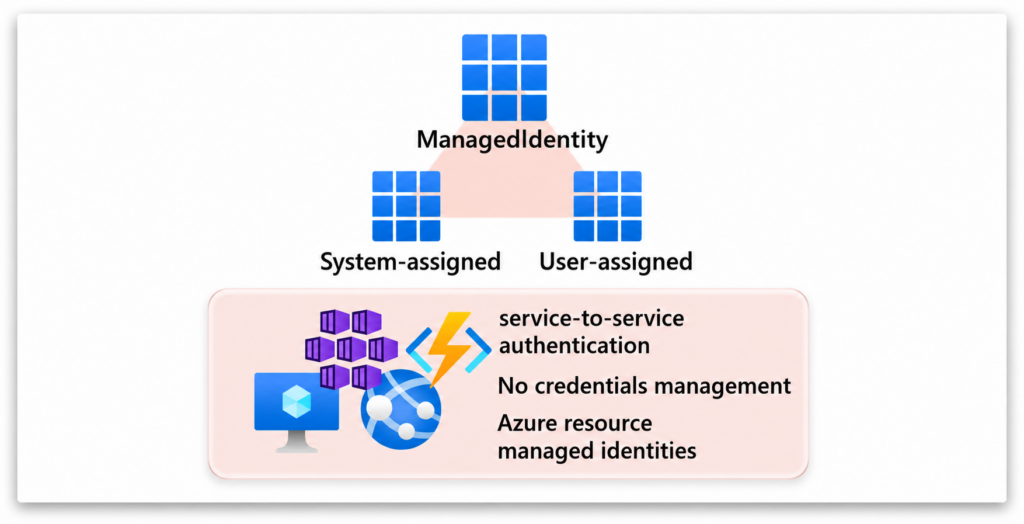
Types of managed identities
Any resource that supports Entra ID authentication (such as a VM, an App Service, a Logic App, a Kubernetes cluster, and many more Azure services and resource types) can use managed identities to obtain tokens and access other resources.
There are two types:
- System-Assigned Managed Identities are created as part, and in the context, of the Azure resource itself. The relationship is strictly1:1. One resource, one identity, one lifecycle. The identity cannot exist independently, cannot be shared, and is automatically deleted when the resource is deleted. This tight coupling is also its primary security advantage.
- User-Assigned Managed Identities, on the other hand, are standalone Azure resources. They can be attached to one or more resources, and their lifecycle is independent from the resources that use them. This decoupling nature of the user-assigned managed identity is the operational advantage, and, naturally, the security tradeoff.
Identifying managed identities
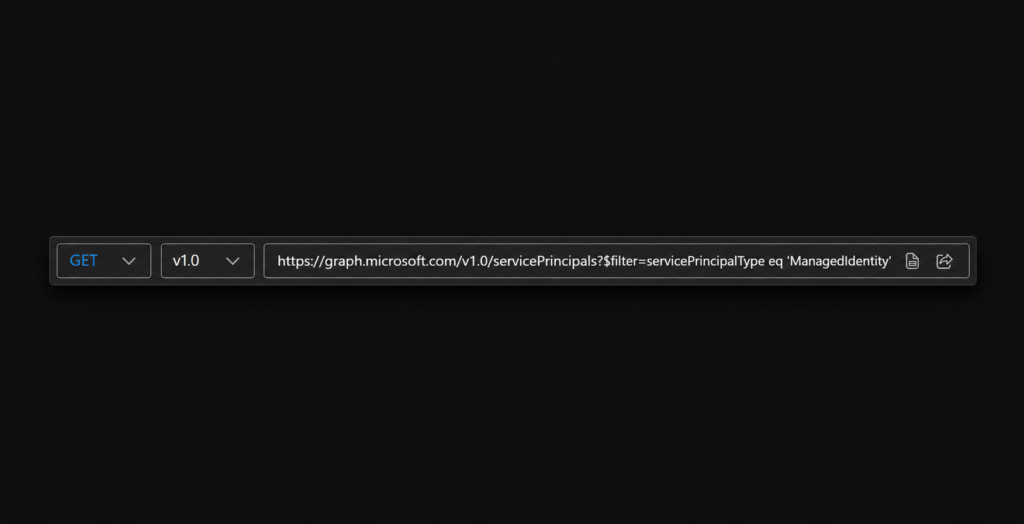
Identifying service principals that represent managed identities in Entra ID is pretty straightforward. We can simply query the directory for the servicePrincipalType property set to ManagedIdentity.
Under the hood, both identity types authenticate through Azure-controlled endpoints—such as the Instance Metadata Service (IMDS) at 169.254.169.254—or through identity endpoints exposed by services like App Service and Functions. The token acquisition flow is entirely local to Azure and no secrets cross the wire, no credentials are stored in Key Vault (or worse, in appsettings.json), or even exposed to developers.
Unlike application-backed service principals, managed identities are not attached to an application object in the directory, so there is no app registration, no manifest, and no redirect URIs. They are also not user-facing and do not participate in any SSO protocols.
Remember the preferredSingleSignOnMode property we discussed earlier? We hope you now understand why it and other authentication-specific properties are typically null for managed identities. They do not authenticate via SAML, OIDC, or password-based flows. Instead, Azure issues and manages certificates with a 90-day validity period, rotating them every 45 days, for each managed identity.
These certificates are issued by Microsoft.ManagedIdentity and include the managed identity service principal’s object ID in the certificate subject. Azure uses them to perform certificate-based authentication and issue tokens directly through its control plane, without exposing credentials to the tenant (or to its administrators).
Part of this mechanism can be observed through the keyCredentials property on the managed identity’s service principal object.
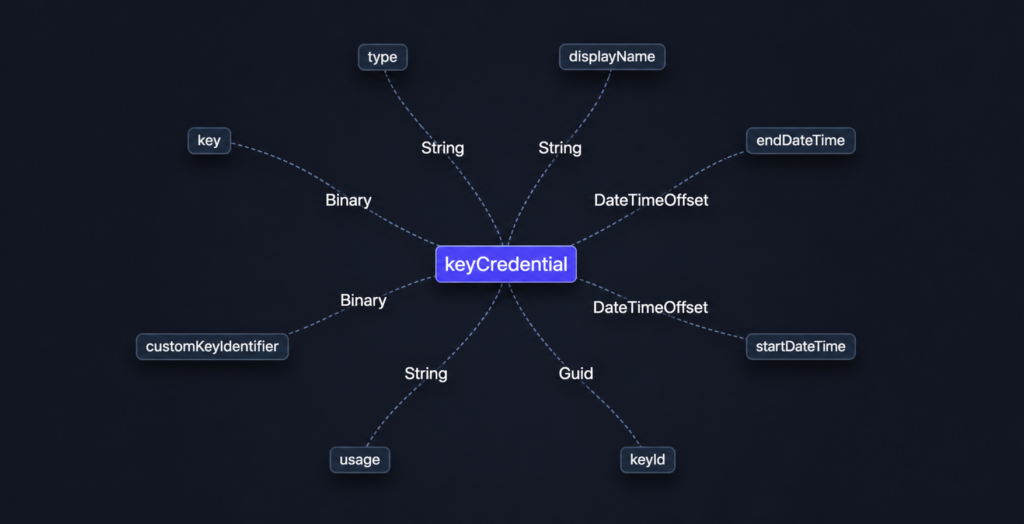
keyCredential property of a managed identityUnlike application-backed service principals, where keyCredentials usually contains certificates uploaded by an administrator or developer, managed identities have their key credentials populated and rotated entirely by Azure.
And querying the property indeed shows an AsymmetricX509Cert entry with Usage set to Verify, with the service principal object ID as the certificate subject.
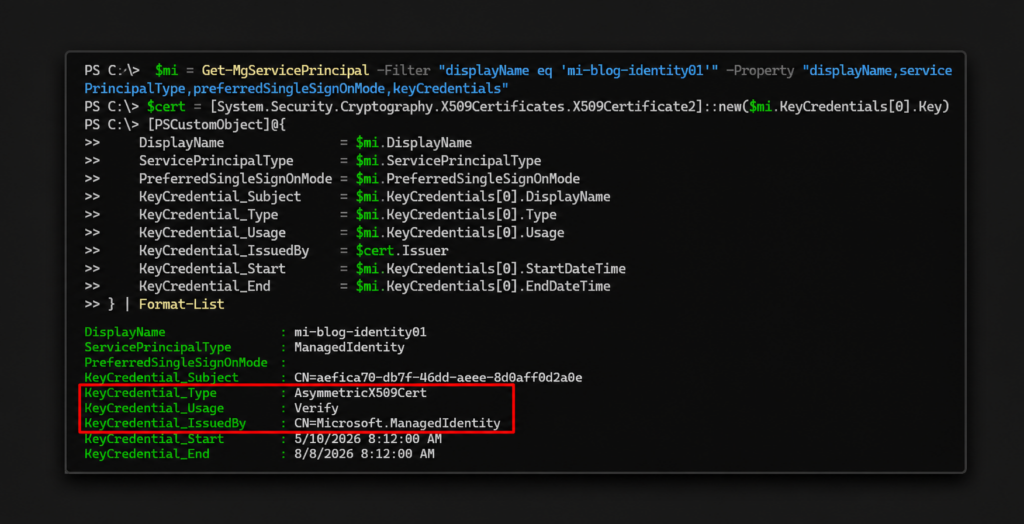
Verify in this managed identity.This design is elegant until you look at it from an attacker's perspective.
Where the managed identity trust boundary becomes blurry
There are two distinct abuse patterns worth understanding that show how the model starts to bend once theory meets reality’s needs.
The first abuse pattern is token theft via the attached resource.
Since managed identities authenticate through local endpoints (IMDS or the platform's identity endpoint), any principal with access (aka, code execution on the underlying resource) can request a token on behalf of the managed identity.
This is the classic, well-documented attack vector:
- Compromise a user with access to a VM / Container Registry / Arc / AKS / Automation Accounts / App services / Logic Apps / Deployment Scripts / Data Factory
- Query the token endpoint in some way (
Invoke-WebRequest 169.254.169.254/metadata/identity/oauth2/token)
If this returns anything, you now hold a valid OAuth token scoped to whatever permissions that identity has to use on Azure APIs.
While this technique applies to both system-assigned and user-assigned managed identities, the attack surface scales directly with the context of the identity.
In the case of user-assigned managed identities shared across multiple resources, a single compromised identity can be used to request tokens for every resource it has permissions on. A textbook case of lateral movement.
Or as it is briefly explained on Microsoft Learn:
The security boundary of managed identities for Azure resources is the resource where the identity is used. All code/scripts running on a virtual machine can request and retrieve tokens for any managed identities available on it.
The second abuse pattern is federated credential abuse, which undermines the trust model behind managed identities.
As we saw a moment ago, user-assigned managed identities do not support configuring traditional credentials; it is explicitly forbidden to modify these properties on the service principal representing the managed identity in Entra ID. But they do, however, support federated identity credentials. These allow external identity providers (such as GitHub Actions, or any OIDC-compliant issuer, including a self-hosted one) to authenticate as the managed identity without any secret exchange.
We won’t go too deep into the implementation details here, since this chapter has already wandered enough, but at a high level, this can be done by creating a federatedIdentityCredential object on the service principal of the managed identity via the ARM API, specifying an OIDC issuer URL and a subject identifier.
Then, at authentication time, Entra ID validates the external token against the configured issuer and matches the subject claim. However, it does not validate ownership between the issuer and the managed identity's tenant or resource.
This means that any principal with the Microsoft.ManagedIdentity/userAssignedIdentities/federatedIdentityCredentials/write action in the Azure RBAC permission (which comes with several built-in roles such as Contributor, Owner, and Managed Identity Contributor) can add a new federated credential pointing to an external repository or environment they control.
Once that credential is configured, the attacker authenticates from their own GitHub workflow (or any OIDC-compliant environment), receives a valid token for the managed identity, and operates with its full set of permissions (entirely from outside the Azure resource boundary).
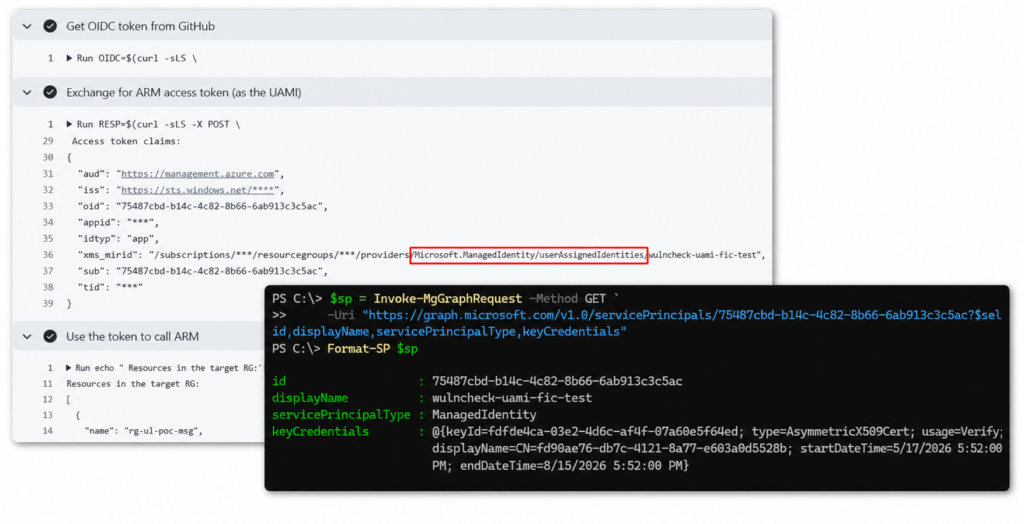
In both cases, the core issue is the same: Managed identities were designed to remove the credential risk inside a resource boundary, but Azure's own permission model allows that boundary to be extended (or bypassed entirely) by anyone with sufficient RBAC access.
The identity is meant to live inside a specific runtime context, but access to it does not always stay within that context. In the first case, it can be assumed by gaining code execution on a resource where the managed identity is attached. In the second, it can be assumed through a federated trust relationship that does not require any real connection to the original Azure resource at all.
Legacy and SocialIdp identities
The next two service principal types of identities are Legacy and SocialIdP. Both are less relevant to the main purpose of this guide, so we’ll touch on them only briefly.
The Legacy type represents older applications created before the modern app registration model, or through legacy experiences. The appId property exists on it but does not point to an app registration. A Legacy service principal can still have credentials and reply URLs that admins can manage directly, and it can only be used in the tenant where it was created.
The SocialIdp type is documented by Microsoft as "for internal use,” so there is less public detail available. Based on its name and usage context, it likely represents social identity providers (such as Google or Facebook) configured for B2C user flows. In practice, this type allows B2C to federate with external social providers, but you typically won’t interact with it directly unless you are working with B2C custom policies.
ServiceIdentity: The service principal type for agents
That brings us to the newest category in this ecosystem: ServiceIdentity, the identity model introduced to support agent-based digital operations.
Agent identities are built on top of two core Entra ID constructs: the Application object and the Service Principal object. That’s why to understand how agent identities work and what their “potential” is, we first had to understand the different models they inherit from.
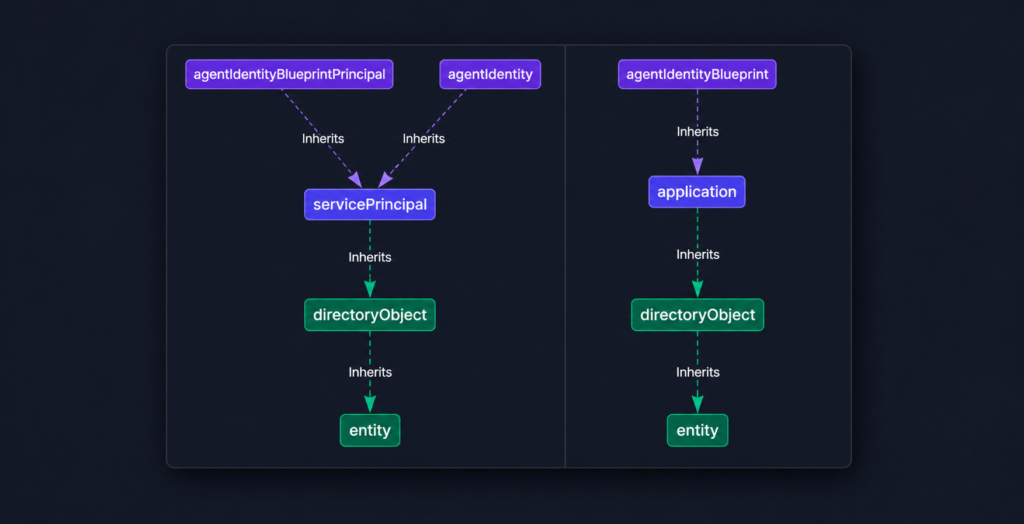
At a high level, the agentIdentityBlueprint, which is a subtype of application, defines the agent template and holds the credentials. The agentIdentity, a subtype of servicePrincipal with property servicePrincipalType set to ServiceIdentity, is the per-agent runtime object that gets permissions and interacts with resources.
This distinction matters because agent identities do not hold credentials of their own.
Instead, they rely on the blueprint to acquire tokens on their behalf through an impersonation model. The blueprint authenticates using its own credentials and performs a token exchange where the resulting token identifies the agent identity as the client, even though the blueprint performed the actual authentication.
That’s why an attacker who gains the ability to add credentials to a blueprint can impersonate every agent identity tied to it across any tenant where those agents are deployed. This is similar to the exposure that comes with trusting a third-party multi-tenant application.
As you can see in the diagram, there’s also a third object (spoiler alert, there’s also a fourth one) in the model: the agentIdentityBlueprintPrincipal, which inherits from servicePrincipal and serves as the tenant-local runtime representation of the blueprint. It is created when a blueprint is instantiated in a tenant and is what enables the blueprint to obtain app-only tokens to create and manage agent identities.
Another important architectural distinction is the relationship model. Traditional applications usually follow a one-to-one relationship between the application object and the service principal in the home tenant, while multi-tenant applications create one service principal per tenant where the app is used. The agent model adds another layer: a single blueprint can spawn multiple agent identity service principals within and across tenants.
Understanding this separation is critical for understanding both the architecture and the attack surface, as agent identities are not just “another service principal type.”
In a later chapter we’ll dive a bit deeper into this architecture, examine what the Microsoft Graph OData metadata endpoint reveals about these object relationships, what authorization layers are probably in place, and make some educated guesses about where future vulnerabilities may emerge.
But first, we’ll take a look at the framework that Microsoft has built for authenticating, authorizing, governing, and protecting these non-human identities.
Read on in the next chapter: Understanding Microsoft Agent ID and the Agent Identity Platform.
Explore the guide
Jump to the next published chapter in the series—or choose your own adventure.
- Introduction: Understanding and Preventing Entra ID Agent Identity Attacks: A Comprehensive Guide
- Chapter 1: Meet Entra ID Agent Identities (BTW They’re Not People)
- Chapter 3: Understanding Microsoft Agent ID and the Agent Identity Platform
- Practice Checkpoint 1: Building Agent ID with MS Graph
- Chapter 4: Agent Identities: Design Deep Dive
- Practice Checkpoint 2: Setting Agent Identity Permissions
- Chapter 5: The Agent Registry and How Agent Identities Operate in Entra ID
- Practice Checkpoint 3: Registering an Agent—With and Without Agent ID
- Practice Checkpoint 4: Verifying Tokens and Claims Across Three Entra ID Authentication Flows
- Chapter 6: Where Things Might Go Wrong with Agent Identities in Entra ID—and How to Prevent Disaster
Endnotes
- 1 https://github.com/microsoftgraph/microsoft-graph-docs-contrib/blob/main/api-reference/beta/resources/agentidentity.md
- 2 https://github.com/microsoftgraph/microsoft-graph-docs-contrib/blob/main/api-reference/beta/resources/agentidentityblueprintprincipal.md
- 3 https://www.silverfort.com/blog/agent-id-administrator-scope-overreach-service-principal-takeover-in-entra-id/