Editor’s Note: Welcome to Chapter 3 of Understanding and Preventing Entra ID Agent Identity Attacks: A Comprehensive Guide. To review previous chapters and practice lessons, start here.
In our previous chapter in this guide, we broke down the differences between the core objects of Entra ID for non-human identities. In this chapter, we dive into the world and idea of the Agent ID platform.
Microsoft Entra Agent ID is about to become a major theme in identity and security conversations. If you work in Entra ID, whether you build apps, secure tenants, or hunt for abuse paths, we are sure that you are going to hear a lot about it.
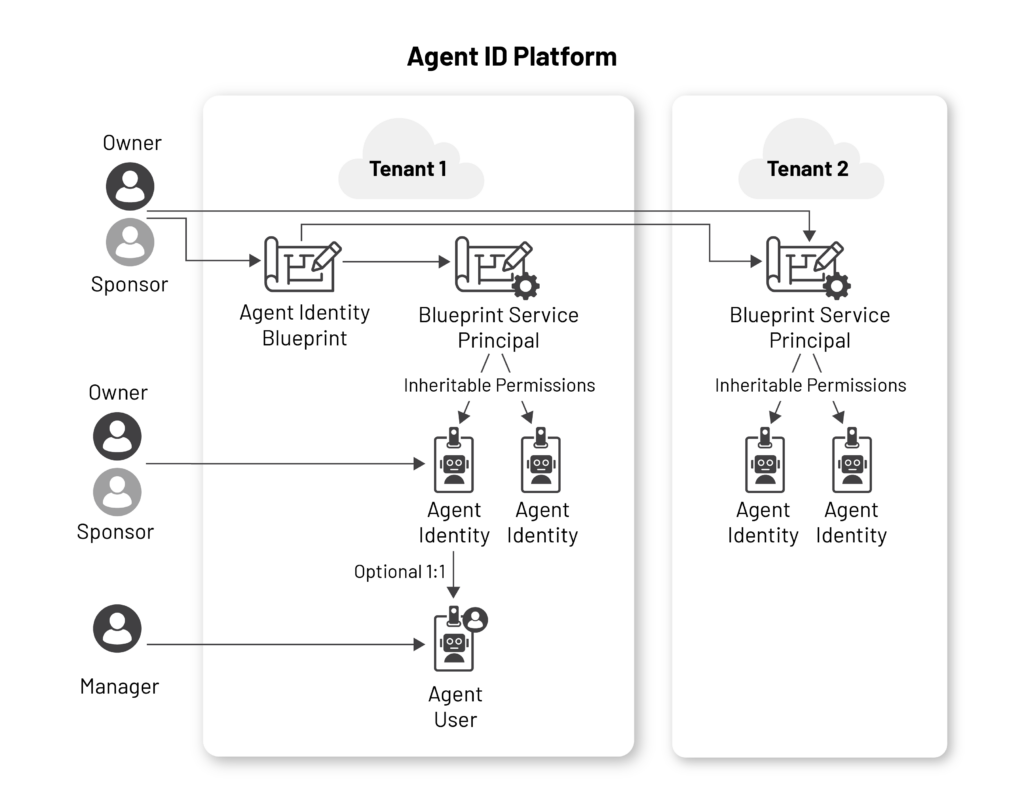
One of the guide’s goals is that by the end of it, you will be able to understand each aspect in the following image:
Why do we need the agent identity platform?
The rise of AI agents is reshaping how organizations operate. The traditional identity models we discussed earlier in this guide were designed for human accounts and deterministic applications. AI agents do not cleanly fit into either bucket. They can make decisions after reasoning, learn and adapt to changes, and behave in an unpredictable way without interactive login.
This situation raised the need for a new type of identity: the agent identity.
Microsoft created the agent identity platform to control and secure this new type of identity. The platform enables discovery, management, monitoring, and securing of AI agent identities using the existing capabilities of Entra ID.
What is an agent identity, really?
An agent identity is a new, dedicated identity type in Microsoft Entra designed specifically for AI agents. This is a crucial shift: agents are no longer treated as users or traditional service principals but as their own class of identities with lifecycle, governance, and authentication models.
To understand agent identity better, it’s useful to understand what makes up an AI agent in practice. Most agent architectures combine several components:
- A model: the language model that performs interpretation and decision making
- An orchestration layer: the component that manages reasoning, planning, and action-taking (often deciding which tool to call and when)
- Memory: state that persists across steps or sessions, enabling the agent to keep context and remain “up to date” within its operating window
- Tools: the interfaces the agent can use to interact with the environment, such as APIs, SaaS actions, scripts, and connectors
Those components matter because an agent’s real power in enterprise environments comes from the tools it can access, and those tools are gated by authentication and authorization.
Agents can be autonomous and operate independently. After an event trigger or a user’s explicit instruction, they can act on behalf of the user in a delegated scenario or they can be created and destroyed dynamically to execute a specific task.
Regardless, at runtime, the agent needs an identity that can authenticate, request tokens, apply policies, and leave audit trails.
Meet the cast: The core Agent ID objects
Before diving into how agents authenticate, inherit permissions, or participate in delegated flows, we need to understand the key objects that make up this model.
Note: The Microsoft agent identity platform is still in preview, so some of the operations discussed here may not work or may change over time. At the time we’re publishing this article, many capabilities are not available through the Entra portal and can only be performed via the MS Graph beta endpoints.
Agent identity blueprint
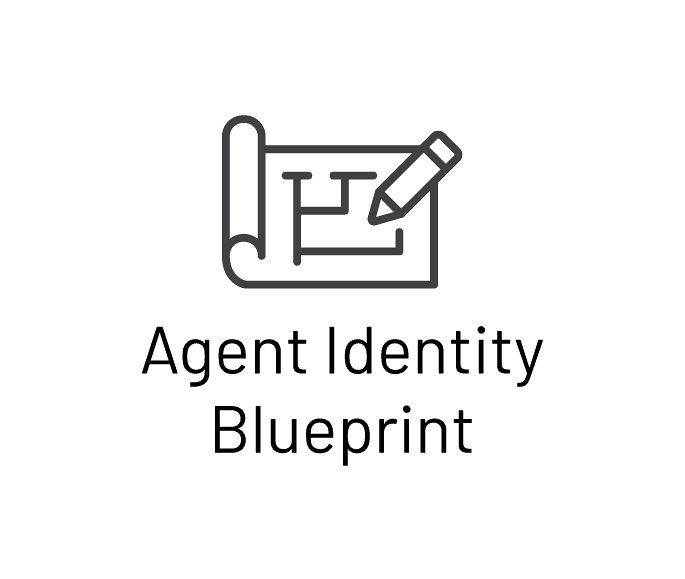
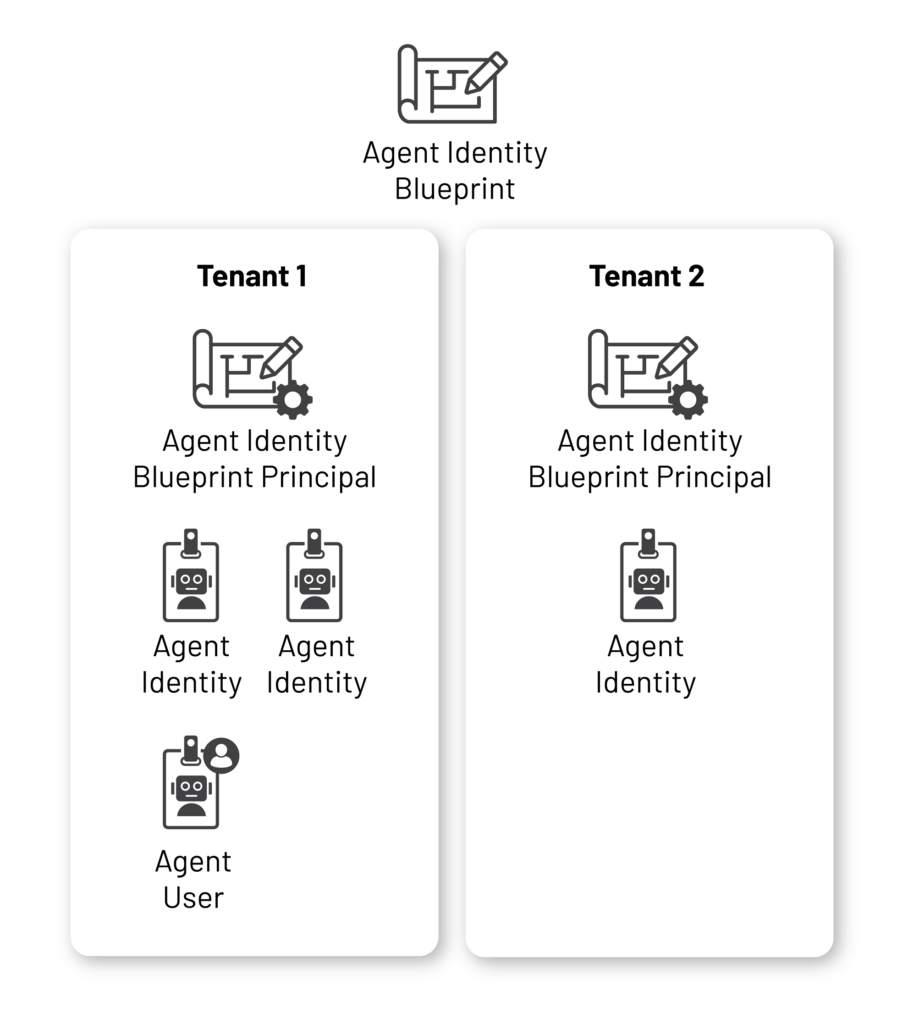
An agent identity blueprint is the foundational template from which agent identities are created. It defines a class of agents and is built on top of the application registration object. The blueprint stores the shared configuration for all agent identities derived from it, including authentication methods, inherited permissions, and other core settings.
Microsoft defines four core purposes for agent identity blueprints:
- Blueprints act as templates: All agent identities created from the same blueprint inherit its shared properties, including description, roles, publisher, and any optional claims added to access tokens.
- Blueprints can create agent identities: Every blueprint is granted the built‑in
AgentIdentity.CreateAsManagerpermission, enabling it to provision, update, and remove agent identities. This permission is assigned by default and cannot currently be revoked. (Believe us, we tried). - Blueprints hold credentials: Agent identities do not maintain their own credentials. Instead, they rely on the credentials configured on their blueprint. Supported credential types include federated identity credentials, certificates, and client secrets.
- Blueprints serve as logical containers: Policies and some configurations applied at the blueprint level automatically affect all agent identities created from it. For example, adding the blueprint to a Conditional Access policy extends that policy to every associated agent identity. Disabling a blueprint also disables all agent identities derived from it.
The agent identity platform introduces a unified administrative role model, shared across both blueprints and the agent identities derived from them. It defines three roles: owner, sponsor, and manager.
The Owner serves as a technical administrator. This is the most privileged role in this model that can handle configurations and modify properties. Some of the capabilities include updating other owners or sponsors, managing credentials, changing configuration, and restoring soft-deleted identities.
Owners can disable and delete agents and re-enable them. Basically, the owner is the admin of the identity. Although they are highly capable, assigning an owner is not mandatory when creating an agent identity blueprint.
Owners can be users or service principals; however this role should be limited to trusted IT admins or service principals that explicitly need to manage agent lifecycle and configuration.
Sponsor is the business owner of an agent who is responsible for the agent lifecycle. Sponsors can delete or disable agents, request access packages for them with justifications, and manage lifecycle-related properties. They understand the agent’s purpose and can validate whether its behavior is expected, especially during security investigations. Unlike owners, sponsors have limited privileges. They cannot re-enable agents, add new sponsors or owners, or modify authentication settings.
When creating an agent identity blueprint, at least one sponsor must be mentioned. It could be assigned to users, service principals, or groups. This role should be given to someone who knows what the agent’s purpose is.
The Manager role will make more sense once we introduce the agent user, so we will come back to it in a moment.
So, to sum it up, if you want to manage a group of similar agents, such as sales focused agents, a single blueprint provides a centralized way to define and govern them. Each agent identity created from the blueprint will automatically inherit some of its shared configuration, while still allowing you to manage individual agent identities when needed.
Agent identity blueprint principal
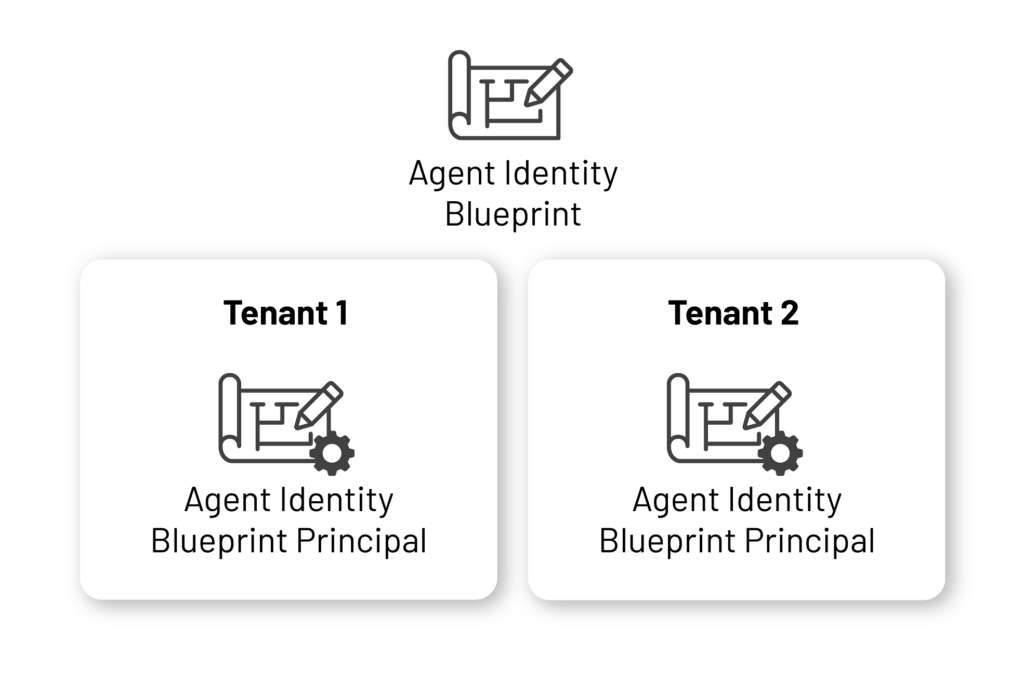
An agent identity blueprint principal is the tenant-specific representation of an agent identity blueprint. It is based on the service principal object, and there could be multiple principals that represent the same agent identity blueprint, one in each different tenant. In other words, it is the instance of the agent identity blueprint in the tenant.
According to Microsoft, blueprint service principals serve two key functions:
- Token issuance: During token requests, the OID (object ID) claim inside a token refers to the blueprint principal, identifying the principal that issued the request.
- Audit logging: In audit logs, operations performed by the blueprint (such as creating an agent identity) appear as actions executed by the blueprint principal’s object ID.
Agent identity
An agent identity is a special type of service principal that represents an AI agent at runtime. It is the actual account the agent uses to authenticate and access services and resources.
Agent identities are created from an agent identity blueprint and inherit its configuration and credentials. For authentication, they rely on their blueprint, which acquires tokens on the agent identity’s behalf.
Despite this dependency, each agent identity remains a distinct identity object in the directory; it can be assigned permissions and roles, governed independently, disabled individually, and managed separately from its blueprint.
Agent identities follow the same administrative role model described above (owner and sponsor). As with agent identity blueprints, the creation of an agent identity requires at least one sponsor, while assigning an owner is optional.
One limitation that is worth mentioning is that currently, you can create up to 250 agent identities per agent identity blueprint (yes, we tried it). This is important to account for when designing large-scale agent architectures.
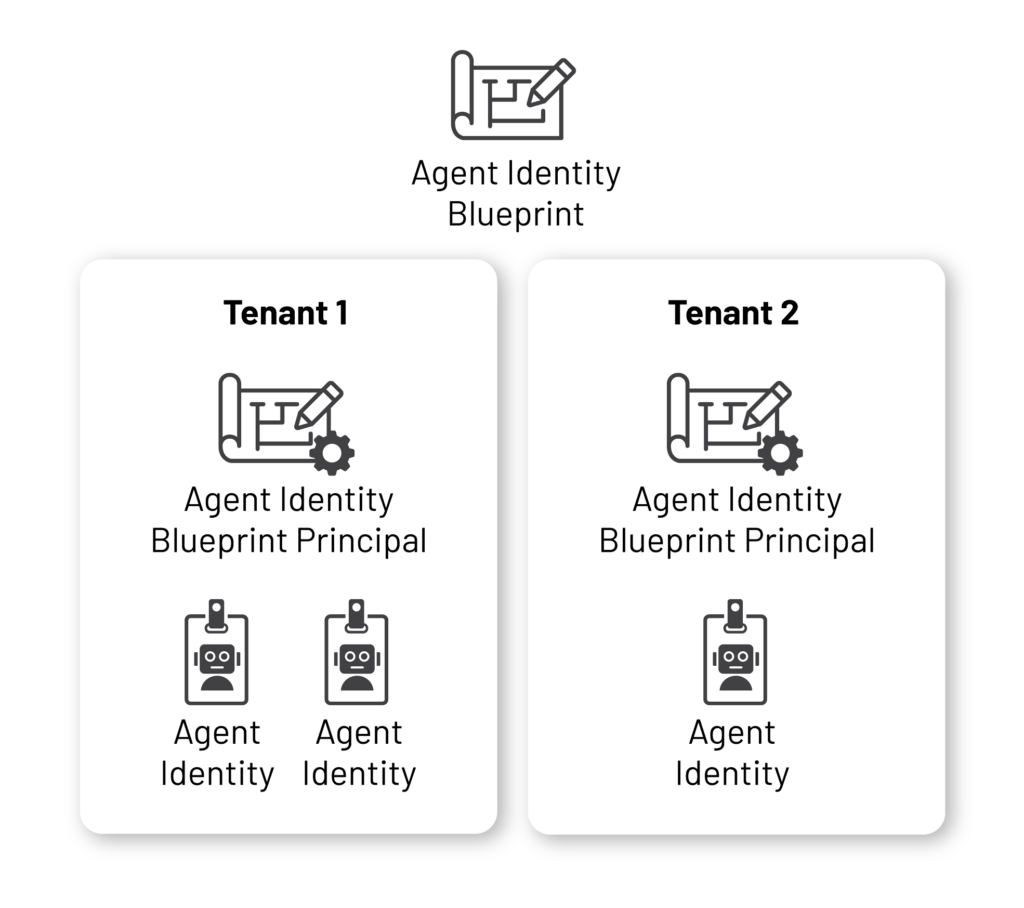
So when we add agent identities to our schema, it will look like this:
Agent user
An agent user is a specialized user identity type that allows an agent identity to access services that require a user-type object, such as a mailbox or chat interface. Managing an agent user is similar to managing a human user, and creating one is optional depending on your organization’s needs.
Only one agent user can exist per agent identity. Each agent user must be linked to a single agent identity during creation, and this relationship is immutable. That said, the agent user has its own unique identifiers that are separate from the parent identity, and it has its own permissions and roles.
To create an agent user, the agent identity blueprint must be granted specific permissions, which are not enabled by default.
Agent users can be added to security groups, excluding role-assignable groups, and to administrative units. In some ways, they can be managed similarly to human users, but with several important limitations.
For example, an agent user password cannot be reset because the agent user does not authenticate independently. Its authentication depends on the parent agent identity.
Agent users also cannot sign in interactively, and Microsoft’s documentation states that they cannot be assigned privileged administrator roles. (However, our observations do not fully align with that last claim; we’ll dig a bit deeper on that in the next chapter.)
Returning to the administrative role model, agent users introduce an additional role besides owners and sponsors: the manager role.
A Manager is a user who is responsible for the agent user, in the same way a real manager oversees a human employee. This role is specific to agent users and allows requesting access packages on behalf of the agent user and manage their day-to-day operational needs. It is the least privileged role in the model and cannot modify or delete agents.
With that said, and after enough inheritance, subtypes, and service principal archaeology, here is the final tree diagram of the newly introduced Agent ID model:
Agent types in the UI Portal
Now that we’ve covered these basic definitions, we can glance at the UI overview page Microsoft initially released as part of the beta Agent ID experience.
Although this view no longer seems to be exposed in the portal (or at least appears to have been hidden for now), it is still useful because it shows how Microsoft originally presented the different types of agents and how the transition from the older service principal-based model to the newer Agent ID model was reflected in the UI.
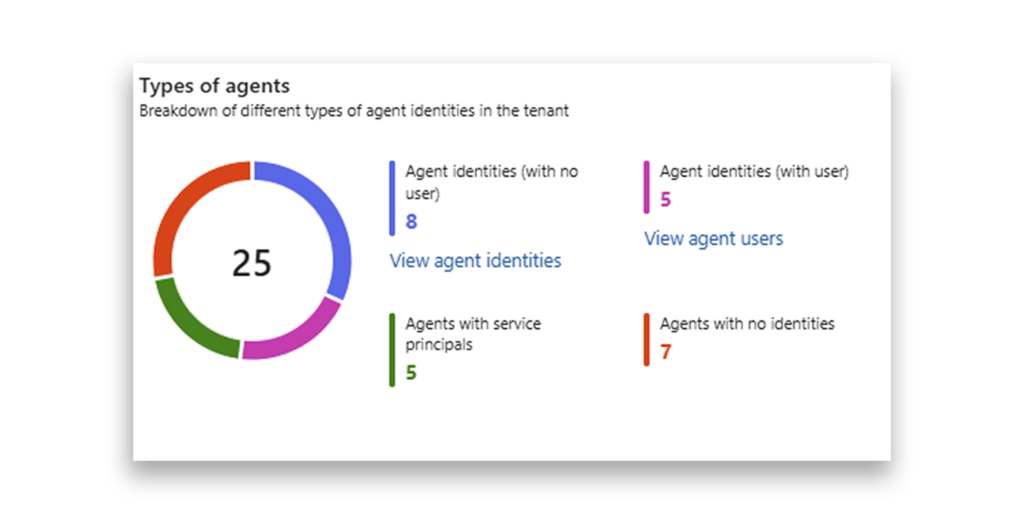
The simplest category to understand is Agents with no identities. These are agents that do not have an associated identity in the Agent ID platform. In other words, the agent exists without being linked to an Agent ID.
Next, Agent identities with no user refers to actual agent identities in the tenant. These identities are not associated with an agent user.
The Agent identities (with user) category reflects the number of agent users in the tenant. Each agent user appears here, following the strict 1:1 relationship with its parent agent identity.
Finally, Agent with service principals refers to agents that were created before the Agent ID model was introduced. These agents still operate under the service principal model. Over time, this category is expected to shrink as agents transition to the new Agent ID model.
Practice Checkpoint: Start building your own Agent ID
Sometimes, the best way to learn is to jump in and try. Now that you have an understanding of the structure behind the Agent ID model, you are ready for our first Practice Checkpoint.
Dive in and start building an Agent ID.
Explore the guide
- Introduction: Understanding and Preventing Entra ID Agent Identity Attacks: A Comprehensive Guide
- Chapter 1: Meet Entra ID Agent Identities (BTW They’re Not People)
- Chapter 2: The Taxonomy of Workload Identities in Entra ID: Enterprise Applications, Service Principals, and Other Forms of Organized Confusion
- Practice Checkpoint 1: Building Agent ID with MS Graph
- Chapter 4: Agent Identities: Design Deep Dive
- Practice Checkpoint 2: Setting Agent Identity Permissions
- Chapter 5: The Agent Registry and How Agent Identities Operate in Entra ID
- Practice Checkpoint 3: Registering an Agent—With and Without Agent ID
- Practice Checkpoint 4: Verifying Tokens and Claims Across Three Entra ID Authentication Flows
- Chapter 6: Where Things Might Go Wrong with Agent Identities in Entra ID—and How to Prevent Disaster