
Editor’s Note: Welcome to Chapter 6 of Understanding and Preventing Entra ID Agent Identity Attacks: A Comprehensive Guide. To review previous chapters and practice lessons, start here.
The Agent ID platform introduces new identity types and operational patterns, and because the feature is just starting to evolve, its real-world misconfigurations and attack paths are only beginning to surface. In this section, we won’t attempt to cover every possible risk or weakness. Instead, we will highlight a small set of simple but important misconfigurations that are likely to become common as organizations begin adopting Agent ID at scale.
Who owns this agent? Agent IDs with no owner and no sponsor
Unmanaged agent identities (those without an owner and sponsor) create an identity governance gap. When there is no accountable person or team assigned, these workload identities are more likely to be overlooked during audits and missed during incident response.
On the Entra Agent ID overview page, we can see the number of unmanaged agent identities.
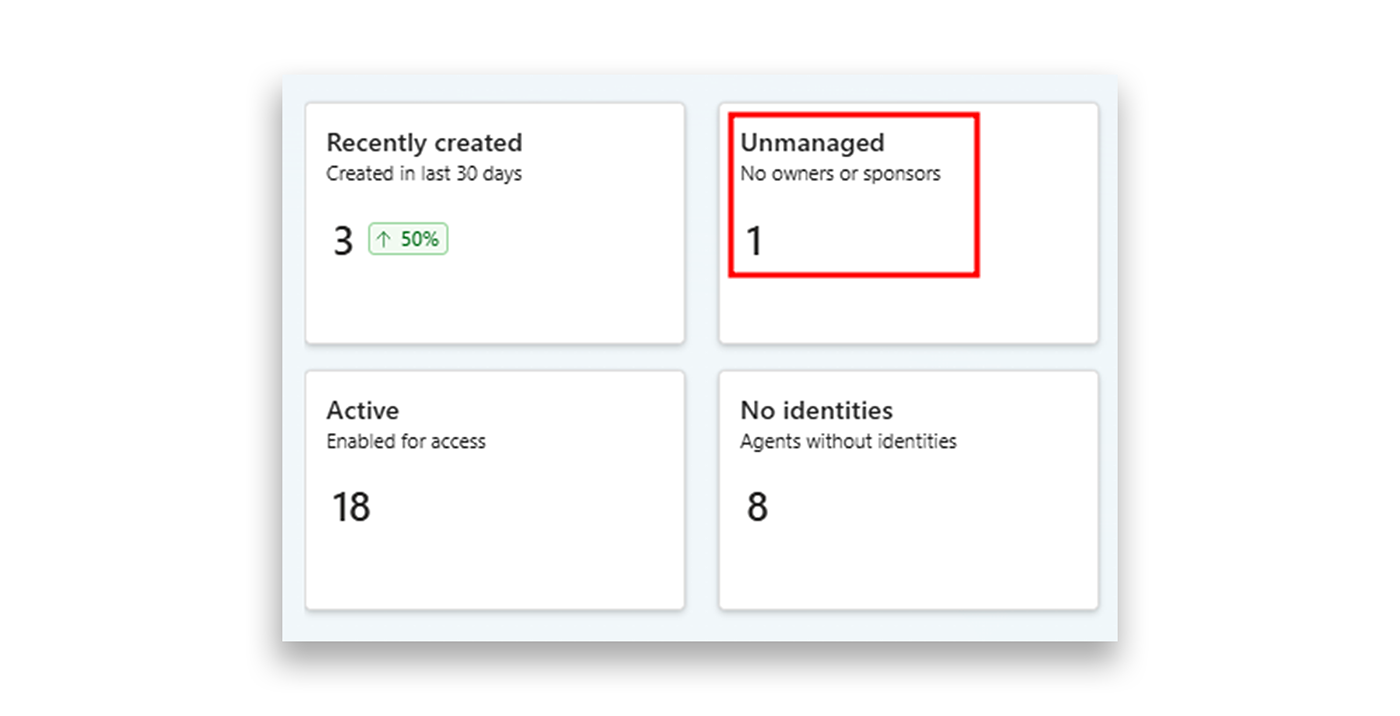
Although at least one sponsor must be specified when creating an agent identity, it is still possible for identities to become unmanaged over time. For example, this situation could happen if a user who served as a sponsor was deleted, such as after leaving the organization.
Another similar situation, but one which does not appear on the overview page, occurs when the sponsor or owner account becomes disabled. In these cases, the agent identity appears to have an assigned owner or sponsor, but the assigned account is no longer active in the organization. This leaves the identity effectively orphaned and easy for administrators to overlook.
Ideally, agent identities should always have an active human responsible for them and aware of their purpose. Ensuring ongoing ownership is an essential part of identity governance.
In Semperis Lightning Intelligence—part of the Identity Resilience Platform—we already flag those two situations. In a clear dashboard, you see not only the number of unmanaged agent identities but also the exact list.
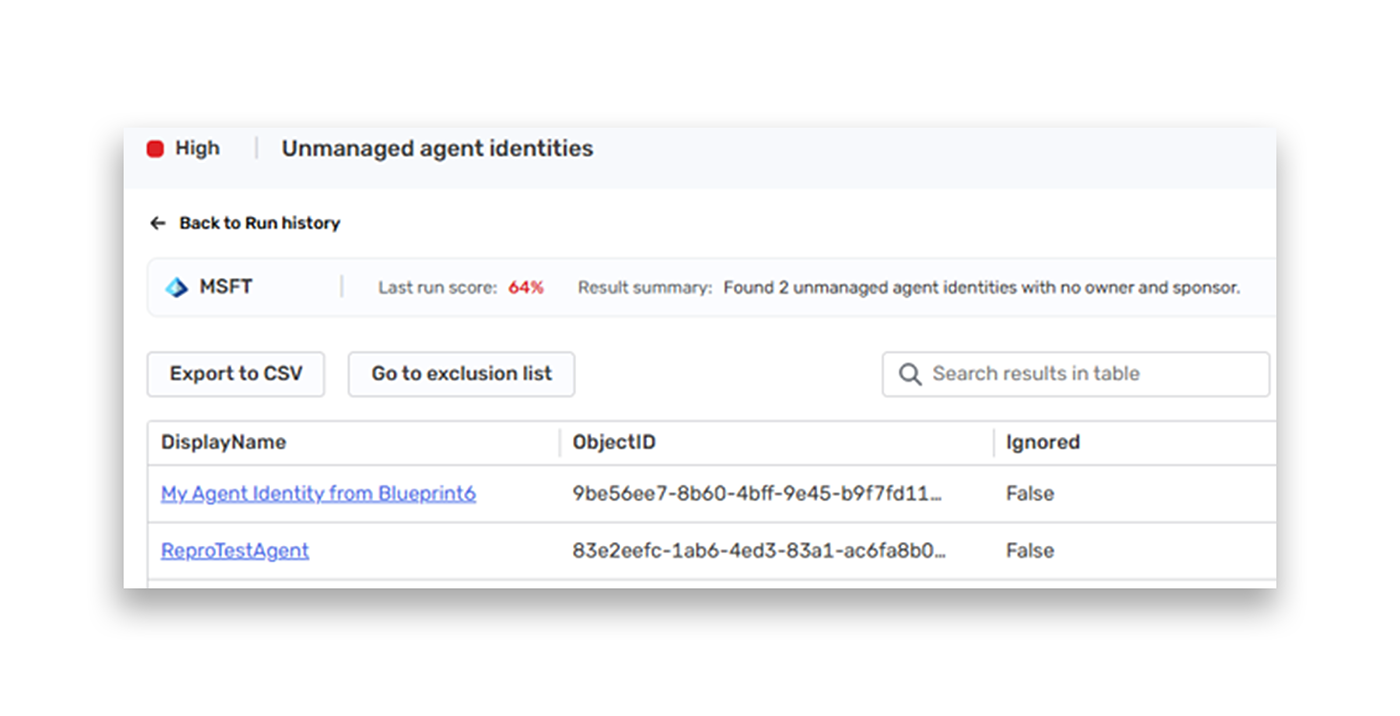
You can also see the discussed orphaned agent identities and what exact sponsors or owners are disabled that make those agent identities orphaned in practice.
Who Knows My Secret? Blueprints Using Client Secrets
As we described earlier in Practice Checkpoint 1 of this guide, a client secret is one of the credential types that can be assigned to an agent identity blueprint. This credential type is considered weak because it is often stored in configuration files, scripts, CI/CD pipelines, or source repositories, where it may be unintentionally disclosed. If an attacker obtains a client secret, they can authenticate as that agent identity blueprint or as the agent identities associated with it without requiring interactive login or MFA.
Microsoft explicitly warns that:
Client secrets shouldn't be used as client credentials in production environments for agent identity blueprints due to security risks.
Instead, Microsoft recommends using federated identity credentials (FIC) with managed identities or certificates for authentication.
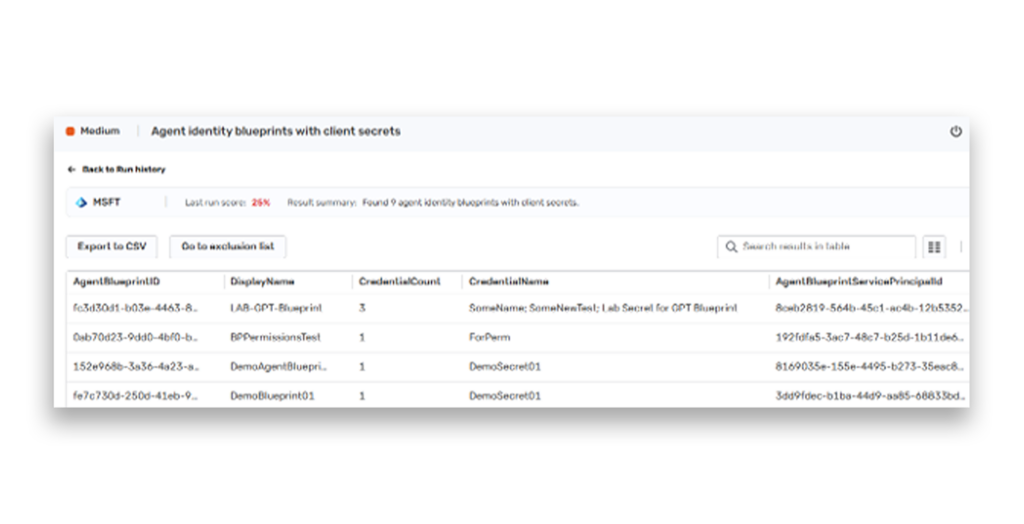
Semperis indicators provide you the ability to follow all agent identity blueprints with secrets in one centralized place and see the exact misconfigured credentials of each blueprint.
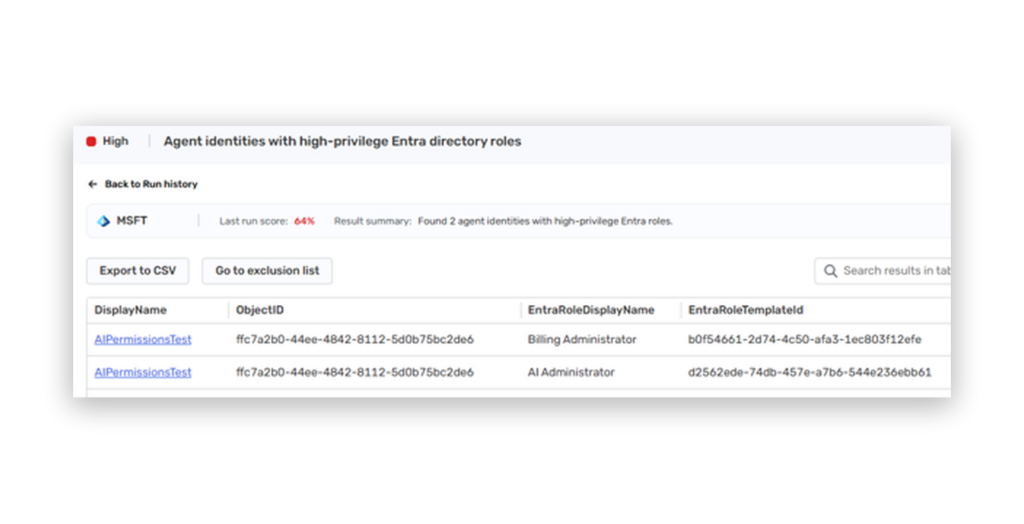
Too Much Power: Highly Privileged Agent Identities
So far, we have talked about how agents get app-only or delegated permissions and what role assignment looks like in this model. Although Microsoft limits which permissions and roles can be assigned to agent identities, applying the principle of least privilege remains critical.
High-privilege permissions on an agent identity increase risk even when no attacker is present. Agent identities can run automatically and perform actions at scale. If an agent is misconfigured, behaves unexpectedly, or is integrated into a workflow incorrectly, high privileges can turn a simple mistake into a tenant-wide incident. From a security perspective, over-privileged agent identities increase the attack surface and would be a target for attackers.
Organization administrators should regularly review the permissions assigned to agent identities and reduce them to the minimum required for the agent to function.
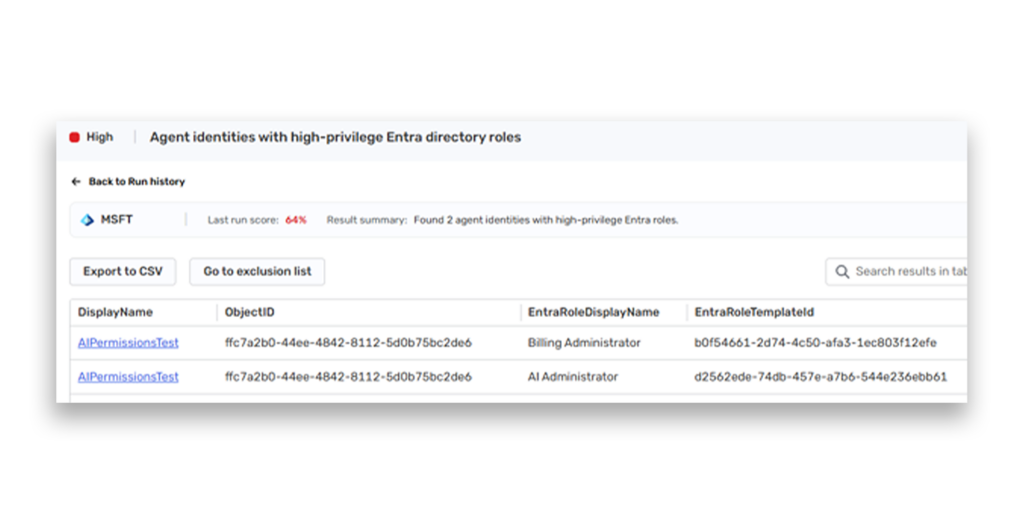
Semperis indicators show you the highly privileged agent identities and their exact overprivileged roles in one place.
Conclusions
Agent Identities are not just another checkbox in the Microsoft Entra admin center. They are Microsoft’s attempt to give AI agents a formal identity inside the directory. Not a vague automation object. Not just a service principal wearing a new hat. A new identity model that tries to represent agents as something the platform can recognize, govern, authorize, and audit.
And that matters because the moment an agent needs to cross a system boundary, call an API, read organizational data, update state, send a message, access a mailbox, or act on behalf of something larger than itself, it stops being only “AI logic.” It becomes a participant in the identity system. It needs a principal. It needs permissions. It needs a token. It needs a place in the directory.
Agent ID is Microsoft’s answer to that need.
At the center of this model sits the Agent Identity Blueprint, the template from which agent identities are created and through which inherited permissions can flow. Around it, Microsoft introduced several related objects: agent identities, agent users, blueprint principals, and service-principal-backed legacy agents. Together, they form a new operational layer for AI agents inside Entra ID.
But as we saw throughout this guide, Agent ID does not appear in a vacuum. It is built on top of existing Entra ID primitives, and those primitives already have structure, permissions, assumptions, and historical baggage attached to them.
Agent identities inherit from service principals. Agent users inherit from users. Blueprints inherit from applications. Permissions flow through familiar OAuth and app role assignment mechanisms. Role enforcement still depends on RBAC actions, API checks, and runtime behavior. The names are new, but the control plane underneath is very familiar.
And to be honest, that is both the (operational) strength and the (security) risk of the model.
It means Agent ID can integrate naturally into Entra ID, Microsoft Graph, audit logs, app permissions, and existing administration flows. But it also means that every inherited capability, every hidden assumption, and every old scoping problem becomes relevant again in a new context.
For example, a credential added to a blueprint grants token acquisition rights for every agent identity that inherits from it, across any tenant where those agents are deployed. The blast radius of a single compromised blueprint is therefore proportional to how many agents share it. And because the blueprint is a derivative of an application object, the trust model is similar to consenting to a multi-tenant third-party application: the party controlling the registration controls the identity, regardless of where it operates.
Agent identities introduce a new attack surface, and we should expect new attack paths to appear as organizations begin adopting them. Some will probably come from over-permissioned blueprints. Some from unclear role boundaries. Some from inherited permissions that defenders do not yet enumerate correctly. Some from agent users touching surfaces that were originally designed for human users. Some from Conditional Access and token behavior that still needs deeper hands-on testing. And some, as always, from the boring places nobody looked at because the portal and docs made them look harmless.
The important thing is not to treat agents as something magical or separate from what we already know, because they are identities.
And identities authenticate, get authorized, perform actions, and leave traces behind. The same old AAA cycle is now wearing an AI-shaped mask.
So if there is one practical takeaway from this dive, it is this.
Do not stop at the portal label or the documentation table. Follow the object model. Follow the inheritance. Follow the token. Follow the permissions. Follow the role actions. Follow the audit and sign-in logs. The real behavior of the platform usually reveals itself somewhere between what the schema describes, what the documentation promises, and what the runtime actually allows.
As Agent ID continues to evolve, the hard questions will not be only technical. They will be questions of trust: how much access we are willing to give these identities, how clearly we can see what they are doing, and how well the platform can enforce boundaries around them once they start operating at scale.
Because agents are not just code running quietly in the background. They are code with agency, wrapped in identity, carrying permissions, making decisions, and crossing boundaries on behalf of someone or something else.
And once code has agency, identity, and trust, it becomes more than “automation.”
It becomes a delegated will inside the system, carrying our permissions, our assumptions, and eventually, our consequences.
Don’t Guess—Scan. How Can Semperis Help?
Semperis tools already provide the ability to identify governance gaps, highlight potential exposure points, and help surface those kinds of misconfigurations and risks. This area is still evolving, and here at Semperis, we are already working on additional indicators of exposure and deeper detection capabilities that will be introduced over time.
As you expand adoption of agent identities in your identity systems, you’ll certainly encounter new questions at every step. Reach out to us any time; we are here to help.
Further reading
- The State of Identity Security in the AI Era | Semperis Expert Guides
- Introducing AI Agents to your Identity Fabric | Semperis Experts
- Top AI-Powered Attacks: How Identity Defenders Can Stay Ahead
- Secure Entra ID Workload Identities—Before AI Agent Sprawl Catches Up
- Identity Context in Microsoft Security: Semperis Integration with Sentinel and Copilot
Explore the guide
- Introduction: Understanding and Preventing Entra ID Agent Identity Attacks: A Comprehensive Guide
- Chapter 1: Meet Entra ID Agent Identities (BTW They’re Not People)
- Chapter 2: The Taxonomy of Workload Identities in Entra ID: Enterprise Applications, Service Principals, and Other Forms of Organized Confusion
- Chapter 3: Understanding Microsoft Agent ID and the Agent Identity Platform
- Practice Checkpoint 1: Building Agent ID with MS Graph
- Chapter 4: Agent Identities: Design Deep Dive
- Practice Checkpoint 2: Setting Agent Identity Permissions
- Chapter 5: The Agent Registry and How Agent Identities Operate in Entra ID
- Practice Checkpoint 3: Registering an Agent—With and Without Agent ID
- Practice Checkpoint 4: Verifying Tokens and Claims Across Three Entra ID Authentication Flows