Over the history of Active Directory, threat actors have continually identified new ways of exposing vulnerabilities in the Kerberos authentication protocol. To help reduce the risks associated with Kerberoasting, Microsoft is deprecating RC4 encryption beginning in April 2026. If you haven’t already located the applications in your environment that could be disrupted by this change, it’s time to put that task at the top of your to-do list. This post explains the process—and points you to resources that can help.
Why is Microsoft decommissioning RC4 encryption?
Tactics, techniques, and procedures (TTPs) that exploit Kerberos can be sorted into three categories:
- Roasting attacks, such as AS-REQ Roasting and Kerberoasting
- Delegation abuse, including Unconstrained Kerberos Delegation and Resource-Based Constrained Delegation
- Ticket abuse, including Golden Ticket, Silver Ticket, Diamond Ticket, Sapphire Ticket, Bronze Bit, Pass-the-Ticket, and so on
Kerberoasting has become one of the most common of these attack techniques. In recent years, Microsoft has introduced defenses against Kerberoasting attacks, and many articles have surfaced about Kerberoasting and how to mitigate it. We won’t dive into the mechanics of the attack in this post, but from a high-level view, here’s how it works:
- An attacker requests a service ticket for a valid service principal name (SPN).
- The Kerberos Key Distribution Center (KDC) issues the service ticket using RC4 encryption—a weaker algorithm than AES-SHA1 (and therefore easier to crack).
- The attacker takes this ticket offline and uses a brute force cracking mechanism to recover the account password.
- The attacker uses the compromised account for lateral movement and privilege escalation.
Because of the common exploitation of RC4 as part of Kerberoasting attacks, Microsoft has announced the deprecation of this encryption, with auditing beginning January 2026, enforcement with manual rollback in April 2026, and full enforcement in July 2026.
However, many companies still rely on in-house or third-party applications that do not support more secure encryption types such as AES-128 and AES-256. If your organization is in this group, you’ll need to locate those app accounts and configure AES for each of them.
NOTE: If you're running an Active Directory migration, consolidation, or trust-based identity project before or across the July 2026 RC4 enforcement deadline, be aware that those projects can trigger failure for RC4-dependent accounts. Our colleague Mike Masciulli provides a detailed discovery methodology to prepare your environment ahead of a migration cutover in the blog RC4 and AD Migration: Uncover the Break Scenarios Hiding in Your Source Domain.
Which applications use RC4?
So, how do you know which applications use RC4 as a Kerberos encryption type?
You’ll need to audit the Kerberos Authentication Service and Kerberos service ticket operations to capture event IDs 4768 (Authentication Service events) and 4769 (Service Ticket Operations) in the Security event log. (Microsoft introduced additional event IDs 201–209, aka KDC hardening, with the January 2026 patches to the System event log to further support the RC4 decommissioning effort. However, the 4768 and 4769 events can be considered the “leading” events, which is why this post focuses on tracking these two events.)
Let’s examine those events.
Event ID 4768
Figure 1 shows an example of output from event ID 4768.
A Kerberos authentication ticket (TGT) was requested.

Account Information:
	Account Name:		jdoe
	Supplied Realm Name:	CHILD
	User ID:			S-1-5-21-1873250772-3107742394-1596888999-1114
	MSDS-SupportedEncryptionTypes:	0x27 (DES, RC4, AES-Sk)
	Available Keys:	AES-SHA1, RC4

Service Information:
	Service Name:		krbtgt
	Service ID:		S-1-5-21-1873250772-3107742394-1596888999-502
	MSDS-SupportedEncryptionTypes:	0x1F (DES, RC4, AES128-SHA96, AES256-SHA96)
	Available Keys:	AES-SHA1, RC4

Domain Controller Information:
	MSDS-SupportedEncryptionTypes:	0x1F (DES, RC4, AES128-SHA96, AES256-SHA96)
	Available Keys:	AES-SHA1, RC4

Network Information:
	Client Address:		::ffff:10.1.1.250
	Client Port:		53904
	Advertized Etypes:
		AES256-CTS-HMAC-SHA1-96
		AES128-CTS-HMAC-SHA1-96
		RC4-HMAC-NT
		DES-CBC-MD5

Additional Information:
	Ticket Options:		0x40810010
	Result Code:		0x0
	Ticket Encryption Type:	0x12
	Session Encryption Type:	0x12
	Pre-Authentication Type:	2
	Pre-Authentication EncryptionType:	0x12

--Remainder snipped for brevity.--
Figure 1. Example output of event ID 4768
This example contains several sets of pertinent information.
Account information
- Account Name. The identity requesting the Ticket Granting Ticket (TGT)
- Supplied Realm Name. The domain where the identity resides
- User ID. The friendly name (or SID) of the identity
- MSDS-SupportedEncryptionTypes. The encryption types that the account can use
Service information
- Service Name. The service principal requested (in this case, krbtgt)
- Service ID. The friendly name (or SID) of the service principal being requested
- MSDS-SupportedEncryptionTypes. The encryption types that the service account can use
Domain controller (DC) information
- MSDS-SupportedEncryptionTypes. The encryption types that the DC supports
Additional information
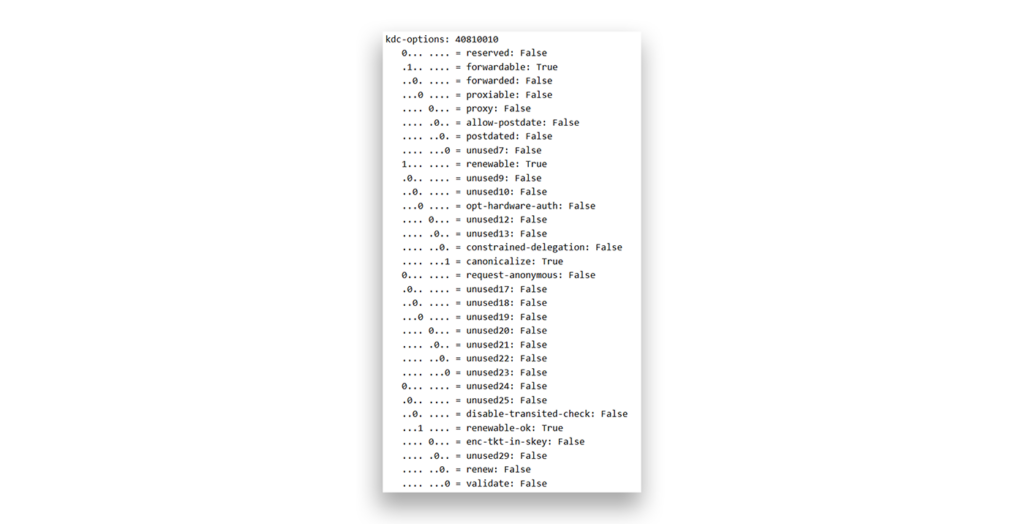
- Ticket Options. 0x40810010 (forwardable, renewable, canonicalize, renewable-ok), as shown in Figure 2.
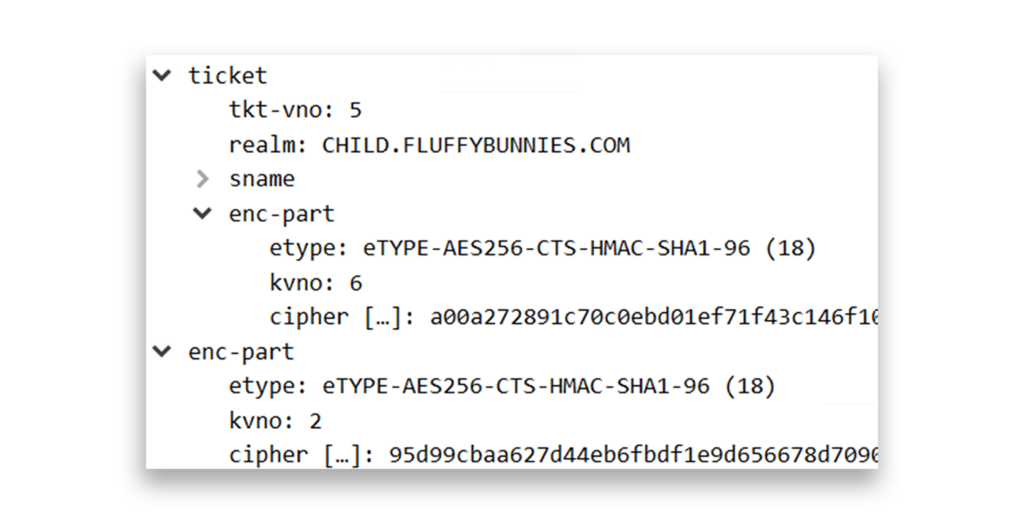
- Ticket Encryption Type. 0x12 (AES256), as shown in Figure 3.
- Session Encryption Type. 0x12 (AES256), as shown in Figure 3.
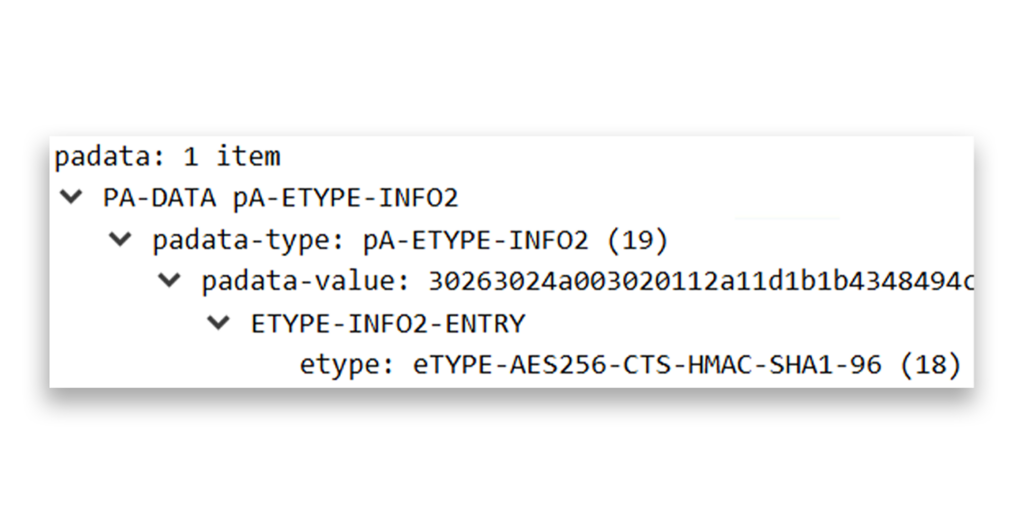
- Pre-Authentication EncryptionType. 0x12 (AES256), as shown in Figure 4.
Event ID 4769
Figure 5 shows an example of output from event ID 4769.
A Kerberos service ticket was requested.

Account Information:
	Account Name:		jdoe@CHILD.CONTOSO.COM
	Account Domain:		CHILD.CONTOSO.COM
	Logon GUID:		{5f752786-c7b3-fb33-0ce8-a54adeea22c3}
	MSDS-SupportedEncryptionTypes:	N/A
	Available Keys:	N/A

Service Information:
	Service Name:		CHILDMEMBER$
	Service ID:		S-1-5-21-1873250772-3107742394-1596888999-1105
	MSDS-SupportedEncryptionTypes:	0x1C (RC4, AES128-SHA96, AES256-SHA96)
	Available Keys:	AES-SHA1, RC4

Domain Controller Information:
	MSDS-SupportedEncryptionTypes:	0x1F (DES, RC4, AES128-SHA96, AES256-SHA96)
	Available Keys:	AES-SHA1, RC4

Network Information:
	Client Address:		::ffff:10.1.1.250
	Client Port:		53905
	Advertized Etypes:
		AES256-CTS-HMAC-SHA1-96
		AES128-CTS-HMAC-SHA1-96
		RC4-HMAC-NT

Additional Information:
	Ticket Options:		0x40810000
	Ticket Encryption Type:	0x12
	Session Encryption Type:	0x12
	Failure Code:		0x0
	Transited Services:	-

--Remainder snipped brevity--
Figure 5. Example output of event ID 4769
This example contains several sets of pertinent information.
Service information
- Service Name. The SPN of the service ticket request (in this case, for host/childmember.child.contoso.com), as illustrated in Figure 6.
sname-string: 2 items
SNameString: host
SNameString: childmember.child.contoso.com
Figure 6. Snippet from a Wireshark trace, showing the SPN of the service ticket request
- Service ID. The friendly name (or SID) of the security principal that registered the SPN
- MSDS-SupportedEncryptionTypes. The encryption types that the service account can use
DC information
- MSDS-SupportedEncryptionTypes. The encryption types that the DC supports
Additional information
- Ticket Options. 0x40810000
- Ticket Encryption Type. 0x12 (AES256)
- Session Encryption Type. 0x12 (AES256)
When RC4 is used for encryption, the results appear slightly different from those in the previous examples. Figure 7 shows the output of event ID 4769 for a client computer that uses only RC4 encryption.
A Kerberos service ticket was requested.

Account Information:
	Account Name:		jdoe@CHILD.CONTOSO.COM
	Account Domain:		CHILD.CONTOSO.COM
	Logon GUID:		{df8a66a8-8c1d-061e-b216-f935b45eb88a}
	MSDS-SupportedEncryptionTypes:	N/A
	Available Keys:	N/A

Service Information:
	Service Name:		CHILDMEMBER$
	Service ID:		CHILD\CHILDMEMBER$
	MSDS-SupportedEncryptionTypes:	0x4 (RC4)
	Available Keys:	AES-SHA1, RC4

Domain Controller Information:
	MSDS-SupportedEncryptionTypes:	0x1F (DES, RC4, AES128-SHA96, AES256-SHA96)
	Available Keys:	AES-SHA1, RC4

Network Information:
	Client Address:		::ffff:10.1.1.250
	Client Port:		51299
	Advertized Etypes:
		AES256-CTS-HMAC-SHA1-96
		AES128-CTS-HMAC-SHA1-96
		RC4-HMAC-NT

Additional Information:
	Ticket Options:		0x40810000
	Ticket Encryption Type:	0x17
	Session Encryption Type:	0x17
	Failure Code:		0x0
	Transited Services:	-

--Remainder snipped for brevity--
Figure 7. Output for event ID 4769 on a client computer that uses only RC4
The areas in bold show the key differences between this instance and the previous examples. Let’s break them down.
Service information
- Service Name. CHILDMEMBER$ (same as previous example)
- Service ID. The friendly name (or SID) of the service principal being requested
- MSDS-SupportedEncryptionTypes. 0x4 (RC4)
Additional information
- Ticket Options. 0x40810000 (same as previous example)
- Ticket Encryption Type. 0x17 (RC4-HMAC)
- Session Encryption Type. 0x17 (RC4-HMAC)
How to audit your environment for apps that use RC4
As the previous RC4 example shows, to identify RC4 encryption in your environment, you need to search through event logs (preferably SIEM logs) to find Authentication Service Requests (AS-REQ) and replies (AS-REP) as well as Ticket Granting Service Requests (TGS-REQ) and replies (TGS-REP) for ticket encryption and session encryption types of 0x17.
To help you with this task, we’ve created sample queries for both Microsoft Sentinel and Splunk. You can use these samples as templates to audit your own environment.
Depending on how you’ve configured event forwarding for Sentinel, you’ll need to query either DeviceEvents or WindowsEvent. For example, if you use Windows Event Forwarding to collect event logs and forward them to Sentinel, you will need to query for WindowsEvent and search only for instances of event IDs 4768 and 4769 that match 0x17 in either Ticket Encryption Type or Session Encryption Type.
You can use the following query to search Sentinel. This query has been expanded to include other columns of data.
WindowsEvent
| where EventID in ('4768', '4769')
| where TimeGenerated between (ago(60d) .. now())
| extend EventDataJson = parse_json(EventData)
| extend TargetUserName = EventDataJson.TargetUserName
| extend TargetDomainName = EventDataJson.TargetDomainName
| extend IpAddress = EventDataJson.IpAddress
| extend ServiceAvailableKeys = EventDataJson.ServiceAvailableKeys
| extend ServiceName = EventDataJson.ServiceName
| extend SessionKeyEncryption = EventDataJson.SessionKeyEncryptionType
| extend TicketEncryption = EventDataJson.TicketEncryptionType
| extend TicketOptions = EventDataJson.TicketOptions
| where SessionKeyEncryption == '0x17' or
    		TicketEncryption == '0x17'
| project  TimeGenerated, EventID, TargetUserName, TargetDomainName, IpAddress, ServiceName, TicketEncryption, SessionKeyEncryption, TicketOptions, ServiceAvailableKeys, EventDataJson
Here’s a short breakdown of the query:
WindowsEvent
How the query is stored in this implementation of Sentinel (might be DeviceEvents in your environment as described earlier)
| where EventID in ('4768', '4769')
Searches for event IDs 4768 and 4769
| where TimeGenerated between (ago(60d) .. now())
Goes back 60 days (you can configure whatever value you want)
| extend EventDataJson = parse_json(EventData)
Formats the EventData column in JSON and parses the JSON to be used in the remaining query
| extend TargetUserName = EventDataJson.TargetUserName
Specifies the identity requesting the ticket
| extend TargetDomainName = EventDataJson.TargetDomainName
Specifies the domain where the requesting identity resides
| extend IpAddress = EventDataJson.IpAddress
Shows the IP address of the client, if it is exposed in the event
| extend ServiceAvailableKeys = EventDataJson.ServiceAvailableKeys
Indicates the available encryption keys for the service
| extend ServiceName = EventDataJson.ServiceName
Specifies the SPN that the ticket request is for
| extend SessionKeyEncryption = EventDataJson.SessionKeyEncryptionType
Specifies the encryption type of the session key that the client (requestor) will use to interact with the ticket owner
| extend TicketEncryption = EventDataJson.TicketEncryptionType
Specifies the encryption type of the TGT or service ticket
| extend TicketOptions = EventDataJson.TicketOptions
Provides additional information regarding the ticket options of the request, which might be useful in identifying ticket options such as referral tickets, delegation, forwarded tickets, proxy tickets, and so on
| where SessionKeyEncryption == '0x17' or
TicketEncryption == '0x17'
Looks for either session key encryption or ticket encryption that is RC4-HMAC (0x17)
| project TimeGenerated, EventID, TargetUserName, TargetDomainName, IpAddress, ServiceName, TicketEncryption, SessionKeyEncryption, TicketOptions, ServiceAvailableKeys, EventDataJson
Indicates the fields to project in the results display
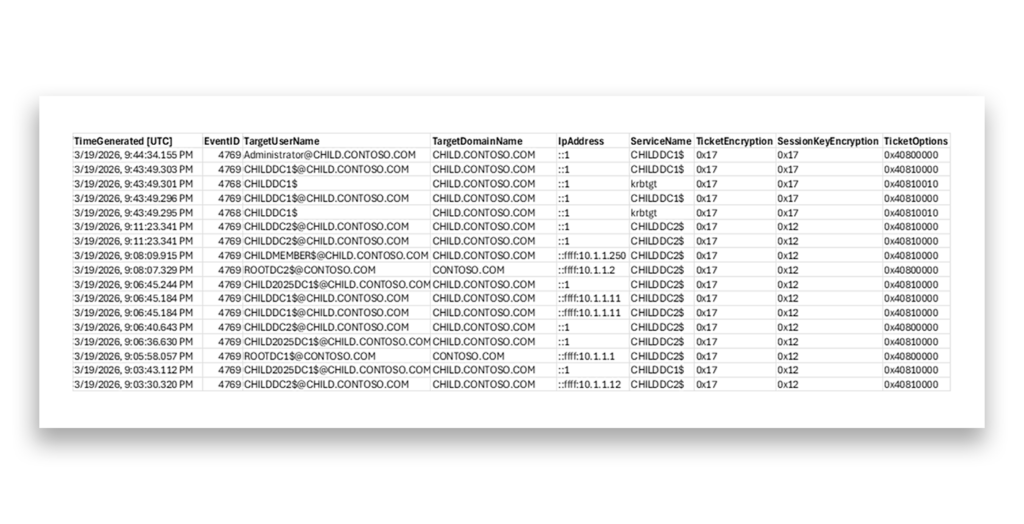
Figure 8 shows an example of the results of this query.
For Splunk, this same query would look like the following:
index="wineventlog" LogName="Security" EventCode IN ("4768", "4769") earliest=-60d@d latest=now
| search Session_Encryption_Type="0x17" or Ticket_Encryption_Type="0x17"
| table _time EventCode Account_Name Account_Domain Client_Address service_name Ticket_Encryption_Type Session_Encryption_Type Ticket_Options, _raw
Before using these queries in your environment, ensure that you have Service Ticket Auditing enabled. Without this enablement, the DCs won’t generate the relevant events (event IDs 4768 and 4769 and event IDs 201–209, which relate to KDC hardening).
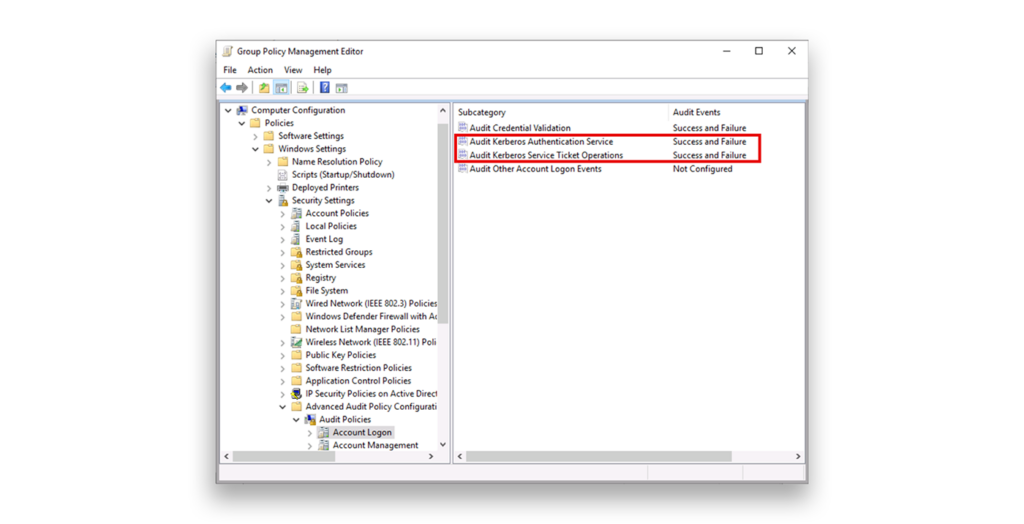
The best way to enable Service Ticket Auditing is either to update an existing Group Policy or to add one that is assigned to your DC’s organization unit (OU). You need to do this for every domain in your AD forest. The path for the relevant settings is Computer Configuration > Windows Settings > Security Settings > Advanced Audit Policy Configuration > Audit Policies > Account Logon. Enable the subcategories Audit Kerberos Authentication Service and Audit Kerberos Service Ticket Operations for both Success and Failure (Figure 9).
If you have never configured an Advanced Audit Policy in your domains, be sure to also enable the Audit: Force audit policy subcategory settings (Windows Vista or later) to override audit policy category settings policy in Computer Configuration > Windows Settings > Security Settings > Local Policies > Security Options. This policy is typically set in the same Group Policy as Service Ticket Auditing.
Note: If you don’t see any 4769 service ticket events in your DCs’ Security event logs, you also won’t see KDC hardening warnings (201–209) in the System log.
Validation tip: Temporarily force a device to support only RC4 and request a service ticket from an account without any values in msDS-SupportedEncryptionTypes. If auditing is properly configured, you should see the related warnings. For more details, see the Microsoft Learn article “Detect and remediate RC4 usage in Kerberos.”
Once you know that your Kerberos auditing is working, the real work begins: analyzing the events that you receive and remediating the affected accounts or systems.
The main difficulty in removing RC4 stems from legacy service accounts whose passwords haven’t been changed in many years. Because RC4 in Active Directory is tied to the NT hash, any account that never had its password reset after AES was introduced (i.e., after Windows Server 2008 and Windows Vista were released) might still have only RC4-compatible keys.
You can fix this only by resetting the password of the service account twice, which forces AD to generate the necessary AES keys. However, you’ll also need to know where that service account is being used in your environment; for example, to start the relevant service on a particular member server or to run a scheduled task.
If you see KDC hardening warnings (201–209 events in the System log) next to the 4768 or 4769 events, this LinkedIn post from Microsoft’s Jerry Devore gives a great overview of how to remediate the relevant accounts and systems, where msds-SET = msDS-SupportedEncryptionTypes (Table 1).
| Event Pair | What It Means | Primary Cause | Quick Fix |
|---|---|---|---|
| 201/203 | RC4-only client + blank msds-SET | Legacy device or keytab | Enable AES on client OR set msds-SET to 28 |
| 202/204 | Account lacks AES key + blank msds-SET | Old password | Reset account password (twice) |
| 205 | DefaultDomainSupportedEncTypes in use | Registry override present | Remove override if possible |
| 206/208 | RC4-only client + AES-only msds-SET | Client incompatibility | Add RC4 to msds-SET (value 28) |
| 207/209 | Account lacks AES key + AES msds-SET | Password not reset | Reset account password (twice) |
The bottom line for IT admins
- Audit now for accounts and devices still tied to RC4.
- Update service accounts to AES-ready configurations ahead of full enforcement or the RC4 deprecation.
- Eliminate or remediate legacy systems that cannot support AES.
- Use event logs proactively to detect problematic devices before they fail—which they will after you apply the July 2026 updates.
Need more assistance?
The deprecation of RC4 is a good step in the fight against Kerberoasting, but it does require quick action. If you have questions about these queries or want help transitioning your application accounts, we’re here for you.