
- “Who is this?” The PKINIT authentication process
- “Do I know you?” PKINIT in Active Directory
- Forcing the unknown
- Ignoring the unknown
- Hiding the unknown
- Making the pieces fit for stealthy persistence
- Tying it all together: How attackers set up Zombie Certificates
- It gets even spookier: Zombie re-animation
- How to detect Zombie Certificates
- How to kill the zombie
- Preventing the next outbreak
- Expect the zombies to rise again—and be ready
- Disclaimer
- Learn more about preventing and rooting out persistence in Active Directory and Entra ID
In my recent research, I've been lazily reviewing Microsoft Public Key Infrastructure design documents and related RFCs (particularly RFC4556) in an effort to find a reliable method for escalating privileges from a regular low-privileged user to any arbitrary account—without misconfigurations. (Yes, this is how I spend my free time. These things matter to me and the people I work with when we’re building cyber preparedness plans.)
Unfortunately, despite digging in similar areas, I didn't find the Certighost attack haunting the halls of documentation, even though it is a known Active Directory Certificate Services (AD CS) vulnerability.
In fact, I didn't find any privilege escalation methods at all.
However, I did find a misconfiguration-based post-exploitation persistence method which, while not as sexy as Certighost, is almost as spooky.
- It doesn't require access to a Certification Authority's private key (a prerequisite for a Golden Certificate or Golden Ticket attack).
- It flies in the face of widespread guidance around regaining access to compromised accounts.
- Unlike Certighost, this one will not be patched out because it relies on a Microsoft-documented configuration designed for testing and troubleshooting.
If you’re responsible for preventing and responding to identity system breaches in your environment, you’ll want to have this one on your radar.
Today, I will introduce you to Zombie Certificates—authentication certificates that cannot be killed!

“Who is this?” The PKINIT authentication process
In a typical Active Directory (AD) environment, the primary form of authentication credential is the well-known username + password combination. Your username is a claim about who you are; your password verifies that claim.
But AD also supports the use of public key certificates as an authentication credential, often in the form of smartcards. This certificate-based authentication process is called Public Key Cryptography for Initial Authentication, aka PKINIT. The Microsoft implementation of PKINIT is fully described in MS-PKCA, but in short, instead of encrypting authentication-related tickets (AS-REP/AS-REQ) with your password, you use a private key, controlled by you, to encrypt your authentication-related tickets.
While digging into RFC5280, Section 6.3.3, I found the algorithm's definition of what happens when a verifier cannot determine revocation status:
After processing such CRLs, if the revocation status has still not been determined, then return the cert_status UNDETERMINED.
“Do I know you?” PKINIT in Active Directory
When you try to authenticate to AD with a certificate via PKINIT, you interact with a Domain Controller (DC) acting as a Kerberos Key Distribution Center (KDC). During PKINIT, the KDC checks to see whether the certificate you are using is currently usable for authentication.
The KDC checks several attributes of the certificate before saying "yeah, I know you," including (but not limited to):
- Issuer: The KDC must trust the Certification Authority (CA) that issued the certificate. If the KDC doesn't trust the certificate's issuer, you ain't gettin' in.
- Intended Usage: Certificates include information that explains how they can be used (more about that below). If you attempt to authenticate with a certificate intended for code signing, you ain't gettin' in.
- Validity Period: If you try to authenticate today with a certificate that isn't valid until 20X6, you ain't gettin' in. And if you try to authenticate today with a certificate that expired in 1666, you ain't gettin' in.
- Revocation Status: An issuer can revoke a certificate by putting the certificate on a Certificate Revocation List (CRL). If you try to use a certificate that’s listed on a CRL, most likely—you guessed it—you ain't gettin' in.
But that last point is a little tricky...
What happens if the CRL is unavailable? After all, CRLs are typically published as HTTP URLs on web servers, and web servers almost never have perfect uptime.
As we have already seen, the RFCs are clear on this question. When a CRL is unavailable, the KDC should mark the certificate's revocation status as UNDETERMINED. What's not so clear from RFCs and Microsoft documentation is what UNDETERMINED means in the context of the PKINIT process.
Forcing the unknown
While building ESC16 detections for Locksmith and Locksmith 2 (open-source community tools you can find on GitHub), I was introduced to the DisableExtensionList setting on AD Certificate Services (AD CS) CAs. Extensions are small pieces of information added to a certificate that explain what purpose the certificate serves and how it can and should be used.
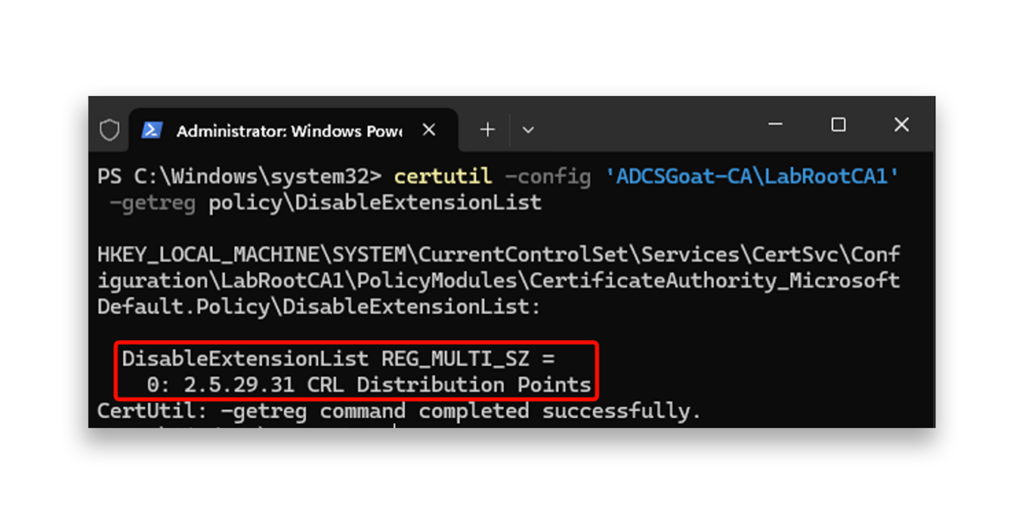
On an AD CS CA, the DisableExtensionList setting is used to prevent specific extensions from being added to certificates issued by a CA. Generally, this list remains empty, but extensions can be added to the list (and thus removed from issued certificates) for testing purposes, to improve compatibility, to increase security, and so on.
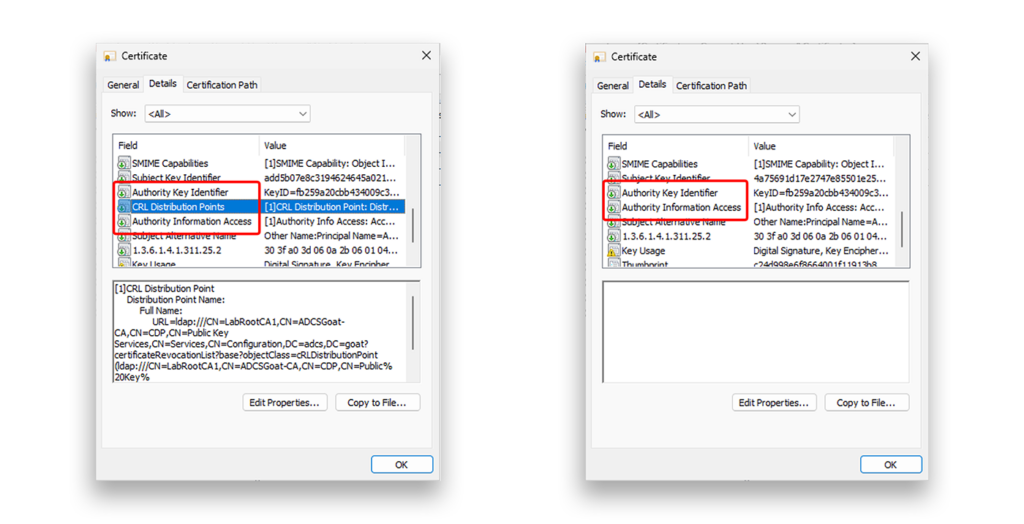
One of the extensions typically added to a certificate is the CRL Distribution Point (CDP) extension, aka OID 2.5.29.31. The CDP extension tells a KDC (or any other verifying party) exactly where to find the revocation status of a certificate.
Question: What happens if I add the CDP extension to the DisableExtensionList? Would an AD CS CA issue a certificate without the CDP extension?
Answer: As it turns out—yes! When OID 2.5.29.31 exists in the DisableExtensionList, every certificate issued by the CA lacks the CDP extension, as Figure 1 shows.
Now the more important question: Could I use a certificate without a CDP extension to successfully perform PKINIT?
Unfortunately, no.
During the PKINIT process, the KDC attempts to check the revocation status of the presented certificate. Without the CDP extension, the KDC has no idea where to check the certificate's status. It responds with KDC_REVOCATION_UNKNOWN, and the authentication request is rejected. The certificate is dead... for now.
This "fail-closed" response is how AD is configured to work out of the box, but this behavior is not ironclad.
Ignoring the unknown
As I dug in, I realized Microsoft had already considered the inaccessible CRL situation and created a registry value to handle it: UseCachedCRLOnlyAndIgnoreRevocationUnknownErrors. As the value name suggests, when UseCachedCRLOnlyAndIgnoreRevocationUnknownErrors is set to 1, cached CRLs are used to check revocation status (better than nothing!) and revocation unknown errors are ignored.
I then wondered: If this registry value is set and I can force an unknown error, would PKINIT succeed?
Dear reader, I am simultaneously very sad and super excited to inform you the answer is a resounding YES.
A single registry value changes the whole PKINIT process from fail-closed to fail-open.
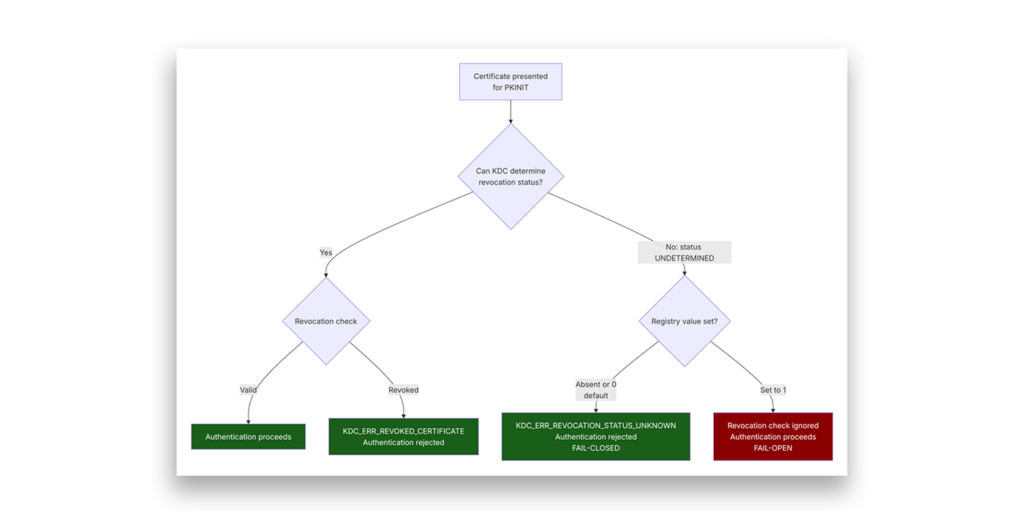
This behavior disturbs me to my core. But it also makes complete sense. According to documentation from various vendors (including Microsoft), this registry value can be used to loosen security controls in situations such as testing and troubleshooting.
It is not intended to be used permanently. In effect, it tells the KDC to leave the gate unlocked for anything that can't prove it's truly dead.
Hiding the unknown
There is an interesting and unexpected side effect associated with a certificate without a CDP extension: it can be revoked and added to a CA's CRL like any other certificate, but inclusion on the list is essentially meaningless.
Think of the CRL as a graveyard and each revocation entry as a tombstone. The Zombie Certificate has a tombstone with its name on it, but the certificate carries no directions to the graveyard, so nobody ever checks.
It looks dead, but it's not. It's a Zombie Certificate!
This presents a real issue during an incident response. Sometimes during IR, you need to reset or revoke all credentials associated with a compromised account, including passwords and all authentication certificates.
What happens when you can't actually revoke an authentication certificate?
Making the pieces fit for stealthy persistence
At this point in my research, I had observed a few different behaviors:
- Authentication certificates can be created without a CDP extension.
- It's impossible to check the revocation status of a certificate that lacks a CDP extension.
- Without a CDP extension, a certificate can appear revoked to the CA and its administrators, but that appearance is meaningless if the revocation status can't be checked.
- If a verifier can’t look up the revocation status of a certificate (for any reason), the certificate's status is "unknown", not "revoked" or "valid".
- By default, Microsoft's implementation of PKINIT rejects certificates with an unknown revocation status.
- The default fail-closed behavior can be changed to fail-open by modifying a single registry value.
All the parts were there. I just needed to stop trying to make them walk.
I spent way too long trying to assemble these behavioral building blocks into a complete chain of privilege escalation, but I eventually gave up. It just seemed impossible. Without administrative access to the CA host or CA service, it's impossible to edit DisableExtensionList. Modifying the UseCachedCRLOnlyAndIgnoreRevocationUnknownErrors registry value on DCs typically requires membership in the domain BUILTIN\Administrators (BA) group. Neither operation is possible without preexisting permissions and privileges.
But what if I stopped focusing on ESCs (escalation techniques) and instead started thinking about PERSISTs (persistence techniques)?
In SpecterOps' 2021 whitepaper Certified Pre-Owned, the authors listed several options for domain-, user-, and machine-level persistence based on AD CS. Persistence isn't as sexy as escalation and will rarely be highlighted in a typical pentest. But attackers use persistence to regain access to an environment they've previously compromised.
It's an important consideration!
Tying it all together: How attackers set up Zombie Certificates
When I switched my thinking from "must find a new ESC!" to "PERSIST is scary too!" the picture came into focus and frankly scared me a bit. Imagine an attacker taking the following steps:
- They gain highly privileged access to your AD environment: BA, Domain Admins (DA), or Enterprise Admins (EA). (This step is intentionally very hand-wavy. Deal with it!)
- The attacker confirms an AD CS Public Key Infrastructure (PKI) exists in the forest and supports PKINIT by checking for the inclusion of one or more CAs in the forest's
NtAuthCertificatesobject. - Using RemoteRegistry or direct registry modification, the attacker sets the
UseCachedCRLOnlyAndIgnoreRevocationUnknownErrorsvalue to1on one or more DCs. - They add the OID
2.5.29.31to a CA'sDisableExtensionList, either viacertutil.exeor direct modification of the CA host's registry. - The attacker requests an authentication certificate for a user they control—probably the BA/DA/EA account they're currently using.
- They confirm the Zombie Certificate works for PKINIT.
In a typical environment, the reconnaissance, registry modification, certificate request, and PKINIT validation phases of this attack can be scripted and performed in seconds because many of these pieces are well known or extremely easy to discern using built-in binaries and .NET junk present on every modern Windows computer.
Unless you are correlating events from several streams into a single set of indicators, you simply will not see this attack taking place.
However, let's imagine our valiant defenders do notice the intrusion and quickly take steps to contain it. They:
- Terminate all active logon sessions from the compromised account
- Reset the compromised account's AD password
- Revoke the compromised account's authentication certificates
- Do some other stuff... I'm not on the Semperis IR team so I rely on their experience…
Despite these steps, the attacker can use the Zombie Certificate they requested in Step 6 above to perform PKINIT and regain access to the account they previously controlled.
How? Because the certificate's revocation status is unknown, and the attacker modified the PKINIT process to fail-open when revocation status is unknown.
It gets even spookier: Zombie re-animation
The IR response I described above was intentionally incomplete: the compromised account should have been disabled and replaced completely with a new account. But during the fog of an incident, remediation steps can get missed.
Incomplete containment is a real thing!
However, a more forward-looking attacker could have made a few changes to their process to keep their access even more persistent. Instead of using a pre-existing template to request an authentication certificate for the account they compromised, the attacker could:
- Create a new template including the ESC1 misconfiguration
- Use the ESC1 template to request a certificate that includes the SAN of a different privileged account
Now, if the initially compromised user is disabled or deleted, the attacker would still retain control of the privileged account included in the SAN.
This zombie has a second heartbeat. Kill the host, and it keeps walking through a different identity.
Side note: There are several additional evil ways to make this attack more stealthy but I cannot in good conscience detail them here.
How to detect Zombie Certificates
How do you know if you have a zombie infestation? Start with the brains.
The "brain" of a Zombie Certificate is the UseCachedCRLOnlyAndIgnoreRevocationUnknownErrors registry value. Check every Domain Controller in your forest and any trusted forests. The full registry path is:
HKEY_LOCAL_MACHINE\SYSTEM\CurrentControlSet\Services\Kdc\UseCachedCRLOnly AndIgnoreRevocationUnknownErrors
If any DC has this value set to 1, treat it as a confirmed indicator of tampering until proven otherwise. Dig in with the following actions:
- Check for authentication certificates issued to privileged users, even if they appear revoked.
- Find any authentication certificates that include the SAN of a privileged user, regardless of the requester's enabled/disabled state.
- Check every CA's
DisableExtensionListby running the following command:certutil -config <CA-HOST-FQDN\CAName> -getreg policy\DisableExtensionList
If you see the following output, something changed that should not have changed:
How to kill the zombie
The registry value is the true kill shot. A zombie certificate is only dangerous as long as at least one DC accepts an unknown revocation status. Remove that condition first.
- On every affected DC, delete
UseCachedCRLOnlyAndIgnoreRevocationUnknownErrorsand restart the Kerberos Key Distribution Center. This immediately restores fail-closed behavior. PKINIT will reject any certificate whose revocation status cannot be confirmed. - Remove OID
2.5.29.31from the CA'sDisableExtensionList. New certificates will again include the CDP extension.
One critical point: certificates already issued without a CDP extension are permanently immune to revocation, regardless of what appears in the CA's CRL. The revocation entry exists, but no verifier will ever find it because the certificate contains no pointer to the CRL. These certificates are harmless once the registry is fixed, but they must be tracked and replaced. - Identify every certificate issued during the window when
DisableExtensionListcontained the CDP OID. Revoke them all. They are already functionally dead once the registry value is corrected, but explicit revocation closes the loop and creates an audit trail. - Force re-enrollment for all affected accounts, especially privileged ones. Issue new certificates that include a valid CDP extension.
Preventing the next outbreak
Killing the active zombie is not enough. You need to stop the next one.
- Monitor the registry of every Domain Controller you trust. Alert on any change to
UseCachedCRLOnlyAndIgnoreRevocationUnknownErrorsacross all DCs. Any value other thanabsentor0should trigger an immediate investigation. - Audit
DisableExtensionListon a schedule. It should be empty on every CA in your forest. You can check the registry path directly or query it viacertutil:certutil -config <CA-HOST-FQDN\CAName> -getreg policy\DisableExtensionList
Pro Tip: The Semperis Lightning Platform can monitor the registry on your behalf! - Use Locksmith 2. Both Locksmith and Locksmith 2 include detection for the DisableExtensionList misconfiguration. Run them regularly as part of your AD CS health checks.
A Zombie Certificate outbreak requires two conditions to exist simultaneously:
- A CA issuing certificates without a CDP extension
- At least one DC that fails open on unknown revocation status
Eliminate either condition and the attack fails. Eliminate both and you have a much healthier PKI.
Expect the zombies to rise again—and be ready
Zombie Certificates are not a theoretical edge case. They rely entirely on documented, intentional Microsoft functionality.
No CVE will fix this. No patch is coming. The attack works because administrators occasionally need to relax revocation checking—and attackers can exploit that same flexibility.
The good news is that the prerequisites are significant. An attacker needs highly privileged access before any of this is possible, which means good privilege hygiene goes a long way. The bad news is that once those prerequisites are met, the attack is fast, scriptable, and survives most standard IR playbooks.
If you run AD CS in your environment, check the registry value and the DisableExtensionList on every CA today. If you find either one set unexpectedly, you have a problem worth investigating. If you find both set together, you may already have a zombie wandering your forest.
If you need assistance rooting out Zombie Certificates, contact Semperis. Our incident response experts live this stuff every day—and we’re here to help.

Disclaimer
This content is provided for educational and informational purposes only. It is intended to promote awareness and responsible remediation of security vulnerabilities that may exist on systems you own or are authorized to test. Unauthorized use of this information for malicious purposes, exploitation, or unlawful access is strictly prohibited. Semperis does not endorse or condone any illegal activity and disclaims any liability arising from misuse of the material. Additionally, Semperis does not guarantee the accuracy or completeness of the content and assumes no liability for any damages resulting from its use.
Learn more about preventing and rooting out persistence in Active Directory and Entra ID
- HIP Podcast: The Hidden Dangers of AD CS with Jake Hildreth, Principal Security Consultant at Semperis
- End the ESCape Clause: Combatting AD CS Vulnerabilities
- Best Practices for Securing Identity Systems Against Modern Threats
- Windows Privilege Abuse: Attackers' Path to Active Directory Compromise
- AD Research: Two New Vulnerabilities Could Lead to Full Domain Takeover
- AD Group Risks: Hidden Dangers in Backup Operators
- AD Group Risks: Hidden Powers of Account Operators
- Privilege Elevation in Entra ID: UnOAuthorized